Pass4Future also provide interactive practice exam software for preparing Adobe Commerce Architect Master (AD0-E718) Exam effectively. You are welcome to explore sample free Adobe AD0-E718 Exam questions below and also try Adobe AD0-E718 Exam practice test software.
Do you know that you can access more real Adobe AD0-E718 exam questions via Premium Access? ()
A merchant notices that product price changes do not update on the storefront.
The index management page in the Adobe Commerce Admin Panel shows the following:
* All indexes are set to 'update by schedule'
* Their status is 'ready'
* There are no items in the backlog
* The indexes were last updated 1 minute ago
A developer verifies that updating and saving product prices adds the relevant product IDs into the catalog_product_price_cl changelog table.
Which two steps should the Architect recommend to the developer to resolve this issue? (Choose two.)
Answer : C, D
To resolve the issue of product price changes not updating on the storefront, you need to take the following steps:
Make sure that no custom or third-party modules modify the changelog and indexing process. Some modules might interfere with the normal functioning of the indexing mechanism and cause data inconsistency or corruption. You can disable any custom or third-party modules that are related to indexing and check if the issue persists.
Make sure that the version_id for the price indexer in the mview_state table is not higher than the last entry for the same column in the changelog table and re-synchronize. The version_id column in the mview_state table indicates the current state of each indexer. If this value is higher than the last entry in the changelog table, it means that the indexer has skipped some records and needs to be re-synchronized. You can use the bin/magento indexer:reset command to reset the state of the price indexer and then run bin/magento indexer:reindex to reindex it.
: https://devdocs.magento.com/guides/v2.4/extension-dev-guide/indexing.html : https://devdocs.magento.com/guides/v2.4/config-guide/cli/config-cli-subcommands-index.html
Since the last production deployment, customers can not complete checkout. The error logs show the following message multiple times:

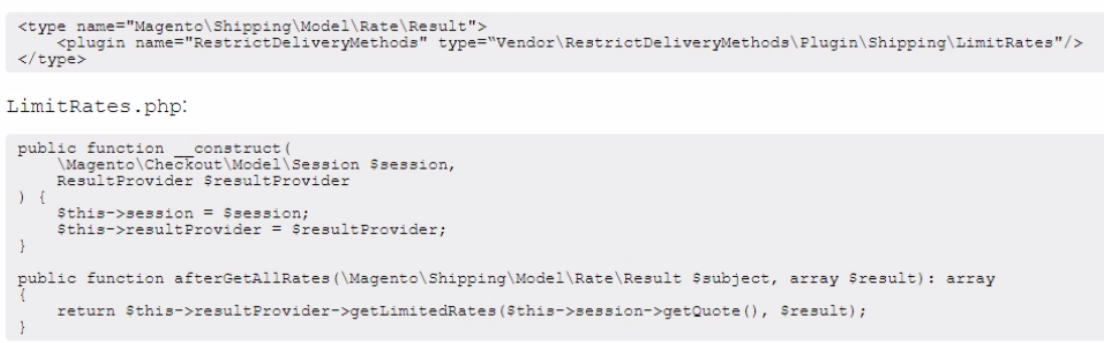
The Architect finds a deployed feature that should limit delivery for some specific postcodes.
The Architect sees the following code deployed in/webapi_rest \di .xml and etc\frontend\di xml

Which step should the Architect perform to solve the issue?
An Adobe Commerce system is configured to run in a multi-tier architecture that includes:
* A cache server with Varnish installed
* A backend web server with Adobe Commerce installed
* A database server with MySQL installed
When an Adobe Commerce Architect tries to clean the cache from the Store Admin by using the "Flush Magento Cache" in Cache Management, the Full Page Cache does not clear.
Which two steps should the Architect take to make the Full Page Cache work properly? (Choose two.)
Due to a marketing campaign, a website is experiencing a very large number of simultaneously placed orders, which is affecting checkout performance. The website is in the production deploy mode.
Which two website settings can an Architect optimize to decrease the impact on checkout performance? (Choose two.)
Answer : A, D
To decrease the impact on checkout performance, the Architect should do two things:
Enable asynchronous indexing admin panel setting. This will allow Magento to update indexes using cron jobs instead of doing it on the fly during checkout. This option can be found under Stores > Settings > Configuration > Advanced > Developer > Grid Settings > Asynchronous indexing. It can also be enabled by executing the following CLI command: bin/magento config:set dev/grid/async_indexing 1
Create a new database and use the Split Database feature. This will allow Magento to separate the sales data from the main database and reduce the load on the database server. This option can be configured with the following command: bin/magento setup:db-schema:split-sales --host='<checkout db host or ip>' --dbname='<name>' --username='<checkout db username>' --password='
https://devdocs.magento.com/guides/v2.4/extension-dev-guide/indexing.html#m2devgde-asynchronous-indexing
https://devdocs.magento.com/guides/v2.4/config-guide/multi-master/multi-master.html
An Adobe Commerce Architect creates a new functionality called Customs Fee, which adds a new total that applies to additional costs for handling customs clearance expenses. The extension allows specifying fee value for every website separately via the Adobe Commerce Configuration System.
The Architect plans to cover new functionality with integration tests. One test case needs to confirm if the total is calculated correctly on different websites.
How should the Architect make sure that test configuration data is added to test methods according to best practices?