Adobe - Big Savings Alert – Don’t Miss This Deal - Ends In 1d 00h 00m 00s Coupon code: 26Y30OFF
  1. Home
  2. Adobe
  3. AD0-E902 Exam
  4. Free AD0-E902 Questions

Free Practice Questions for Adobe AD0-E902 Exam

Pass4Future also provide interactive practice exam software for preparing Adobe Workfront Fusion Developer Professional (AD0-E902) Exam effectively. You are welcome to explore sample free Adobe AD0-E902 Exam questions below and also try Adobe AD0-E902 Exam practice test software.

Page:    1 / 14   
Total 51 questions

Question 1

A scenario is too large, with too many modules. Which technique can reduce the number of modules?


Answer : A

Step by Step Comprehensive Detailed Explanation:

Problem Summary:

The scenario has become too large due to the high number of modules.

The goal is to reduce the number of modules by optimizing how data is transformed.

Option Analysis:

A . Nesting multiple mapping panel functions:

Nesting multiple functions in the mapping panel (e.g., using if(), concat(), replace()) eliminates the need for separate modules to set and reset variables for each transformation.

This is a highly efficient technique to transform data in fewer modules, making it the correct answer.

B . Using a Compose a string module and Text Parser:

This involves additional modules (Compose a string + Text Parser) instead of reducing the number of modules. It is not an optimal solution to this problem.

C . Setting the scenario to Auto Commit:

The Auto Commit setting helps with transactional control and does not reduce the number of modules in a scenario.

Why Nesting Mapping Functions is Effective:

Efficiency: Complex transformations can be performed inline within a single mapping panel.

Readability: Proper nesting and naming conventions make it easier to understand the logic without adding unnecessary modules.

Scalability: This approach keeps the scenario compact and reduces complexity as the scenario grows.

How to Implement:

Open the mapping panel in relevant modules.

Use multiple nested functions like if(), concat(), add(), etc., within the mapping expressions.

Test the mapping thoroughly to ensure correctness.


Question 2

A Fusion designer discovers that an iteration is processing thousands of bundles, though it should not need to.

What should the designer do to reduce the number of bundles?


Answer : B

Step by Step Comprehensive Detailed Explanation:

Problem Summary:

A trigger module is causing excessive iteration processing thousands of bundles unnecessarily.

The goal is to optimize the scenario by reducing the number of processed bundles.

Option Analysis:

A . Configure the trigger module to reduce the maximum number of results:

Reducing the maximum number of results processed per cycle limits the number of bundles processed at a time, but it does not solve the root issue of processing unnecessary records.

B . Configure the trigger module to filter out unnecessary records:

Filtering at the trigger level ensures that only the required records are fetched for processing, addressing the root cause of excessive bundle processing. This is the correct answer.

C . Configure scenario settings to reduce cycles per execution:

Limiting execution cycles reduces the overall runtime but does not directly address the number of bundles being processed unnecessarily.

Why Filtering at the Trigger is Best:

Efficiency: By setting up filters directly in the trigger, you ensure that only relevant data is retrieved.

Performance: Reducing the number of unnecessary bundles improves processing speed and reduces resource usage.

Accuracy: Filtering ensures only actionable data enters the workflow, maintaining scenario integrity.

How to Implement:

Open the trigger module settings.

Add appropriate filters to exclude unnecessary records. For example:

Add conditions to filter out old data or irrelevant statuses.

Use fields like updatedDate, status, or any other criteria relevant to the workflow.

Test the trigger module to verify that only relevant bundles are retrieved.

Reference: These answers are based on Workfront Fusion best practices for optimizing scenarios, as outlined in the Fusion documentation. Proper use of mapping panel functions and trigger filters ensures scenarios are efficient and scalable.


Question 3

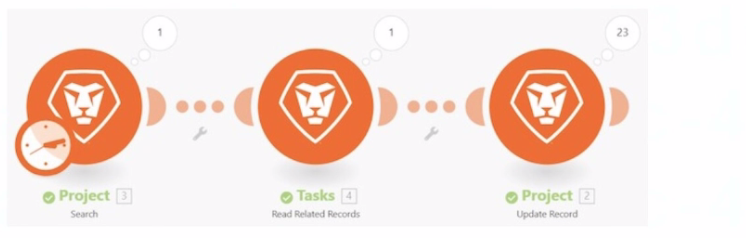
Refer to the exhibit.

This scenario shows a 1 in the bundle inspector for the Tasks module and a 23 in the bundle inspector for the Project module.

What does the number in the bundle inspector represent?


Answer : B

Step by Step Comprehensive Detailed Explanation:

Understanding the Scenario:

In Workfront Fusion, each module in a scenario processes data and generates bundles as output.

The bundle inspector shows the number of bundles (data packets) output by a module during an execution.

Option Analysis:

A . The number of seconds to process the module:

This is incorrect. The number in the bundle inspector does not indicate time but rather the count of output bundles. Processing time is not displayed in this way.

B . The number of output bundles:

Correct. The number displayed in the bundle inspector represents how many bundles the module output during the execution. In the given example, the 'Tasks' module outputs 1 bundle, and the 'Project' module outputs 23 bundles.

C . The number of operations performed:

This is incorrect. The bundle inspector displays the number of output bundles, not operations. While operations may be a result of processing bundles, they are tracked separately in Fusion reports.

D . The number of times a module has been edited:

This is incorrect. Editing history is not displayed in the bundle inspector.

Explanation of Bundle Inspector:

Each module processes input data and generates output bundles.

These numbers in the bundle inspector indicate how many bundles the module is outputting in the current run of the scenario.

For example, if a 'Search' module retrieves 23 records, the bundle inspector will show 23, meaning the module outputs 23 bundles.

Context of the Given Image:

The 'Tasks' module processes and outputs 1 bundle.

The 'Project' module processes 1 input bundle (from 'Tasks') and outputs 23 bundles.

Reference: This information is consistent with Workfront Fusion documentation, which explains the bundle inspector's function during scenario execution. The bundle inspector is used to monitor data processing and ensure expected outputs from modules.

Question 4

A Fusion scenario updates project conditions each night, and should set the project condition to At Risk if there are any high priority open issues on the project. The scenario retrieves all open projects and cycles through the projects. For each project with issues, it retrieves all associated open issues, iterates through them and sets the project condition to At Risk if the issue is high priority or On Target if it is not.

A user notices that Fusion is updating the progress condition multiple times, once for each issue in the project.

How can the developer ensure the project is updated only once?


Answer : C

Step by Step Comprehensive Detailed Explanation:

Problem Summary:

The Fusion scenario updates the project condition multiple times, once for each high-priority issue.

The desired behavior is to update the project condition only once, based on the overall condition of all associated issues.

Option Analysis:

A . Change the issue search module to result set of First Matching:

This would limit the search to only the first issue. However, this does not account for all issues on the project, leading to incomplete logic for setting the project condition.

B . Add an Ignore error directive as an error handler route for the update module:

Ignoring errors does not prevent multiple updates; it only suppresses errors in the workflow.

C . Create a separate scenario to update the overall project condition:

Correct. By separating the project update logic into a different scenario, the developer can ensure the condition is updated only once after analyzing all issues. The project condition is calculated holistically, based on the state of all high-priority issues.

D . Apply the Run Once flow control function:

'Run Once' controls execution at the scenario level, not within a module's iteration. It cannot prevent multiple updates in this context.

Why Separate Scenario is Best:

Simplifies Logic: A separate scenario can be designed to run after all issues have been checked, ensuring only one update per project.

Avoids Redundancy: Prevents unnecessary API calls to update the same project multiple times.

Improves Performance: Reduces the number of operations and bundles processed in the main scenario.

Implementation:

Create a separate scenario triggered after the issue-checking scenario completes.

Use aggregate data (e.g., a data store or intermediate processing) to evaluate the overall project condition before performing a single update.


Question 5

To meet compliance standards, a user must include a process that tracks every Workfront project update created by Fusion.

What can they do to address this business requirement?


Answer : C

Step by Step Comprehensive Detailed Explanation:

Problem Summary:

The organization requires a process to track every project update made by Fusion to meet compliance standards.

This process must provide a clear audit trail of updates, including details like user and timestamp.

Option Analysis:

A . Use reporting on the Last Updated by ID and Last Update Date:

While this provides basic reporting, it only reflects the most recent update and does not maintain a comprehensive history of changes over time.

B . Update the External Reference ID with User ID and Timestamp:

Updating the External Reference ID could cause issues if this field is used for other purposes. It is not designed for logging multiple updates.

C . Create a Note record related to the record updated:

Correct. Creating a Note record for each update ensures that every change is logged with relevant details (e.g., user, timestamp, update reason). This approach creates a full audit trail that is easily accessible and reportable.

Why Note Records are Best:

Audit Trail: Notes provide a clear and searchable history of updates for each project.

Compliance: Ensures compliance by documenting who made what changes and when.

Flexibility: Notes can include custom details such as update reasons or additional context, making them more robust than standard fields.

Implementation:

In the Fusion scenario, add a module to create a Note record after each update.

Populate the Note with relevant details, such as:

User ID ({lastUpdatedBy})

Timestamp ({lastUpdateDate})

Description of the change.


Page:    1 / 14   
Total 51 questions