These Android AFD-200 sample questions are a small glimpse of our full set of Android AFD-200 actual questions. They give you a preview of what the real AFD-200 exam might look like and the contents of Pass4Future's premium Android AFD-200 product. You must not underestimate the value of Android AFD-200 practice exam questions, as they allow you to understand the actual Flutter Certified Application Developer exam in greater depth. Using them will save your time and money otherwise wasted in Flutter Certified Application Developer exam reattempts. Study guides and tutorials provide you with theoretical details about the AFD-200 exam; these AFD-200 practice exam questions prepare you to pass the exam. Get Pass4Future's premium access to continue your AFD-200 exam practice with the complete set of Android AFD-200 realistic questions. Our Android AFD-200 practice questions come in various formats; make sure to check out the details and free demo of each format.
Do you know that you can access more real Android AFD-200 exam questions via Premium Access? ()
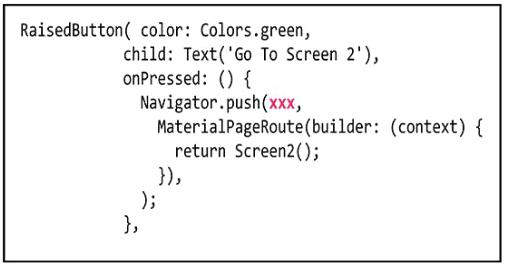
The image in this question includes a Dart code for a Raised button widget. When the app user taps this button, the app will display the content of Screen2( ) class of this app using Navigator.push navigation technique.

To do this you should replace the xxx in this Navigator.push class with ............
Answer : B
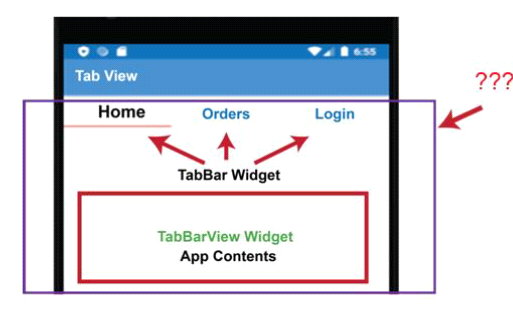
The image in this question includes a Flutter app interface which uses three tabs to navigate the app content.

Which of the following choices is the parent widget for the TabBar and TabBarView widgets?
Answer : A
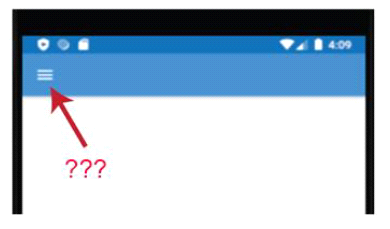
The image in this question includes a Flutter app interface. Which Flutter widget has been added to this app title bar to add this navigation button?

Answer : B
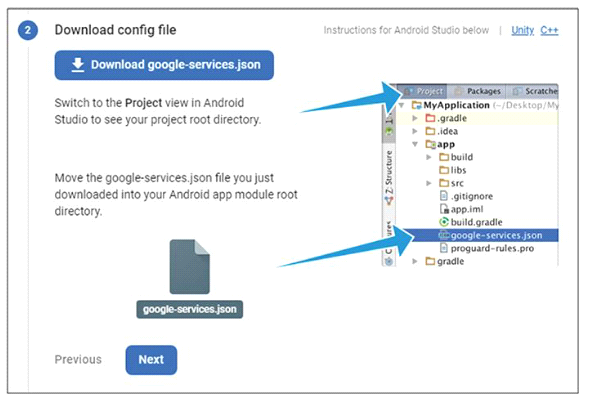
While configuring your Android app on Firebase web site, you should download the google- services.json file from Firebase web site and add it to your Android app files as illustrated in the image of
this question.

Select the best answer from the following choices: What is the main role of this file for your app?
Answer : A
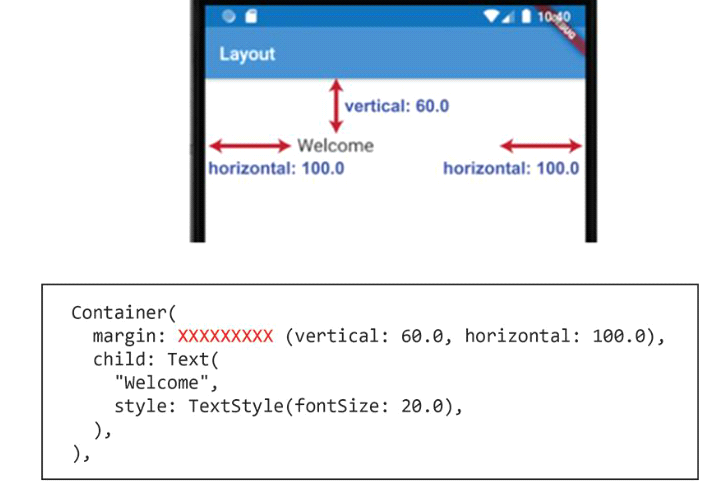
As illustrated in the image in this question, to get the Text value: "Welcome" in this app interface, you may configure the Text widget as a child widget of the Container widget in the following code:

But, you should replace the XXXXXXXXX with one of the following choices. Which of the following is the best answer ?
Answer : D