Appian - Big Savings Alert – Don’t Miss This Deal - Ends In 1d 00h 00m 00s Coupon code: 26Y30OFF
  1. Home
  2. Appian
  3. ACD101 Exam
  4. Free ACD101 Questions

Free Appian Certified Associate Developer (ACD101) Practice Questions

These Appian ACD101 sample questions are a small glimpse of our full set of Appian ACD101 actual questions. They give you a preview of what the real ACD101 exam might look like and the contents of Pass4Future's premium Appian ACD101 product. You must not underestimate the value of Appian ACD101 practice exam questions, as they allow you to understand the actual Appian Certified Associate Developer exam in greater depth. Using them will save your time and money otherwise wasted in Appian Certified Associate Developer exam reattempts. Study guides and tutorials provide you with theoretical details about the ACD101 exam; these ACD101 practice exam questions prepare you to pass the exam. Get Pass4Future's premium access to continue your ACD101 exam practice with the complete set of Appian ACD101 realistic questions. Our Appian ACD101 practice questions come in various formats; make sure to check out the details and free demo of each format.

Appian ACD101 Sample Exam Questions

Page:    1 / 14   
Total 121 questions

Question 1

Review the following expression rule:

ri!name is defined as "Maria".

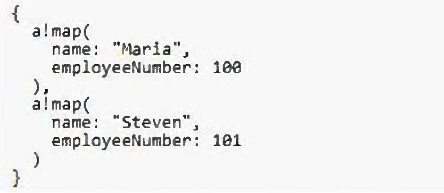
ri!directory is defined as the following:

What is the expected output?


Answer : C

Given that ri!name is defined as 'Maria' and ri!directory contains two a!map() structures, one of which includes the name 'Maria,' the expression wherecontains(ri!name, index(ri!directory, 'name')) will evaluate as follows: The index() function will return a list of values from ri!directory for the key 'name,' which will be {'Maria', 'Steven'}. The wherecontains() function will then check where 'Maria' is found within this list. Since 'Maria' is the first element, the function will return a list of indices where 'Maria' is found, in this case, {1}. Appian lists are 1-indexed, so the first position is represented by 1, not 0. Reference: Appian Expression Language Documentation - Functions


Question 2

You are configuring a Related Action for an entity-backed record type.

What is the proper domain prefix to reference the record data that will be passed into the Process Model as context for the Record Action?


Answer : B

When configuring a Related Action for an entity-backed record type, the proper domain prefix to reference the record data passed into the Process Model as context for the Record Action is pv!. This prefix stands for process variables, which are used to pass data into and out of a process model. In the context of a Related Action, pv! would be used to reference the specific process variables that are configured to receive the record data. Reference: Appian Documentation - Process Variables and Record Types


Question 3

You are configuring an employee onboarding User Input Task that will be assigned to the human resources group.

Based on the default behavior for task assignments, which statement is valid?


Answer : C

Based on the default behavior for task assignments in Appian, when a User Input Task is assigned to a group, any one member of the group can accept the

task. Once accepted, the task becomes locked to that user, and they are responsible for completing it. This prevents multiple users from working on the same task simultaneously and ensures clear accountability. Reference: Appian Documentation - Task Assignments and User Input Tasks


Question 4

You are using a local variable in an expression rule to describe the height of an applicant.

Which statement correctly describes the application of Appian best practices for naming your local variable?


Answer : B

The best practice for naming variables in Appian is to use clear and descriptive names that convey the purpose or content of the variable. Therefore, local!applicantHeight is the best option as it precisely describes the value contained by the variable, which is the height of an applicant. This naming convention aids in readability and maintainability of the code, making it easier for developers to understand and modify the code in the future. Reference: Appian Best Practices - Expression Writing and Naming Conventions


Question 5

You need to start a process using an email trigger.

How should you configure this process model using the Process Model Properties dialog?


Answer : A

To start a process using an email trigger, you need to configure the process model to listen for an email event. This is done by going to File > Properties > Alerts in the process model properties dialog and configuring the Custom Alert settings. Here you can specify the email address that will trigger the process when an email is sent to it. Reference: Appian Documentation - Configuring Alerts in Process Models


Page:    1 / 14   
Total 121 questions