Pass4Future also provide interactive practice exam software for preparing Appian Certified Lead Developer (ACD301) Exam effectively. You are welcome to explore sample free Appian ACD301 Exam questions below and also try Appian ACD301 Exam practice test software.
Do you know that you can access more real Appian ACD301 exam questions via Premium Access? ()
You need to connect Appian with LinkedIn to retrieve personal information about the users in your application. This information is considered private, and users should allow Appian to retrieve their information. Which authentication method would you recommend to fulfill this request?
Answer : D
Comprehensive and Detailed In-Depth Explanation:
As an Appian Lead Developer, integrating with an external system like LinkedIn to retrieve private user information requires a secure, user-consented authentication method that aligns with Appian's capabilities and industry standards. The requirement specifies that users must explicitly allow Appian to access their private data, which rules out methods that don't involve user authorization. Let's evaluate each option based on Appian's official documentation and LinkedIn's API requirements:
A . API Key Authentication:
API Key Authentication involves using a single static key to authenticate requests. While Appian supports this method via Connected Systems (e.g., HTTP Connected System with an API key header), it's unsuitable here. API keys authenticate the application, not the user, and don't provide a mechanism for individual user consent. LinkedIn's API for private data (e.g., profile information) requires per-user authorization, which API keys cannot facilitate. Appian documentation notes that API keys are best for server-to-server communication without user context, making this option inadequate for the requirement.
B . Basic Authentication with user's login information:
This method uses a username and password (typically base64-encoded) provided by each user. In Appian, Basic Authentication is supported in Connected Systems, but applying it here would require users to input their LinkedIn credentials directly into Appian. This is insecure, impractical, and against LinkedIn's security policies, as it exposes user passwords to the application. Appian Lead Developer best practices discourage storing or handling user credentials directly due to security risks (e.g., credential leakage) and maintenance challenges. Moreover, LinkedIn's API doesn't support Basic Authentication for user-specific data access---it requires OAuth 2.0. This option is not viable.
C . Basic Authentication with dedicated account's login information:
This involves using a single, dedicated LinkedIn account's credentials to authenticate all requests. While technically feasible in Appian's Connected System (using Basic Authentication), it fails to meet the requirement that ''users should allow Appian to retrieve their information.'' A dedicated account would access data on behalf of all users without their individual consent, violating privacy principles and LinkedIn's API terms. LinkedIn restricts such approaches, requiring user-specific authorization for private data. Appian documentation advises against blanket credentials for user-specific integrations, making this option inappropriate.
D . OAuth 2.0: Authorization Code Grant:
This is the recommended choice. OAuth 2.0 Authorization Code Grant, supported natively in Appian's Connected System framework, is designed for scenarios where users must authorize an application (Appian) to access their private data on a third-party service (LinkedIn). In this flow, Appian redirects users to LinkedIn's authorization page, where they grant permission. Upon approval, LinkedIn returns an authorization code, which Appian exchanges for an access token via the Token Request Endpoint. This token enables Appian to retrieve private user data (e.g., profile details) securely and per user. Appian's documentation explicitly recommends this method for integrations requiring user consent, such as LinkedIn, and provides tools like a!authorizationLink() to handle authorization failures gracefully. LinkedIn's API (e.g., v2 API) mandates OAuth 2.0 for personal data access, aligning perfectly with this approach.
Conclusion: OAuth 2.0: Authorization Code Grant (D) is the best method. It ensures user consent, complies with LinkedIn's API requirements, and leverages Appian's secure integration capabilities. In practice, you'd configure a Connected System in Appian with LinkedIn's Client ID, Client Secret, Authorization Endpoint (e.g., https://www.linkedin.com/oauth/v2/authorization), and Token Request Endpoint (e.g., https://www.linkedin.com/oauth/v2/accessToken), then use an Integration object to call LinkedIn APIs with the access token. This solution is scalable, secure, and aligns with Appian Lead Developer certification standards for third-party integrations.
Appian Documentation: 'Setting Up a Connected System with the OAuth 2.0 Authorization Code Grant' (Connected Systems).
Appian Lead Developer Certification: Integration Module (OAuth 2.0 Configuration and Best Practices).
LinkedIn Developer Documentation: 'OAuth 2.0 Authorization Code Flow' (API Authentication Requirements).
Users must be able to navigate throughout the application while maintaining complete visibility in the application structure and easily navigate to previous locations. Which Appian Interface Pattern would you recommend?
Answer : D
Comprehensive and Detailed In-Depth Explanation:
The requirement emphasizes navigation with complete visibility of the application structure and the ability to return to previous locations easily. The Breadcrumbs pattern is specifically designed to meet this need. According to Appian's design best practices, the Breadcrumbs pattern provides a visual trail of the user's navigation path, showing the hierarchy of pages or sections within the application. This allows users to understand their current location relative to the overall structure and quickly navigate back to previous levels by clicking on the breadcrumb links.
Option A (Billboards as Cards): This pattern is useful for presenting high-level options or choices on a homepage in a visually appealing way. However, it does not address navigation visibility or the ability to return to previous locations, making it irrelevant to the requirement.
Option B (Activity History): This pattern tracks and displays a log of activities or actions within the application, typically for auditing or monitoring purposes. It does not enhance navigation or provide visibility into the application structure.
Option C (Drilldown Report): This pattern allows users to explore detailed data within reports by drilling into specific records. While it supports navigation within data, it is not designed for general application navigation or maintaining structural visibility.
Option D (Breadcrumbs): This is the correct choice as it directly aligns with the requirement. Per Appian's Interface Patterns documentation, Breadcrumbs improve usability by showing a hierarchical path (e.g., Home > Section > Subsection) and enabling backtracking, fulfilling both visibility and navigation needs.
The business database for a large, complex Appian application is to undergo a migration between database technologies, as well as interface and process changes. The project manager asks you to recommend a test strategy. Given the changes, which two items should be included in the test strategy?
Answer : B, D
Comprehensive and Detailed In-Depth Explanation:
As an Appian Lead Developer, recommending a test strategy for a large, complex application undergoing a database migration (e.g., from Oracle to PostgreSQL) and interface/process changes requires focusing on ensuring system stability, functionality, and the specific updates. The strategy must address risks tied to the scope---database technology shift, interface modifications, and process updates---while aligning with Appian's testing best practices. Let's evaluate each option:
A . Internationalization testing of the Appian platform:
Internationalization testing verifies that the application supports multiple languages, locales, and formats (e.g., date formats). While valuable for global applications, the scenario doesn't indicate a change in localization requirements tied to the database migration, interfaces, or processes. Appian's platform handles internationalization natively (e.g., via locale settings), and this isn't impacted by database technology or UI/process changes unless explicitly stated. This is out of scope for the given context and not a priority.
B . A regression test of all existing system functionality:
This is a critical inclusion. A database migration between technologies can affect data integrity, queries (e.g., a!queryEntity), and performance due to differences in SQL dialects, indexing, or drivers. Regression testing ensures that all existing functionality---records, reports, processes, and integrations---works as expected post-migration. Appian Lead Developer documentation mandates regression testing for significant infrastructure changes like this, as unmapped edge cases (e.g., datatype mismatches) could break the application. Given the ''large, complex'' nature, full-system validation is essential to catch unintended impacts.
C . Penetration testing of the Appian platform:
Penetration testing assesses security vulnerabilities (e.g., injection attacks). While security is important, the changes described---database migration, interface, and process updates---don't inherently alter Appian's security model (e.g., authentication, encryption), which is managed at the platform level. Appian's cloud or on-premise security isn't directly tied to database technology unless new vulnerabilities are introduced (not indicated here). This is a periodic concern, not specific to this migration, making it less relevant than functional validation.
D . Tests for each of the interfaces and process changes:
This is also essential. The project includes explicit ''interface and process changes'' alongside the migration. Interface updates (e.g., SAIL forms) might rely on new data structures or queries, while process changes (e.g., modified process models) could involve updated nodes or logic. Testing each change ensures these components function correctly with the new database and meet business requirements. Appian's testing guidelines emphasize targeted validation of modified components to confirm they integrate with the migrated data layer, making this a primary focus of the strategy.
E . Tests that ensure users can still successfully log into the platform:
Login testing verifies authentication (e.g., SSO, LDAP), typically managed by Appian's security layer, not the business database. A database migration affects application data, not user authentication, unless the database stores user credentials (uncommon in Appian, which uses separate identity management). While a quick sanity check, it's narrow and subsumed by broader regression testing (B), making it redundant as a standalone item.
Conclusion: The two key items are B (regression test of all existing system functionality) and D (tests for each of the interfaces and process changes). Regression testing (B) ensures the database migration doesn't disrupt the entire application, while targeted testing (D) validates the specific interface and process updates. Together, they cover the full scope---existing stability and new functionality---aligning with Appian's recommended approach for complex migrations and modifications.
Appian Documentation: 'Testing Best Practices' (Regression and Component Testing).
Appian Lead Developer Certification: Application Maintenance Module (Database Migration Strategies).
Appian Best Practices: 'Managing Large-Scale Changes in Appian' (Test Planning).
You are on a protect with an application that has been deployed to Production and is live with users. The client wishes to increase the number of active users.
You need to conduct load testing to ensure Production can handle the increased usage
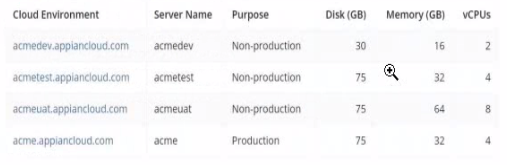
Review the specs for four environments in the following image.

Which environment should you use for load testing7
Answer : A
The image provides the specifications for four environments in the Appian Cloud:
acmedev.appiancloud.com (acmedev): Non-production, Disk: 30 GB, Memory: 16 GB, vCPUs: 2
acmetest.appiancloud.com (acmetest): Non-production, Disk: 75 GB, Memory: 32 GB, vCPUs: 4
acmeuat.appiancloud.com (acmeuat): Non-production, Disk: 75 GB, Memory: 64 GB, vCPUs: 8
acme.appiancloud.com (acme): Production, Disk: 75 GB, Memory: 32 GB, vCPUs: 4
Load testing assesses an application's performance under increased user load to ensure scalability and stability. Appian's Performance Testing Guidelines emphasize using an environment that mirrors Production as closely as possible to obtain accurate results, while avoiding direct impact on live systems.
Option A (acmeuat): This is the best choice. The UAT (User Acceptance Testing) environment (acmeuat) has the highest resources (64 GB memory, 8 vCPUs) among the non-production environments, closely aligning with Production's capabilities (32 GB memory, 4 vCPUs) but with greater capacity to handle simulated loads. UAT environments are designed to validate the application with real-world usage scenarios, making them ideal for load testing. The higher resources also allow testing beyond current Production limits to predict future scalability, meeting the client's goal of increasing active users without risking live data.
Option B (acmedev): The development environment (acmedev) has the lowest resources (16 GB memory, 2 vCPUs), which is insufficient for load testing. It's optimized for development, not performance simulation, and results would not reflect Production behavior accurately.
Option C (acme): The Production environment (acme) is live with users, and load testing here would disrupt service, violate Appian's Production Safety Guidelines, and risk data integrity. It should never be used for testing.
Option D (acmetest): The test environment (acmetest) has moderate resources (32 GB memory, 4 vCPUs), matching Production's memory and vCPUs. However, it's typically used for SIT (System Integration Testing) and has less capacity than acmeuat. While viable, it's less ideal than acmeuat for simulating higher user loads due to its resource constraints.
Appian recommends using a UAT environment for load testing when it closely mirrors Production and can handle simulated traffic, making acmeuat the optimal choice given its superior resources and non-production status.
You are the project lead for an Appian project with a supportive product owner and complex business requirements involving a customer management system. Each week, you notice the product owner becoming more irritated and not devoting as much time to the project, resulting in tickets becoming delayed due to a lack of involvement. Which two types of meetings should you schedule to address this issue?
Answer : B, C
Comprehensive and Detailed In-Depth Explanation:
As an Appian Lead Developer, managing stakeholder engagement and ensuring smooth project progress are critical responsibilities. The scenario describes a product owner whose decreasing involvement is causing delays, which requires a proactive and collaborative approach rather than an immediate escalation to replacement. Let's analyze each option:
A . An additional daily stand-up meeting: While daily stand-ups are a core Agile practice to align the team, adding another one specifically to secure the product owner's time is inefficient. Appian's Agile methodology (aligned with Scrum) emphasizes that stand-ups are for the development team to coordinate, not to force stakeholder availability. The product owner's irritation might increase with additional meetings, making this less effective.
B . A risk management meeting with your program manager: This is a correct choice. Appian Lead Developer documentation highlights the importance of risk management in complex projects (e.g., customer management systems). Delays due to lack of product owner involvement constitute a project risk. Escalating this to the program manager ensures visibility and allows for strategic mitigation, such as resource reallocation or additional support, without directly confronting the product owner in a way that could damage the relationship. This aligns with Appian's project governance best practices.
C . A sprint retrospective with the product owner and development team: This is also a correct choice. The sprint retrospective, as per Appian's Agile guidelines, is a key ceremony to reflect on what's working and what isn't. Including the product owner fosters collaboration and provides a safe space to address their reduced involvement and its impact on ticket delays. It encourages team accountability and aligns with Appian's focus on continuous improvement in Agile development.
D . A meeting with the sponsor to discuss the product owner's performance and request a replacement: This is premature and not recommended as a first step. Appian's Lead Developer training emphasizes maintaining strong stakeholder relationships and resolving issues collaboratively before escalating to drastic measures like replacement. This option risks alienating the product owner and disrupting the project further, which contradicts Appian's stakeholder management principles.
Conclusion: The best approach combines B (risk management meeting) to address the immediate risk of delays with a higher-level escalation and C (sprint retrospective) to collaboratively resolve the product owner's engagement issues. These align with Appian's Agile and leadership strategies for Lead Developers.
Appian Lead Developer Certification: Agile Project Management Module (Risk Management and Stakeholder Engagement).
Appian Documentation: 'Best Practices for Agile Development in Appian' (Sprint Retrospectives and Team Collaboration).