Avaya - Big Savings Alert – Don’t Miss This Deal - Ends In 1d 00h 00m 00s Coupon code: 26Y30OFF
  1. Home
  2. Avaya
  3. 71300X Exam
  4. Free 71300X Questions

Free Practice Questions for Avaya 71300X Exam

Pass4Future also provide interactive practice exam software for preparing Avaya Aura® Communication Applications Integration (71300X) Exam effectively. You are welcome to explore sample free Avaya 71300X Exam questions below and also try Avaya 71300X Exam practice test software.

Page:    1 / 14   
Total 64 questions

Question 1

On Avaya Session Border Controller for Enterprise (SBCE), where do you access the tool that displays SIP messages, in real time, as they pass through the SBCE?


Answer : C

Stat the tue Tracing Tools, TraceSM, SSH to Session Manager

1. Launch PuTTY (or similar client application) for a SSH session to Session Manager (port 22). Use the Session Manager IP Address (172.16.255.107).

2. Log in.

3. At the Session Manager command line type traceSM --x and press Enter.

Note: The traceSM tool shows the SIP call flow in Session Manager.

It gives insight into Session Manager's decisions.

Benefit: can filter certain types of SIP messages

References: Avaya Aura Session Border Controller Enterprise Implementation and Maintenance (2012), page 485


Question 2

For an Avaya SIP telephone, working as a Remote Worker via the Avaya Session Border Controller for Enterprise (SBCE), which IP address should be configured in the Server List of the one-X Communicator?


Answer : D

Remote Worker Avaya one-X Communicator Configuration

The following screens illustrate Avaya one-X Communicator administration settings for the Remote Worker used in the reference configuration.

Example:

1. On the Avaya one-X Communicator application running on the PC, click on the Settings icon on the top right to display the Settings window.2. Click on Telephony, the General Settings window will appear. The following values were used in the reference configuration:

Under Using: select SIP (SIP must be selected; H.323 is not supported for Remote

Workers).

* Under Server List, click Add (the Add Server window to the right will appear).

* Under Proxy Server enter 192.168.157.180 (This is one of the two ''public'' IP addresses for interface B1 on the Avaya SBCE used for Remote Worker access to Session Manager (public IP not used for relay services).

Etc.

References: Configuring Remote Workers with Avaya Session Border Controller for Enterprise Rel. 6.2, Avaya Aura Communication Manager Rel. 6.3 and Avaya Aura Session Managers Rel. 6.3 - Issue 1.0, page 81

https://downloads.avaya.com/css/P8/documents/100183254


Question 3

In Avaya Session Border Controller for Enterprise (SBCE) 7.x, which two configuration screens must be configured for Personal Profile Management (PPM) to be successfully downloaded to an Avaya SIP Telephone (AST)? (Choose two.)


Answer : A, B

B: Application relays function as port forwards. Different clients require different application relays.

A: An Avaya SIP phone downloads and processes a configuration file, sends out a slew of SUBSCRIBE messages, and uses something called Personal Profile Manager (PPM).

Note: The PPM is a software module that runs as part of an Avaya Session Manager. It consists of a series of web services that phones use to retrieve and manage SIP related user data.

References: https://andrewjprokop.wordpress.com/2014/03/28/understanding-avayas-personal-profile-manager-ppm/

https://downloads.avaya.com/css/P8/documents/101028355


Question 4

On Avaya Session Border Controller for Enterprise (SBCE), which statement about how to examine messages with Wireshark is true?


Answer : B

Viewing the Packet Capture with Wireshark.

0. Start a Packet Capture in the EMS web GUi.

1. After the capture completes, click the Capture tab.

2. Double-click on the capture file name.

3. The File Download window opens.

4. Click Open.

The Wireshark application opens the trace.

Note: The Wireshark call tracing tool can be used on virtual desktop for vLabs.

References: Avaya Aura Session Border Controller Enterprise Implementation and Maintenance (2012), page 468


Question 5

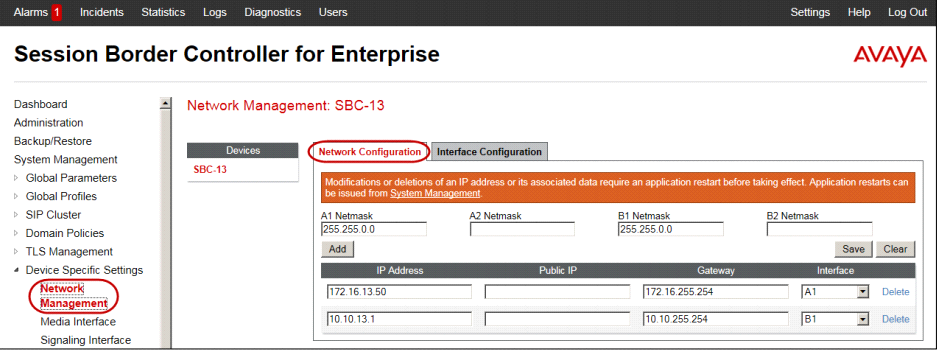
After running the Install wizard on Avaya Session Border Controller for Enterprise (SBCE), you added a Public Outside IP address to the B1 interface. You try to ping this IP address from a PC in the same subnet but it falls.

What would you do first to resolve the issue?


Answer : D

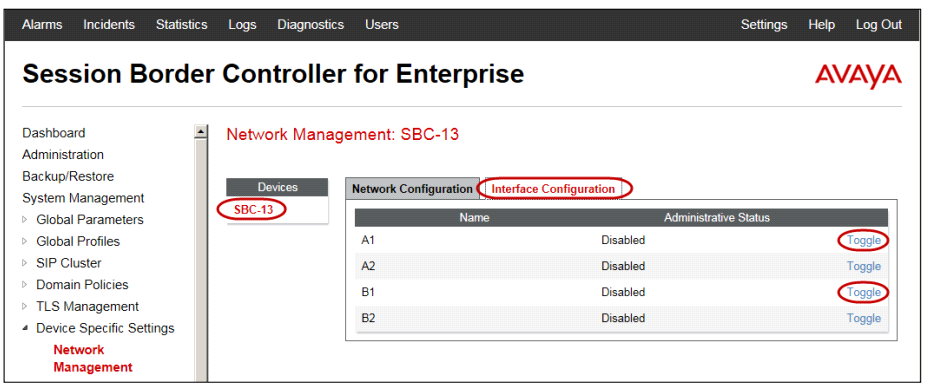
The interface might need to be enabled.

2. Click on the Interface Configuration tab.

3. Click the Toggle link for both the A1 and the B1 interfaces.

The Administrative Status for both A1 and B1 changes to Enabled

References: Avaya Aura Session Border Controller Enterprise Implementation and Maintenance (2012), page 204


Page:    1 / 14   
Total 64 questions