CompTIA - Big Savings Alert – Don’t Miss This Deal - Ends In 1d 00h 00m 00s Coupon code: 26Y30OFF
  1. Home
  2. CompTIA
  3. PT0-003 Exam
  4. Free PT0-003 Questions

Free Practice Questions for CompTIA PT0-003 Exam

Pass4Future also provide interactive practice exam software for preparing CompTIA PenTest+ (PT0-003) Exam effectively. You are welcome to explore sample free CompTIA PT0-003 Exam questions below and also try CompTIA PT0-003 Exam practice test software.

Page:    1 / 14   
Total 331 questions

Question 1

During a penetration test, a tester attempts to pivot from one Windows 10 system to another Windows system. The penetration tester thinks a local firewall is blocking connections. Which of the following command-line utilities built into Windows is most likely to disable the firewall?


Answer : D

Understanding netsh.exe:

Purpose: Configures network settings, including IP addresses, DNS, and firewall settings.

Firewall Management: Can enable, disable, or modify firewall rules.

Disabling the Firewall:

Command: Use netsh.exe to disable the firewall.

netsh advfirewall set allprofiles state off

Usage in Penetration Testing:

Pivoting: Disabling the firewall can help the penetration tester pivot from one system to another by removing network restrictions.

Command Execution: Ensure the command is executed with appropriate privileges.

Reference from Pentesting Literature:

netsh.exe is commonly mentioned in penetration testing guides for configuring network settings and managing firewalls.

HTB write-ups often reference the use of netsh.exe for managing firewall settings during network-based penetration tests.


Penetration Testing - A Hands-on Introduction to Hacking

HTB Official Writeups

Question 2

A penetration tester is performing network reconnaissance. The tester wants to gather information about the network without causing detection mechanisms to flag the reconnaissance activities. Which of the following techniques should the tester use?


Answer : A

To gather information about the network without causing detection mechanisms to flag the reconnaissance activities, the penetration tester should use sniffing.

Sniffing:

Definition: Sniffing involves capturing and analyzing network traffic passing through the network. It is a passive reconnaissance technique that does not generate detectable traffic on the network.

Tools: Tools like Wireshark and tcpdump are commonly used for sniffing. They capture packets and provide insights into network communications, protocols in use, devices, and potential vulnerabilities.

Advantages:

Stealthy: Since sniffing is passive, it does not generate additional traffic that could be detected by intrusion detection systems (IDS) or other monitoring tools.

Information Gathered: Sniffing can reveal IP addresses, MAC addresses, open ports, running services, and potentially sensitive information transmitted in plaintext.

Comparison with Other Techniques:

Banner Grabbing: Active technique that sends requests to a target service to gather information from banners, which can be detected.

TCP/UDP Scanning: Active technique that sends packets to probe open ports and services, easily detected by network monitoring tools.

Ping Sweeps: Active technique that sends ICMP echo requests to determine live hosts, also detectable by network monitoring.

Pentest Reference:

Reconnaissance Phase: Using passive techniques like sniffing during the initial reconnaissance phase helps gather information without alerting the target.

Network Analysis: Understanding the network topology and identifying key assets and vulnerabilities without generating traffic that could trigger alarms.

By using sniffing, the penetration tester can gather detailed information about the network in a stealthy manner, minimizing the risk of detection.

Question 3

After a recent penetration test was conducted by the company's penetration testing team, a systems administrator notices the following in the logs:

2/10/2023 05:50AM C:\users\mgranite\schtasks /query

2/10/2023 05:53AM C:\users\mgranite\schtasks /CREATE /SC DAILY

Which of the following best explains the team's objective?


Answer : D

The logs indicate that the penetration testing team's objective was to create persistence in the network.

Log Analysis:

schtasks /query: This command lists all the scheduled tasks on the system. It is often used to understand what tasks are currently scheduled and running.

schtasks /CREATE /SC DAILY: This command creates a new scheduled task that runs daily. Creating such a task can be used to ensure that a script or program runs regularly, maintaining a foothold in the system.

Persistence:

Definition: Persistence refers to techniques used to maintain access to a compromised system even after reboots or other interruptions.

Scheduled Tasks: One common method of achieving persistence on Windows systems is by creating scheduled tasks that execute malicious payloads or scripts at regular intervals.

Other Options:

Enumerate Current Users: The logs do not show commands related to user enumeration.

Determine Users' Permissions: Commands like whoami or net user would be more relevant for checking user permissions.

View Scheduled Processes: While schtasks /query can view scheduled tasks, the addition of the schtasks /CREATE command indicates the intent to create new scheduled tasks, which aligns with creating persistence.

Pentest Reference:

Post-Exploitation: Establishing persistence is a key objective after gaining initial access to ensure continued access.

Scheduled Tasks: Utilizing Windows Task Scheduler to run scripts or programs automatically at specified times as a method for maintaining access.

By creating scheduled tasks, the penetration testing team aims to establish persistence, ensuring they can retain access to the system over time.


Question 4

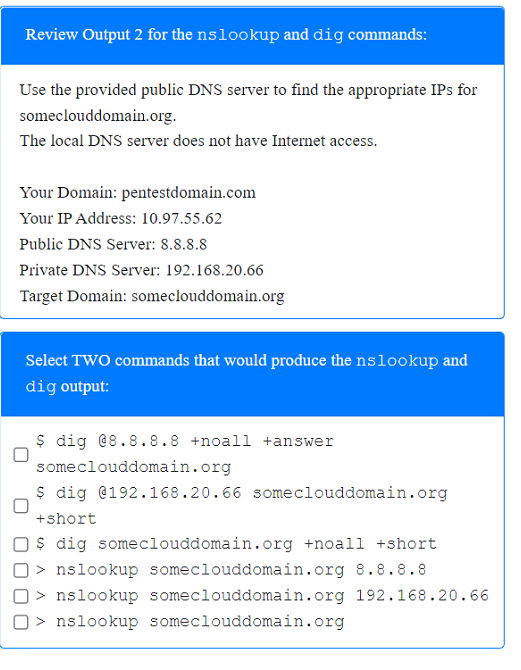
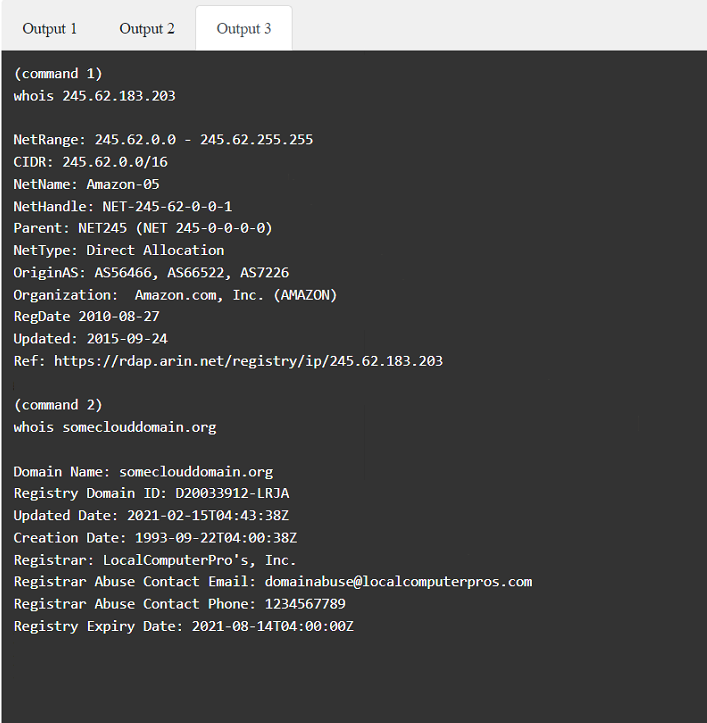
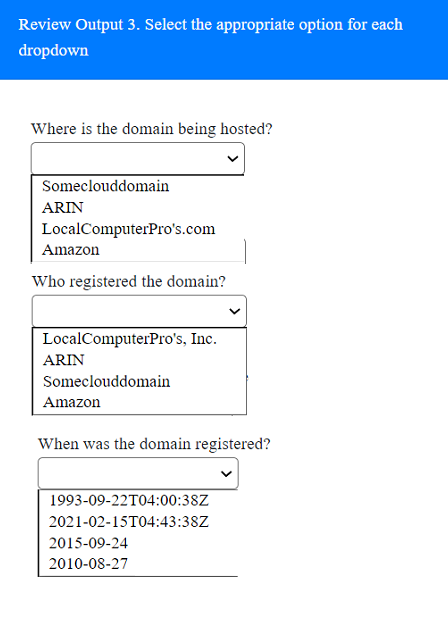
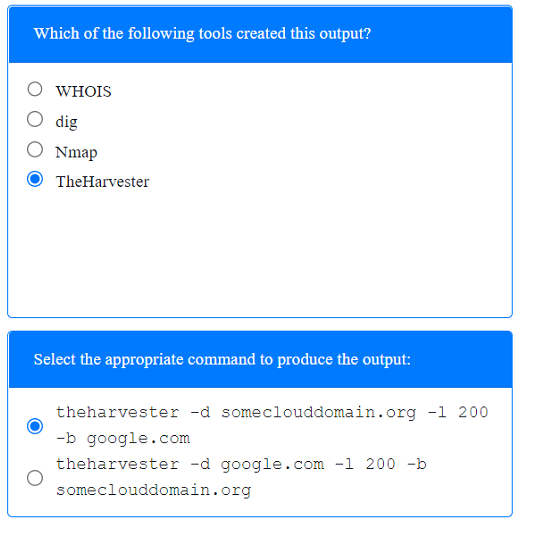
SIMULATION

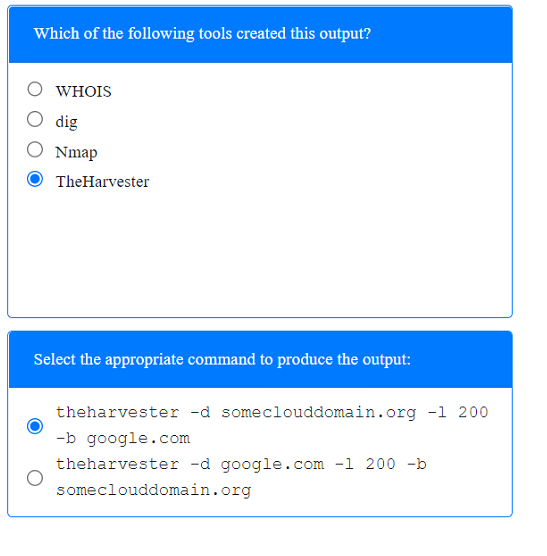
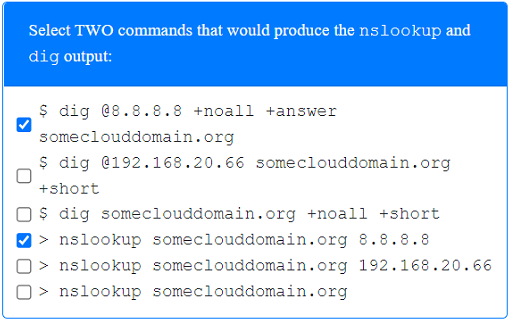
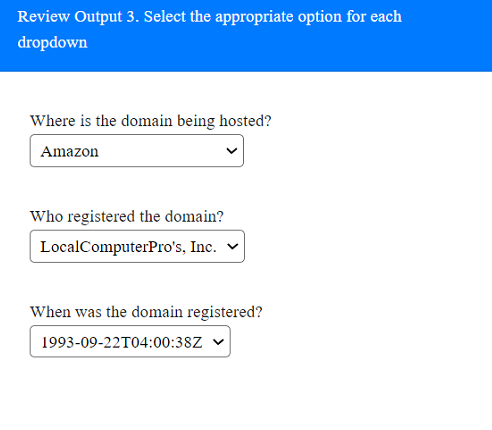
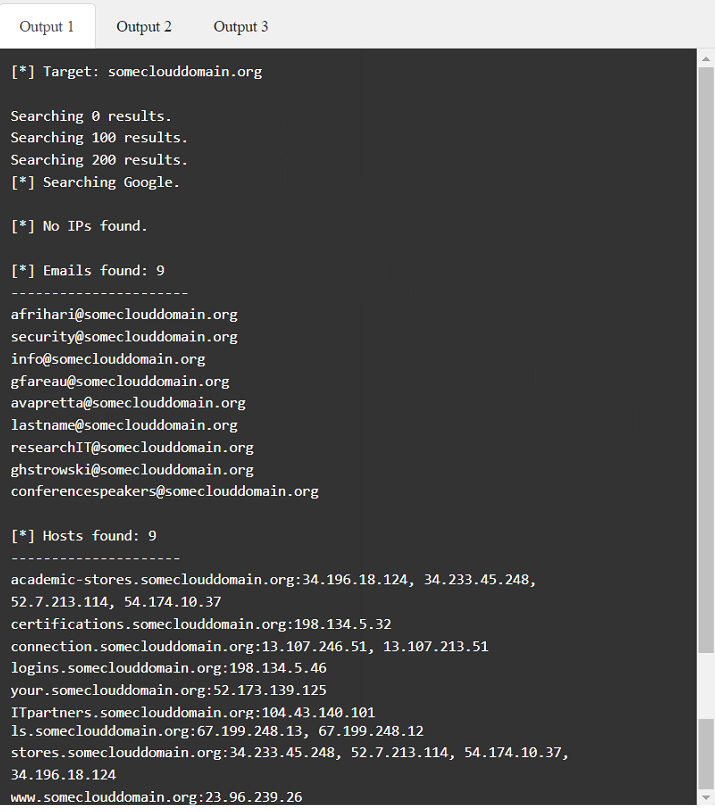
A penetration tester has been provided with only the public domain name and must enumerate additional information for the public-facing assets.

INSTRUCTIONS

Select the appropriate answer(s), given the output from each section.

Output 1


Answer : A


Question 5

During a penetration test, the tester gains full access to the application's source code. The application repository includes thousands of code files. Given that the assessment timeline is very short, which of the following approaches would allow the tester to identify hard-coded credentials most effectively?


Answer : A

Given a short assessment timeline and the need to identify hard-coded credentials in a large codebase, using an automated tool designed for this specific purpose is the most effective approach. Here's an explanation of each option:

Run TruffleHog against a local clone of the application (Answer: A):

Effectiveness: It quickly and automatically identifies potential credentials and other sensitive information across thousands of files, making it the most efficient choice under time constraints.

Drawbacks: It is not designed to scan source code for hard-coded credentials. Instead, it focuses on web application vulnerabilities such as outdated software and misconfigurations.

Perform a manual code review of the Git repository (Option C):

Drawbacks: Given the short timeline, this approach is impractical and inefficient for identifying hard-coded credentials quickly.

Use SCA software to scan the application source code (Option D):

Drawbacks: While SCA tools are useful for dependency analysis, they are not specifically tailored for finding hard-coded credentials.

Conclusion: Running TruffleHog against a local clone of the application is the most effective approach for quickly identifying hard-coded credentials in a large codebase within a limited timeframe.


TruffleHog is widely recognized for its ability to uncover hidden secrets in code repositories, making it a valuable tool for penetration testers.

Scan the live web application using Nikto (Option B):

Page:    1 / 14   
Total 331 questions