CompTIA - Big Savings Alert – Don’t Miss This Deal - Ends In 1d 00h 00m 00s Coupon code: 26Y30OFF
  1. Home
  2. CompTIA
  3. XK0-006 Exam
  4. Free XK0-006 Questions

Free Practice Questions for CompTIA XK0-006 Exam

Pass4Future also provide interactive practice exam software for preparing CompTIA Linux+ V8 (XK0-006) Exam effectively. You are welcome to explore sample free CompTIA XK0-006 Exam questions below and also try CompTIA XK0-006 Exam practice test software.

Page:    1 / 14   
Total 149 questions

Question 1

A Linux administrator needs to securely erase the contents of a hard disk. Which of the following commands is the best for this task?


Answer : B

Secure data destruction is an important security requirement addressed in Linux+ V8 objectives. When data must be permanently erased, standard file deletion commands are insufficient because they do not overwrite the data on disk.

The shred command is specifically designed to securely erase files or block devices by overwriting them multiple times with random data. Using sudo shred /dev/sda1 overwrites the entire partition, making data recovery extremely difficult or impossible. This aligns directly with Linux+ V8 best practices for secure data sanitization.

The other options are incorrect. rm -rf removes directory entries but does not overwrite disk data. parted rm deletes partition entries but leaves the underlying data intact. dd if=/dev/null writes zero bytes and does not overwrite existing data blocks.

Linux+ V8 documentation identifies shred as the most appropriate tool for secure erasure when compliance or confidentiality is required. Therefore, the correct answer is B.


Question 2

SIMULATION

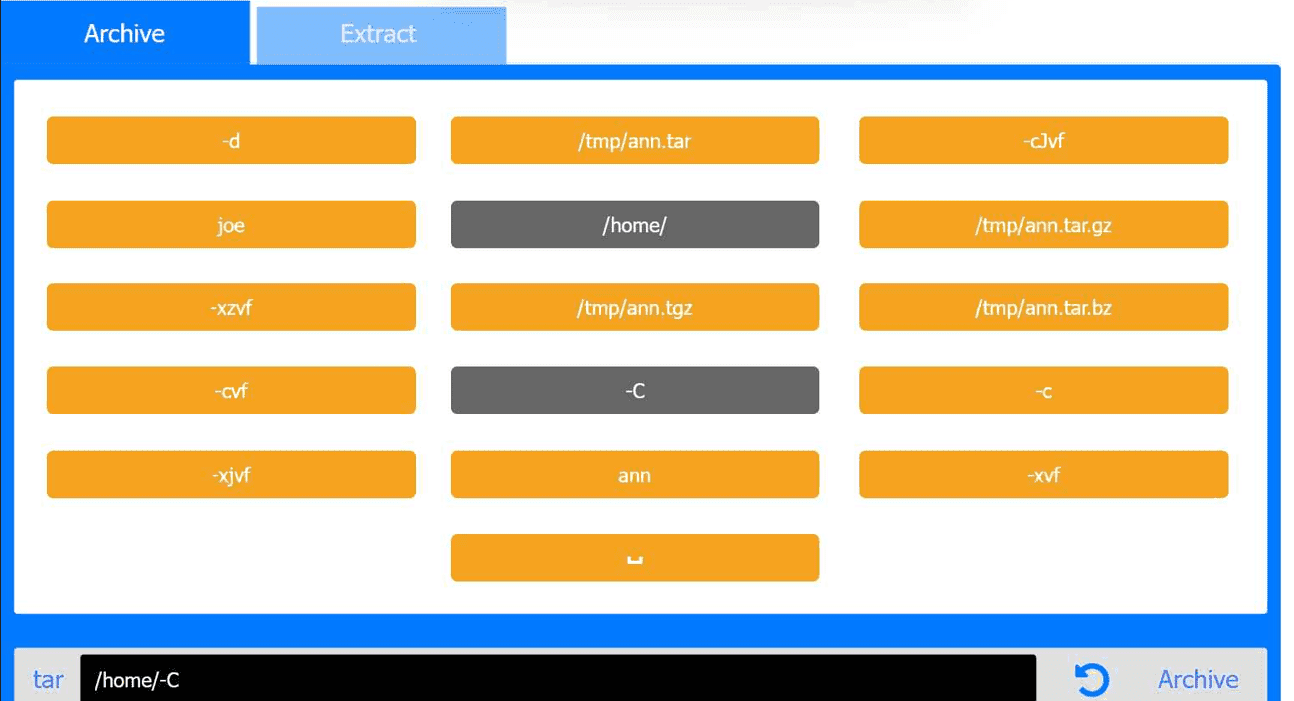
Joe, a user, has taken a position previously held by Ann. As a systems administrator, you

need to archive all the files from Ann's home directory and extract them into Joe's home

directory.

INSTRUCTIONS

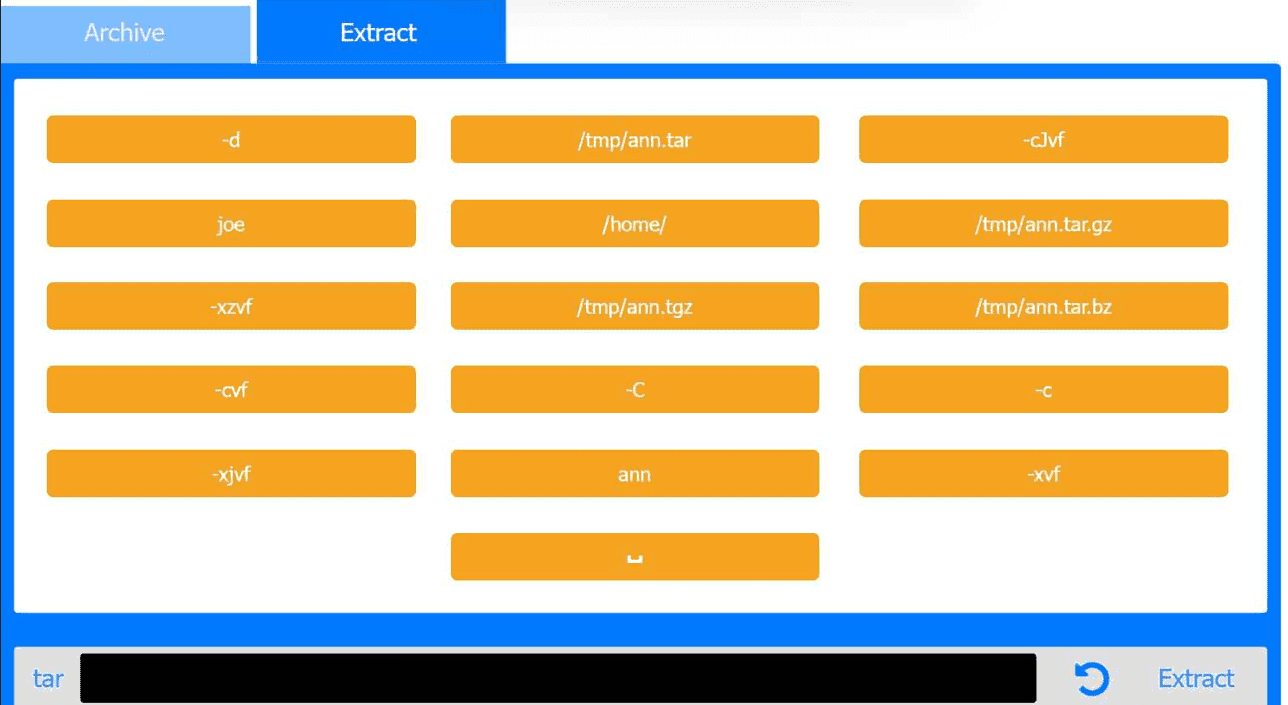
Within each tab, click on an object to form the appropriate commands. Command objects may only be used once, but the spacebar _ object may be used multiple times. Not all objects will be used.

If at any time you would like to bring back the initial state of the simulation, please click the Reset All button.


Answer : A

Archive Tab -- Create the archive from Ann's home directory

Correct Command:

tar -cvf /tmp/ann.tar -C /home/ ann

Extract Tab -- Extract the archive into Joe's home directory

Correct Command:

tar -xvf /tmp/ann.tar -C /home/ joe

This performance-based question tests file archiving and restoration using tar, a core System Management skill in the CompTIA Linux+ V8 objectives. The task requires preserving Ann's files and placing them correctly into Joe's home directory.

Archive Phase Explanation

The goal of the first step is to archive Ann's entire home directory without embedding the full path (/home/ann) inside the archive. This is accomplished using the -C option.

Command breakdown:

tar archive utility

-c create an archive

-v verbose output (optional but allowed)

-f /tmp/ann.tar specifies the archive file

-C /home/ changes directory before archiving

ann archives the ann directory only

This results in a clean archive containing Ann's files without absolute paths, which is best practice and explicitly covered in Linux+ V8 documentation.

Extract Phase Explanation

The second step extracts the archived files into Joe's home directory.

Command breakdown:

-x extract

-v verbose

-f /tmp/ann.tar specifies the archive

-C /home/joe extracts files directly into Joe's home directory

This ensures Joe receives Ann's files correctly under /home/joe/ann or directly under /home/joe depending on post-extraction handling, which matches Linux+ expectations for administrative user transitions.


Question 3

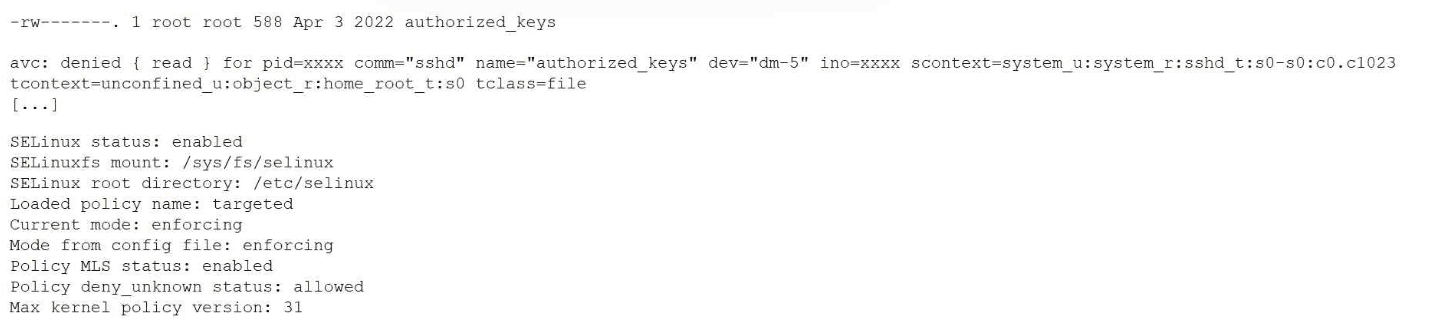
A Linux administrator just finished setting up passwordless SSH authentication between two nodes. However, upon test validation, the remote host prompts for a password. Given the following logs:

Which of the following is the most likely cause of the issue?


Answer : D

This issue is directly related to SELinux enforcement, which is a key topic in the Security domain of CompTIA Linux+ V8. The logs clearly indicate that SSH key-based authentication is failing due to an SELinux access control violation rather than a traditional file permission or SSH configuration problem.

The most important clue is the AVC denial message, which shows that the sshd process is being denied read access to the authorized_keys file. The security context of the file is listed as unconfined_u:object_r:home_root_t:s0. Under a targeted SELinux policy, SSH is only permitted to read authorized_keys files that are labeled with the correct SELinux type, typically ssh_home_t.

Because SELinux is running in enforcing mode, it actively blocks access that violates policy rules, even if standard UNIX permissions are correct. Although the file permissions (600) are acceptable for an authorized_keys file, SELinux does not rely solely on traditional permissions. The mismatch between the expected SELinux context and the actual context prevents sshd from accessing the file, causing SSH to fall back to password authentication.

Option D correctly identifies the root cause: the authorized_keys file does not have the correct SELinux security context. This is a well-documented Linux+ V8 troubleshooting scenario, commonly resolved by restoring the correct context using commands such as restorecon or by ensuring the file resides in a properly labeled home directory.

The other options are incorrect. Restarting sshd does not fix SELinux labeling issues. The policy itself is functioning as intended, and file ownership alone does not override SELinux access controls.

Linux+ V8 documentation emphasizes that SELinux denials must be addressed by correcting file contexts rather than weakening security controls. Therefore, the correct answer is D.


Question 4

A Linux administrator wants to make the enable_auth variable set to 1 and available to the environment of subsequently executed commands. Which of the following should the administrator use for this task?


Answer : D

Environment variables in Linux can exist either locally within a shell or be exported to child processes. CompTIA Linux+ V8 emphasizes the distinction between shell variables and environment variables, as this affects how applications inherit configuration values.

Option D, export ENABLE_AUTH=1, is the correct choice because it both assigns the variable and marks it for export to the environment. Once exported, the variable becomes available to all subsequently executed commands and child processes spawned from the current shell. This behavior is required when applications or scripts rely on environment variables for configuration.

Option B, ENABLE_AUTH=1, only sets a shell-local variable. While it is accessible within the current shell session, it is not inherited by child processes unless explicitly exported. Option A, let ENABLE_AUTH=1, performs arithmetic evaluation and does not export the variable. Option C incorrectly assigns the output of a command substitution and does not set the desired value.

Linux+ V8 documentation highlights export as the correct mechanism for making variables available system-wide within a user session. Therefore, the correct answer is D.


Question 5

SIMULATION

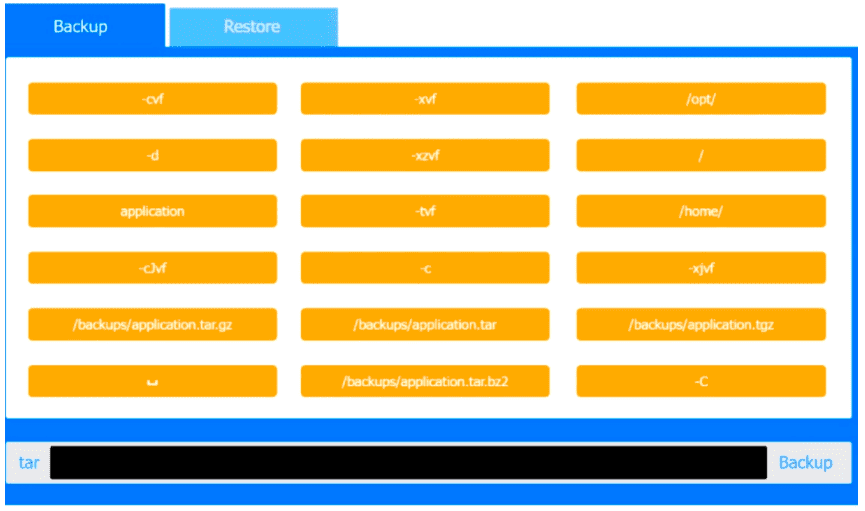
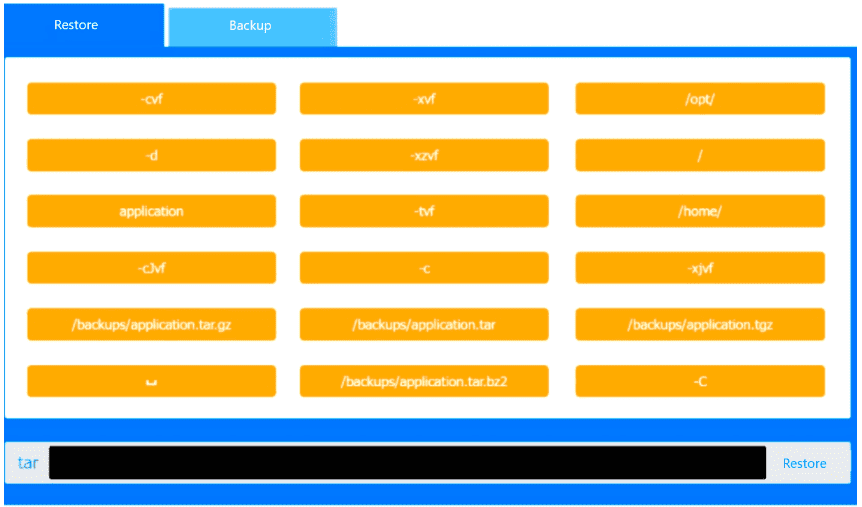
You are a systems administrator and have created an uncompressed backup of the

application directory. Several hours later, you must restore the application from backup.

INSTRUCTIONS

Within each tab, click on an object to form the appropriate command used to create the

backup and restore the application.

Command objects may only be used once, and not all will be used. Click the arrow to

remove any unwanted objects from your command.

If at any time you would like to bring back the initial state of the simulation, please click

the Reset All button.


Answer : A

This performance-based question tests correct use of the tar utility for backup and restore operations, which is part of System Management in CompTIA Linux+ V8. The key detail is that the backup is explicitly described as uncompressed, so the correct archive file must be a plain .tar file rather than .tar.gz, .tgz, or .tar.bz2.

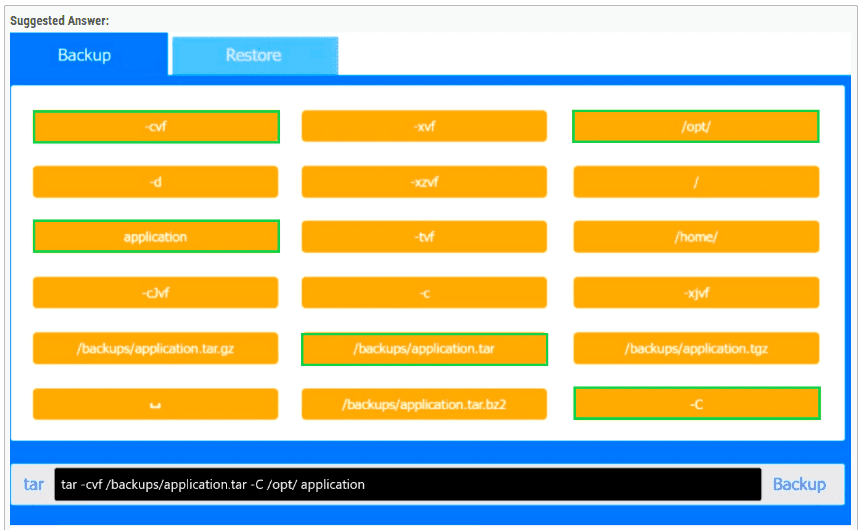
For the backup command, the correct syntax is:

tar -cvf /backups/application.tar -C /opt/ application

Here, -c creates the archive, -v enables verbose output, and -f specifies the archive filename. The -C /opt/ option changes to the /opt/ directory before archiving, and application is then archived relative to that location. This is the correct Linux+ method because it avoids storing unnecessary leading path components in the archive.

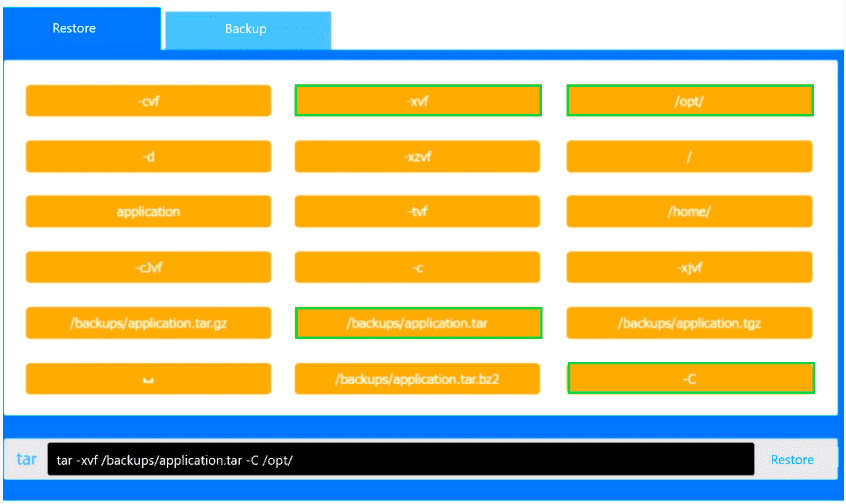
For the restore command, the correct syntax is:

tar -xvf /backups/application.tar -C /opt/

Here, -x extracts the archive, -v displays files being restored, and -f identifies the archive file. The -C /opt/ option ensures the archived application directory is restored back into /opt/, recreating /opt/application correctly.

The other file choices such as /backups/application.tar.gz, /backups/application.tgz, and /backups/application.tar.bz2 are incorrect because they indicate compressed backups, which the question specifically rules out. Likewise, options such as -xzvf or -xjvf are used for gzip- or bzip2-compressed archives and would not apply here.

Therefore, the verified correct PBQ answers are:

Backup: tar -cvf /backups/application.tar -C /opt/ application

Restore: tar -xvf /backups/application.tar -C /opt/


Page:    1 / 14   
Total 149 questions