Pass4Future also provide interactive practice exam software for preparing Dell EMC Dell PowerMax Operate v.2 (D-PVM-OE-01) Exam effectively. You are welcome to explore sample free Dell EMC D-PVM-OE-01 Exam questions below and also try Dell EMC D-PVM-OE-01 Exam practice test software.
Do you know that you can access more real Dell EMC D-PVM-OE-01 exam questions via Premium Access? ()
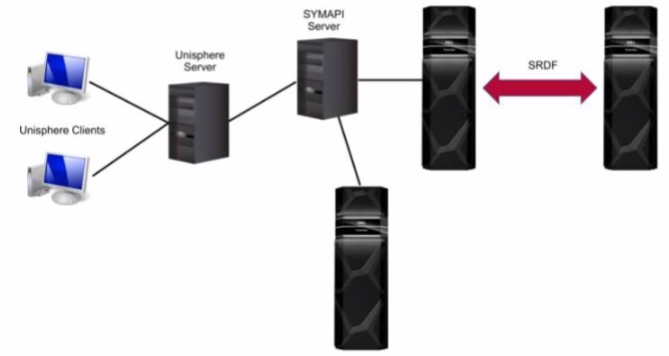
Refer to the exhibit.

What is the Unisphere for PowerMax deployment option pictured?
Answer : C
Step by Step Comprehensive Detailed
Unisphere for PowerMax offers different deployment options to manage PowerMax storage arrays. Based on the exhibit, we can identify the following:
Separate SYMAPI Server: The diagram shows a dedicated SYMAPI server. SYMAPI (Symmetrix Application Programming Interface) is a command-line interface used to manage PowerMax and VMAX storage arrays. This indicates that the Unisphere server is not directly connected to the storage arrays.
Unisphere Server Connected to SYMAPI Server: The Unisphere server is shown to be connected to the SYMAPI server. This means that the Unisphere server relies on the SYMAPI server to communicate with the PowerMax arrays.
No Direct Connection to Arrays: The Unisphere server does not have a direct connection to the PowerMax arrays.
Considering these points, the deployment option depicted in the exhibit is a remote deployment. In a remote deployment, the Unisphere server is installed on a separate host and communicates with the PowerMax arrays through a SYMAPI server. This allows for centralized management of multiple arrays from a single Unisphere instance.
Why other options are incorrect:
A . Embedded: In an embedded deployment, the Unisphere software runs directly on the PowerMax array itself. This eliminates the need for a separate Unisphere server.
B . Either remote or local: While the diagram could technically represent a local deployment with a dedicated SYMAPI server, the presence of the separate SYMAPI server and the lack of direct connection to the arrays strongly suggest a remote deployment.
D . Local: In a local deployment, the Unisphere server is typically installed on the same host as Solutions Enabler, which has direct connectivity to the storage arrays.
Reference and documents of Dell's public documentation for PowerMax Operate v.2:
Dell Unisphere for PowerMax 10.0.0 Installation Guide: This guide provides detailed information about the different Unisphere deployment options, including local, remote, and embedded. It also includes diagrams and explanations of each deployment scenario. You can find this document on the Dell Support website by searching for 'Unisphere for PowerMax Installation Guide.'
Dell PowerMax Family: Essentials and Best Practices Guide: This guide offers a general overview of PowerMax systems and their management using Unisphere. It may provide context for understanding the different deployment options.
What is an update operation in SRDF on PowerMax arrays?
Answer : C
Step by Step Comprehensive Detailed
In SRDF (Symmetrix Remote Data Facility), an 'update' operation refers to a specific process where changes made on the target (R2) side are copied back to the source (R1) side. This is typically used in disaster recovery scenarios where:
Failover: A failover occurs, and the target (R2) becomes the active production site.
Data Modification: Data is modified or updated on the target (R2) while it's acting as the primary.
Update Operation: An 'update' is initiated to synchronize the changes from the target (R2) back to the source (R1), ensuring that the source has the latest data.
This process is crucial for maintaining data consistency and ensuring a smooth transition back to the original production site after a failover event.
Why other options are incorrect:
A . process to retain the data on the target R2 side: This is not specific to an 'update' operation. Data retention on the target is a general aspect of SRDF.
B . A process used to return to the original production site after a failover event: While an 'update' is part of the failback process, it's not the entire process itself. Failback involves other steps like reversing replication direction and restoring host access.
D . A process that allows separate hosts to access the same data independently: This describes a different SRDF configuration (like Active/Active) and is not related to the 'update' operation.
Reference and documents of Dell's public documentation for PowerMax Operate v.2:
Dell Solutions Enabler 10.0.0 SRDF Family CLI User Guide: This guide provides detailed information about SRDF commands and operations, including the symrdf update command used to initiate an update from R2 to R1. You can find this document on the Dell Support website by searching for 'Solutions Enabler SRDF Family CLI User Guide.'
Dell PowerMax Family: Essentials and Best Practices Guide: This guide offers a comprehensive overview of SRDF and its functionalities, including disaster recovery scenarios and the use of the 'update' operation.
What function does the storsrvd daemon support?
Answer : D
The storsrvd daemon is a critical component of the Solutions Enabler (SYMCLI) software suite used to manage Dell PowerMax and VMAX storage arrays. Its primary function is to:
Listen for SYMAPI Sessions: It acts as a communication endpoint, listening for incoming SYMAPI sessions from clients or management tools like Unisphere.
Handle Management Requests: When a client connects, storsrvd receives and processes SYMAPI commands and requests, forwarding them to the appropriate components within Solutions Enabler for execution.
Essentially, storsrvd acts as an intermediary between SYMCLI clients and the storage array, facilitating communication and management operations.
Why other options are incorrect:
A . Manages Composite Groups and Device Groups: This is handled by other components within Solutions Enabler.
B . Provides centralized gatekeeper device management: While storsrvd plays a role in device management, it's not the sole component responsible for it.
C . Provides replication consistency protection: This is a function of SRDF (Symmetrix Remote Data Facility) and related components.
Reference and documents of Dell's public documentation for PowerMax Operate v.2:
Dell Solutions Enabler 10.0.0 CLI User Guide: This guide provides information about the architecture and components of Solutions Enabler, including the role of the storsrvd daemon in handling SYMAPI communication. You can find this document on the Dell Support website by searching for 'Solutions Enabler CLI User Guide.'
An administrator is using the Workload Planner feature in Unisphere for PowerMax
How does the Planner calculate if the Storage Group workload is stable?
Answer : D
Step by Step Comprehensive Detailed
The Workload Planner in Unisphere for PowerMax helps you analyze and predict the performance impact of adding new workloads to your storage array. It uses sophisticated algorithms to calculate how the addition of a new workload will affect the existing workloads and whether it will violate any service level objectives (SLOs).
To determine if a Storage Group workload is stable, the Planner considers two key calculated values:
Read Response Time: The predicted read response time of the Storage Group after the new workload is added.
Write Response Time: The predicted write response time of the Storage Group after the new workload is added.
The Planner compares these calculated values against the service level (SL) defined for the Storage Group. If both the calculated read and write response times fall within the defined SL response time, the Planner considers the workload to be stable. This means that the new workload can be added without negatively impacting the performance of the existing workloads or violating the SLOs.
Why other options are incorrect:
A . One of the calculated values is within 10-20% of the SL-defined response time: Both read and write response times must be within the defined SL, not just one.
B . Both calculated values are within a 10-15% threshold of the SL-defined response time: The threshold is not fixed at 10-15%. The calculated values must be within the actual SL-defined response time.
C . One of the calculated values remains within the SL-defined response time: Again, both read and write response times need to be within the defined SL.
Reference and documents of Dell's public documentation for PowerMax Operate v.2:
Dell Unisphere for PowerMax 10.0.0 Online Help: The online help for Unisphere provides detailed information about the Workload Planner feature, including how it calculates and analyzes workload stability. You can access this help within Unisphere itself or on the Dell Support website.
Dell PowerMax Family: Essentials and Best Practices Guide: This guide may offer general information about performance management and workload planning in PowerMax, providing context for understanding the Workload Planner's functionality.
When using TimeFinder SnapVX technology, what is the maximum number of target volumes that can be linked to a snapshot on a single source volume?
Answer : A
Step by Step Comprehensive Detailed
TimeFinder SnapVX is a snapshot technology in PowerMax that allows you to create point-in-time copies of data. When using SnapVX, you can link target volumes to a snapshot to create writable copies of the data at that specific point in time.
The maximum number of target volumes that can be linked to a single snapshot on a source volume is 255. This limitation ensures efficient management and performance of the SnapVX snapshots and linked targets.
Why other options are incorrect:
B . 256, C. 512, D. 1024: These numbers exceed the maximum limit of linked targets per snapshot.
Reference and documents of Dell's public documentation for PowerMax Operate v.2:
Dell Solutions Enabler 10.0.0 TimeFinder SnapVX CLI User Guide: This guide provides detailed information about SnapVX features and limitations, including the maximum number of linked targets per snapshot. You can find this document on the Dell Support website by searching for 'Solutions Enabler TimeFinder SnapVX CLI User Guide.'
Dell PowerMax Family: Essentials and Best Practices Guide: This guide offers a comprehensive overview of PowerMax technologies, including SnapVX. It may provide context for understanding the limitations and best practices for using SnapVX snapshots and linked targets.