Pass4Future also provide interactive practice exam software for preparing F5 Networks BIG-IP Administration Install, Initial Configuration, and Upgrade (F5CAB1) Exam effectively. You are welcome to explore sample free F5 Networks F5CAB1 Exam questions below and also try F5 Networks F5CAB1 Exam practice test software.
Do you know that you can access more real F5 Networks F5CAB1 exam questions via Premium Access? ()
modification]
An organization is planning to upgrade a BIG-IP system from 16.1.x to 17.1.x.
For a successful upgrade, the Service Check Date must be equal to or newer than the License Check Date required for 17.1.x.
Which command will show the Service Check Date on the BIG-IP system being upgraded?
Answer : A
BIG-IP licensing information, including the Service Check Date, is stored in the file:
/config/bigip.license
This file contains all license attributes downloaded from the F5 licensing server, including:
License key
Licensed modules
Useful life date
Service check date
The Service Check Date determines whether the system is eligible for upgrades to specific TMOS versions. When reviewing upgrade readiness, administrators extract this value directly from the license file with:
grep 'Service check date' /config/bigip.license
Why the other options are incorrect:
/config/bigip.conf stores BIG-IP configuration objects, not license metadata.
/config/svc_chk_date.dat is not a valid file in the licensing system; it does not contain license parameters.
/config/BigDB.dat stores internal database values, not licensing attributes.
Thus, only the bigip.license file contains the correct licensing information required for verifying upgrade eligibility.
Refer to the exhibit.

An organization has purchased a BIG-IP license that includes all available modules but has chosen to provision only the modules they require.
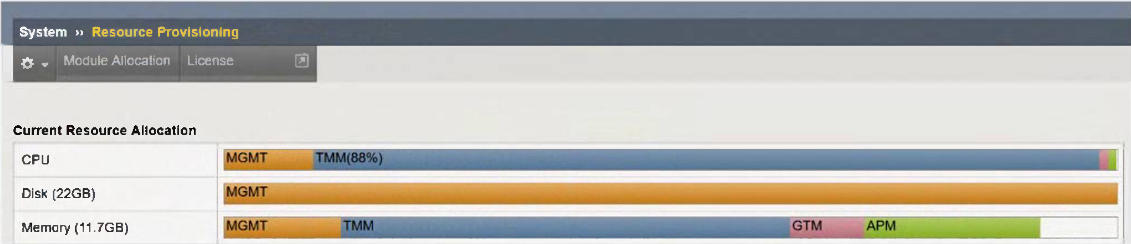
The exhibit displays the current resource allocation from the System Resource Provisioning page.
Based on the information provided, which F5 modules have been provisioned?
Answer : C
The exhibit shows the Current Resource Allocation for:
CPU
Disk
Memory
In particular, the Memory Allocation bar displays the modules that are currently provisioned.
Memory is the most reliable indicator because BIG-IP allocates memory only to modules that are actively provisioned.
From the exhibit:
MGMT (Management) -- always present
TMM (Traffic Management Microkernel) -- indicates LTM is provisioned
GTM -- this label indicates that the DNS module is provisioned (GTM = Global Traffic Manager, now called DNS)
APM -- explicitly shown, indicating Access Policy Manager is provisioned
Therefore, the provisioned modules are:
LTM (implied by TMM allocation)
DNS/GTM
APM
This matches Option C: LTM, DNS, APM.
A BIG-IP Administrator upgrades the BIG-IP LTM to a newer software version. After the administrator reboots into the new volume, the configuration fails to load.
Why is the configuration failing to load?
Answer : B
When upgrading to a newer TMOS software version, BIG-IP validates whether the current license is permitted to run that version.
This is controlled by the Service Check Date in the device's license file.
If the Service Check Date is older than the minimum required for the target version:
The system boots into the new volume,
But fails to load the configuration,
And will instead present messages indicating that the configuration cannot be applied due to an invalid or outdated license.
This is a well-known behavior:
An outdated license, not reactivated before upgrade, causes configuration load failure after reboot into the new software.
Why the other options are incorrect:
A . Performed on the standby unit
Upgrading a standby unit does not cause configuration load failure.
Standby-only upgrades are standard best practice.
C . Two reboots required
BIG-IP does not require two reboots during an upgrade.
One reboot into the new volume is sufficient.
D . DNS connectivity failure
DNS connectivity does not affect configuration loading.
DNS is only needed for automatic license activation, not for applying config at boot.
Thus, the configuration failed to load because the license was not reactivated before the upgrade, making Option B correct.
A BIG-IP Administrator is using Secure Copy Protocol (SCP) to transfer a TMOS image to the BIG-IP system in preparation for an upgrade.
To what directory should the file be transferred?
Answer : A
BIG-IP systems require all ISO images (base TMOS images and HotFix images) to be stored in a specific directory used for software installation:
/shared/images/
This directory:
Is the only supported location from which the BIG-IP software installation system validates and installs ISO files
Is accessible by both the GUI and TMSH installers
Has adequate storage space allocated specifically for images
Is part of the shared partition that persists across reboots
When transferring images via SCP, the administrator must copy them directly into /shared/images/ so that:
The GUI (System Software Management Available Images) can detect the image
TMSH install software image commands can reference it
Other directories such as /local/images/ or /var/images/ are not valid storage paths for software images.
modification]
When is the License Service Check Date enforced on a BIG-IP system?
Answer : B
The Service Check Date determines whether a particular software version is allowed to run under the device's license.
When installing or upgrading TMOS, the installer checks the Service Check Date stored in the BIG-IP license file.
If the license date is older than the minimum required for the target version, the software installation is blocked.
This check happens specifically during a software install, not during routine device operations.
Editing virtual servers or system startup do not trigger this validation.
Thus, the enforcement happens during software installation.