F5 Networks - Big Savings Alert – Don’t Miss This Deal - Ends In 1d 00h 00m 00s Coupon code: 26Y30OFF
  1. Home
  2. F5 Networks
  3. F5CAB5 Exam
  4. Free F5CAB5 Questions

Free Practice Questions for F5 Networks F5CAB5 Exam

Pass4Future also provide interactive practice exam software for preparing F5 Networks BIG-IP Administration Support and Troubleshooting (F5CAB5) Exam effectively. You are welcome to explore sample free F5 Networks F5CAB5 Exam questions below and also try F5 Networks F5CAB5 Exam practice test software.

Page:    1 / 14   
Total 65 questions

Question 1

A BIG-IP device sends out the following SNMP trap: big-ipo.f5.com - bigipExternalLinkChange Link: 1.0 is DOWN. Where in the BIG-IP Configuration utility should the BIG-IP Administrator verify the current status of Link 1.0?


Answer : D

Comprehensive and Detailed Explanation From BIG-IP Administration Support and Troubleshooting documents: Identifying network-level performance issues often starts with investigating hardware-level alerts78. In F5 terminology, a 'Link' like '1.0' or '1.1' refers to a physical interface on the appliance79. When an SNMP trap reports that a link is 'DOWN,' it indicates a loss of signal or an administrative shutdown of the physical port80. To verify this, the administrator must navigate to Network > Interfaces > Interface List81. This screen provides real-time status, showing whether the interface is 'up,' 'down,' or 'uninitialized,' as well as any media speed or duplex mismatches that could be causing performance degradation82. Troubleshooting this is the first step in resolving 'pool member down' or 'VLAN failsafe' issues, as a down interface will take down any VLANs associated with it, immediately halting all traffic flow for the services relying on that physical path.


Question 2

A Standard Virtual Server for a web application is configured with Automap for the Source Address Translation option. The original source address of the client must be known by the backend servers. What should the BIG-IP Administrator configure to meet this requirement?


Answer : B

In complex network environments, 'SNAT Automap' is frequently used to ensure that backend servers send return traffic through the BIG-IP. However, SNAT hides the original client's IP address, replacing it with the BIG-IP's self-IP. When interpreting traffic flow for security or logging purposes, backend servers often need that original IP. To resolve this without breaking the network-layer routing provided by SNAT, the administrator should apply an HTTP profile to the virtual server and enable the 'Insert X-Forwarded-For' option. When this is enabled, the BIG-IP inserts a standard HTTP header containing the client's original IP address before forwarding the request to the pool member. This troubleshooting method allows the backend application to log the actual user's identity while maintaining a functional L3/L4 traffic flow where the server responds to the BIG-IP's local address. This is a standard troubleshooting solution for 'web server not working as expected' scenarios where applica8tion logic depends on knowing the geography or specific identity of the connecting user.


Question 3

A BIG-IP Administrator needs to determine why only one pool member is showing connections from the virtual server, resulting in uneven load balancing.

What two reasons would cause uneven load balancing? (Choose two answers)


Answer : B, C

Uneven load balancing on a BIG-IP system typically occurs when traffic is not distributed evenly across all available pool members. One common reason is that monitors have marked down multiple pool members (Option B). When health monitors fail for specific pool members, BIG-IP automatically removes those members from load-balancing decisions. As a result, traffic is sent only to the remaining healthy member, creating the appearance that load balancing is not functioning correctly. This behavior is expected and aligns with BIG-IP's design to ensure traffic is sent only to healthy resources.

Another frequent cause is the presence of a persistence profile on the pool or virtual server (Option C). Persistence (such as source address or cookie persistence) forces subsequent client connections to be sent to the same pool member for session continuity. While persistence is critical for certain applications, it can override the load-balancing algorithm and cause most or all traffic to be directed to a single pool member, especially during low traffic volumes or testing scenarios.

The other options are incorrect because a virtual server marked down (Option A) would not pass traffic at all, and all pool members marked down (Option D) would result in no connections rather than uneven distribution. This analysis follows standard BIG-IP troubleshooting methodology using pool status, monitor results, and persistence configuration review.


Question 4

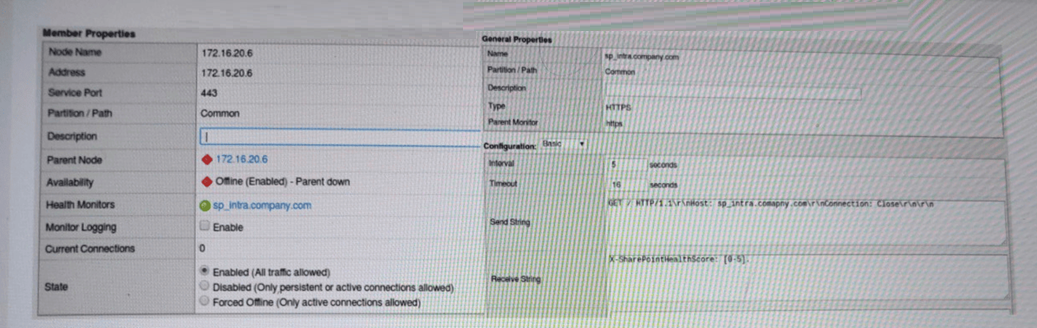
A BIG-IP Administrator notices that one of the servers that runs an application is NOT receiving any traffic. The BIG-IP Administrator examines the configuration status of the application and observes the displayed monitor configuration and affected pool member status.

What is the possible cause of this issue? (Choose one answer)


Answer : A

The key clue in the exhibit is the pool member's availability showing ''Offline (Enabled) -- Parent down''. In BIG-IP terminology, a pool member inherits the status of its parent node. If the node is marked down (for example, by a node-level monitor or a default ''node is down'' condition), then all pool members using that node IP will also be marked down and will not receive any traffic, even if the application service on the member port might be healthy.

While the HTTPS monitor configuration (send/receive strings) is displayed, the status specifically indicates a node (parent) failure, not a service-level failure. If the problem were the application not matching the receive string, you would typically see the member down due to the member's monitor failing (and the status would reflect monitor failure details), rather than ''parent down.''

Option D is too broad; BIG-IP can generally reach the subnet (other servers work), and this symptom points to a specific node condition. Option C is incorrect because HTTP/1.1 is commonly used for monitoring and is valid when properly formatted (especially with a Host header). Therefore, the most likely cause is that the node health monitor is not responding, causing the node---and consequently the member---to be marked down.


Question 5

A BIG-IP Administrator observes the following pool member status message:

Pool /Common/testpool member /Common/10.120.0.5:8090 monitor status down

[/Common/http: up, /Common/http2: down; last error:]

Why is this pool member being marked down? (Choose one answer)


Answer : A

The pool member is marked DOWN because it is monitored by multiple health monitors, specifically an HTTP monitor and an HTTP/2 monitor. The status message clearly shows that the HTTP monitor is UP, while the HTTP/2 monitor is DOWN. In BIG-IP, when multiple monitors are assigned to a pool member, the default behavior is AND logic, meaning all assigned monitors must succeed for the pool member to be considered healthy.

In this scenario, the server is responding successfully to standard HTTP (likely HTTP/1.1) requests but does not support or respond correctly to HTTP/2 requests. As a result, the HTTP/2 monitor fails, which causes the overall monitor status to be DOWN, even though HTTP traffic itself is working.

This behavior is expected and documented in BIG-IP monitoring logic. Unless the monitor rule is explicitly changed to ''at least one of'', a single failing monitor will mark the pool member down. Therefore, the correct conclusion is that the pool member is only serving HTTP traffic, not HTTP/2.

The resolution would be to either remove the HTTP/2 monitor, correct the application to support HTTP/2, or adjust the monitor rule to match the intended health-check logic.


Page:    1 / 14   
Total 65 questions