Pass4Future also provide interactive practice exam software for preparing Fortinet NSE 5 - FortiSIEM 6.3 (NSE5_FSM-6.3) Exam effectively. You are welcome to explore sample free Fortinet NSE5_FSM-6.3 Exam questions below and also try Fortinet NSE5_FSM-6.3 Exam practice test software.
Do you know that you can access more real Fortinet NSE5_FSM-6.3 exam questions via Premium Access? ()
Which FortiSIEM feature must you use to produce a report on which FortiGate devices in your environment are running which firmware version?
Answer : B
Feature Overview: FortiSIEM provides several tools for querying and reporting on device information within an environment.
Inventory Tab: The Inventory tab is specifically designed to display detailed information about devices, including their firmware versions.
Query Functionality: Within the Inventory tab, you can run queries to filter and display devices based on specific attributes, such as the firmware version for FortiGate devices.
Report Generation: By running a query in the Inventory tab, you can produce a report that lists the FortiGate devices and their corresponding firmware versions.
Reference: FortiSIEM 6.3 User Guide, Inventory Management section, explains how to use the Inventory tab to query and report on device attributes.
If an incident's status is Cleared, what does this mean?
Answer : B
Incident Status in FortiSIEM: The status of an incident indicates its current state and helps administrators track and manage incidents effectively.
Cleared Status: When an incident's status is 'Cleared,' it means that a specific condition set to clear the incident has been satisfied.
Clear Condition: This is typically a predefined condition that indicates the issue causing the incident has been resolved or no longer exists.
Automatic vs. Manual Clearance: While some incidents may be cleared automatically based on clear conditions, others might be manually cleared by an operator.
Reference: FortiSIEM 6.3 User Guide, Incident Management section, detailing the various incident statuses and the conditions that lead to an incident being marked as 'Cleared.'
Refer to the exhibit.

A FortiSIEM is continuously receiving syslog events from a FortiGate firewall The FortiSlfcM administrator is trying to search the raw event logs for the last two hours that contain the keyword tcp . However, the administrator is getting no results from the search.
Based on the selected filters shown in the exhibit, why are there no search results?
Answer : A
Case Sensitivity in Searches: In FortiSIEM, search queries, including those for raw event logs, are case sensitive. This means that keywords must be entered exactly as they appear in the logs.
Keyword Mismatch: The exhibit shows the keyword 'TCP' in the Value field. If the actual events use 'tcp' (lowercase), the search will return no results because of the case mismatch.
Correct Keyword: To match the keyword correctly, the administrator should enter 'tcp' in the Value field.
Reference: FortiSIEM 6.3 User Guide, Search and Filtering section, which discusses the importance of case sensitivity in search queries.
Which FortiSIEM components are capable of performing device discovery?
Answer : D
Device Discovery in FortiSIEM: Device discovery is the process by which FortiSIEM identifies and adds devices to its management scope.
Role of Collectors: Collectors are responsible for gathering data from network devices, including discovering new devices in the network.
Functionality: Collectors use protocols such as SNMP, WMI, and others to discover devices and gather their details.
Capability: While agents (Windows and Linux) primarily gather data from their host systems, the collectors actively discover devices across the network.
Reference: FortiSIEM 6.3 User Guide, Device Discovery section, which details the role of collectors in discovering network devices.
Refer to the exhibit.

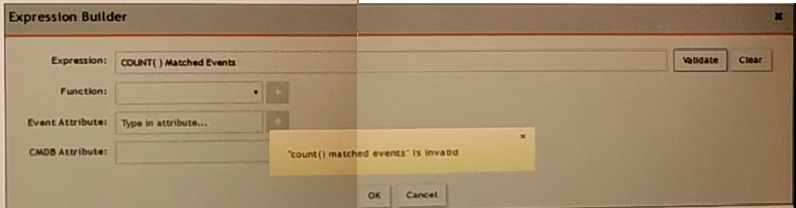
An administrator is trying to identify an issue using an expression bated on the Expression Builder settings shown in the exhibit however, the error message shown in the exhibit indicates that the expression is invalid.
Which is the correct expression?
Answer : C
Expression Builder in FortiSIEM: The Expression Builder is used to create expressions for analyzing event data.
Correct Syntax: The correct syntax for counting matched events is COUNT(Matched Events).
Function: COUNT is a function that takes a parameter, in this case, 'Matched Events,' to count the number of occurrences.
Common Errors: Incorrect syntax, such as reversing the order or using parentheses improperly, can lead to invalid expressions.
Reference: FortiSIEM 6.3 User Guide, Expression Builder section, which explains the correct syntax and usage for creating valid expressions for event analysis.