Pass4Future also provide interactive practice exam software for preparing Fortinet NSE 5 - FortiSwitch 7.6 Administrator (NSE5_FSW_AD-7.6) Exam effectively. You are welcome to explore sample free Fortinet NSE5_FSW_AD-7.6 Exam questions below and also try Fortinet NSE5_FSW_AD-7.6 Exam practice test software.
Do you know that you can access more real Fortinet NSE5_FSW_AD-7.6 exam questions via Premium Access? ()
Refer to the exhibit.

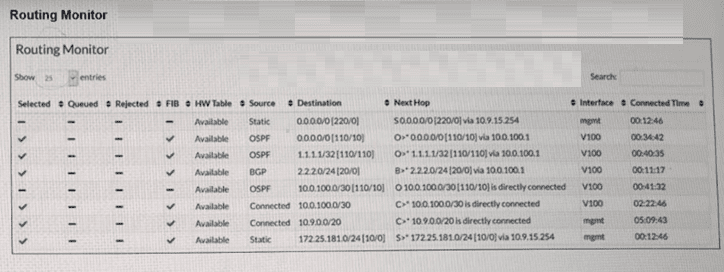
Two routes in the routing monitor are marked as available but are not installed in the forwarding information base (FIB). Which statement correctly explains why the routes have this status? (Choose one answer)
Answer : A
According to theFortiSwitchOS 7.6 Administration Guideand theFortiSwitch 7.6 Study Guide, the Routing Monitor provides a comprehensive view of the Routing Information Base (RIB), which includes all routes learned via static configuration or dynamic protocols (OSPF, BGP, etc.). However, not every route present in the RIB is active for traffic forwarding. The switch must select the 'best' path for any given destination to be installed into theForwarding Information Base (FIB).
The provided exhibit shows a routing table with multiple sources for the same destination. Specifically, there is aStaticdefault route ($0.0.0.0/0$) with an administrative distance of 220, and anOSPFdefault route ($0.0.0.0/0$) with an administrative distance of 110. In FortiSwitchOS routing logic, when multiple routes to the exact same destination exist, the system compares theirAdministrative Distance (AD). The route with the lowest AD is considered the most 'preferred' or 'trustworthy'.
In this case, the OSPF route ($AD 110$) is more preferred than the Static route ($AD 220$). Consequently, the OSPF route is marked with a green checkmark in theFIBcolumn, while the Static route---despite being 'Available' in the RIB---is excluded from the FIB. The same logic applies to the $10.0.100.0/30$ subnet, where theConnectedroute is preferred over the OSPF learned route for the same destination. Therefore, the status reflects standard route selection behavior where less-preferred routes remain in the RIB as backups but are not used for active forwarding.
Refer to the exhibit.

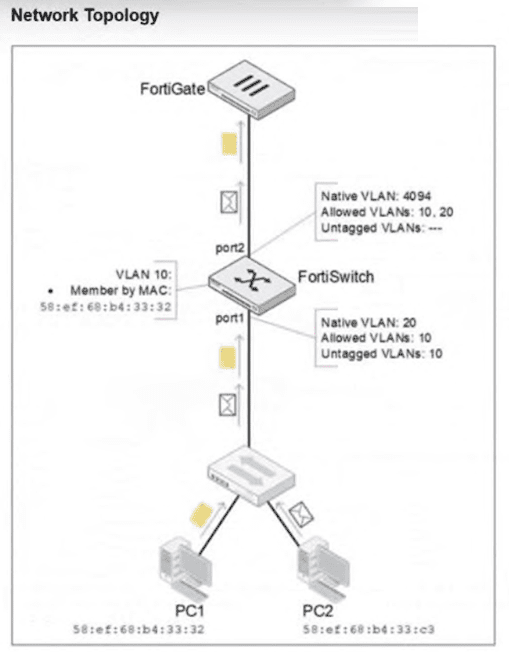
PC1 and PC2 are connected to port1 on FortiSwitch. Which VLAN tags will FortiSwitch apply when forwarding PC1 and PC2 traffic out of port2? (Choose one answer)
Answer : C
According to theFortiSwitchOS 7.6 Administration Guideand theFortiSwitch 7.6 Study Guide, the classification of untagged traffic entering a switch port is determined by the port's hierarchy of VLAN assignment rules.
For the traffic arriving atport1:
PC1 (MAC 58:ef:68:b4:33:32):The exhibit shows an explicitMAC-based VLAN assignmentrule for this specific MAC address, placing it intoVLAN 10. In FortiSwitchOS, dynamic assignments like MAC-based or protocol-based rules take precedence over the port's static native VLAN. Therefore, PC1's traffic is internally associated with VLAN 10.
PC2 (MAC 58:ef:68:b4:33:c3):There is no MAC-based rule for this device. As a result, the switch falls back to the default behavior and assigns the traffic to the port'sNative VLAN, which isVLAN 20.
For the traffic exiting port2:
The egress behavior depends on the VLAN tagging configuration of the outgoing interface. On port2, the Native VLAN is 4094, and VLANs 10 and 20 are listed as Allowed VLANs. According to Fortinet documentation, any traffic belonging to an allowed VLAN that does not match the native VLAN ID of the egress port must be sent as tagged 802.1Q frames. Since neither VLAN 10 nor VLAN 20 matches the native ID of 4094, the FortiSwitch will apply a VLAN 10 tag to PC1's traffic and a VLAN 20 tag to PC2's traffic as they are forwarded to the FortiGate.
(Full question statement start from here)
Refer to the exhibit.


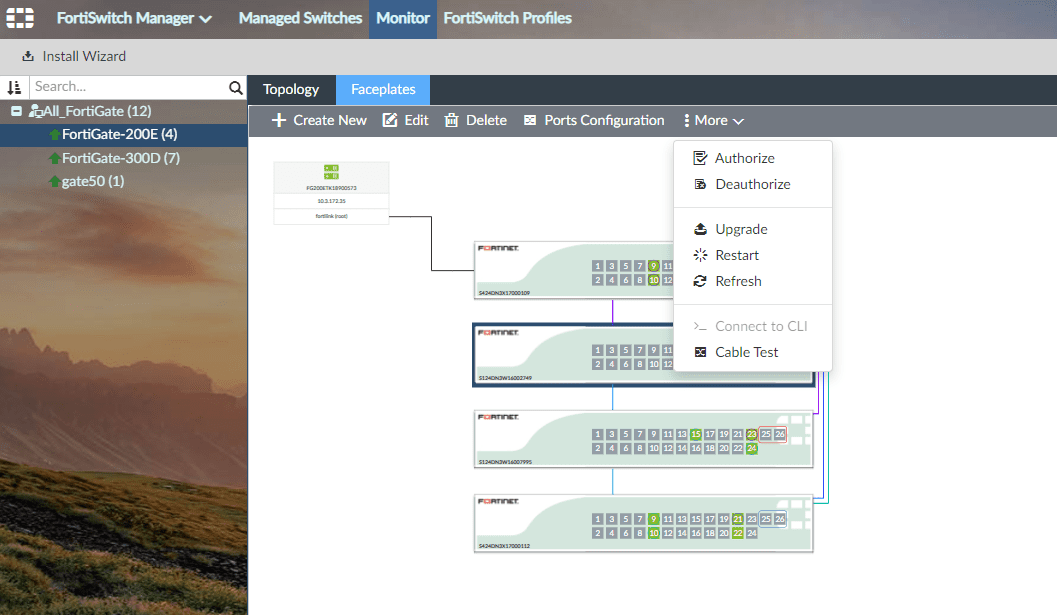
Which information does FortiGate use to generate the port details in the FortiSwitch Faceplates view? (Choose one answer)
Answer : C
In a FortiLink-managed switching architecture, the FortiGate firewall acts as the centralized controller for downstream FortiSwitch devices. TheFortiSwitch Faceplatesview in the FortiGate GUI provides a physical-style representation of switch ports, including port numbers, operational status, link state, speed, duplex, and connected neighbor information. According to FortiOS 7.6 and FortiSwitchOS 7.6 documentation fromFortinet, this port-level intelligence is derived fromLink Layer Discovery Protocol (LLDP)advertisements received from the FortiSwitch.
LLDP is an IEEE 802.1AB standard protocol used for vendor-neutral Layer 2 neighbor discovery. FortiSwitch periodically sends LLDP frames that include detailed port descriptors such as chassis ID, port ID, port description, system name, system capabilities, and VLAN-related attributes. When FortiGate receives these LLDP advertisements over the FortiLink interface, it correlates the information with the managed FortiSwitch inventory and renders accurate port details in the Faceplates view.
Other options are incorrect for the following reasons. The FortiSwitch model alone is insufficient to populate per-port operational details. Cisco Discovery Protocol (CDP) is a Cisco-proprietary protocol and is not used by FortiGate for Faceplates visualization. FortiLink discovery frames are used to establish and maintain the FortiLink management relationship, but they do not carry the granular per-port metadata required for the Faceplates display.
Therefore, the Faceplates view relies specifically onLLDP advertisements received from the FortiSwitch, making optionCthe correct and fully verified answer based on FortiOS 7.6 and FortiSwitchOS 7.6 behavior.
(Full question statement start from here)
How does enabling an IGMP snooping proxy on FortiSwitch help reduce the number of IGMP reports processed by the IGMP querier? (Choose one answer)
Answer : D
In FortiSwitchOS 7.6,IGMP snooping proxyis an enhancement to standard IGMP snooping that optimizes multicast control-plane traffic between hosts, switches, and the upstream IGMP querier. Its primary purpose is toreduce the number of IGMP membership reportsthat the querier must process, thereby improving scalability and efficiency in multicast-enabled networks.
Without an IGMP snooping proxy, every multicast receiver on a VLAN independently sends IGMP membership reports to the querier. In environments with many hosts subscribing to the same multicast groups, this behavior can generate a large volume of redundant IGMP reports, unnecessarily increasing control-plane load on both the querier and intermediate network devices.
When the IGMP snooping proxy feature is enabled, the FortiSwitch acts as anIGMP proxy agenton behalf of hosts within the VLAN. The switch tracks multicast group membership locally andsuppresses individual IGMP reports from downstream hosts. Instead, the FortiSwitch forwards an IGMP report upstreamonly when the first host joins a multicast group. Likewise, when hosts leave the group, the switch sends an IGMP leave message or reportonly when the last remaining member leaves.
This aggregation mechanism dramatically reduces IGMP signaling traffic while preserving correct multicast forwarding behavior. Importantly, the switch does not alter IGMP packet types or convert them to broadcast or unicast traffic. It simply optimizes reporting behavior based on group membership state.
Therefore, the correct explanation is that IGMP snooping proxy reduces IGMP report processingby forwarding IGMP reports only when the first member joins and the last member leaves, makingOption Dthe correct and fully verified answer according to FortiSwitchOS 7.6 documentation.
You are managing FortiSwitch ports from a FortiGate device with multiple VDOMs. Which two methods can you use to assign FortiSwitch ports to VDOMs? (Choose two answers)
Answer : A, D
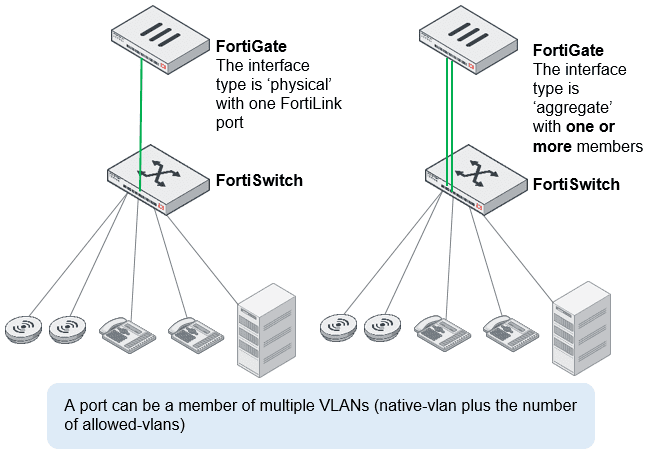
According to theFortiOS 7.6 Administration Guideand theFortiSwitch 7.6 FortiLink Guide, managing FortiSwitch units in a multi-VDOM environment allows for granular control over physical switch resources. By default, when a FortiSwitch is discovered and authorized via FortiLink, its ports reside in the same VDOM as the FortiLink interface (typically the root or a dedicated management VDOM).
To allocate these ports to other VDOMs, administrators have two primary methods. The first method isdirect assignment(Option A). Using the FortiGate CLI or GUI, an administrator can export a specific physical port directly to a target VDOM. For example, the command set export-to <VDOM_name> under the config switch-controller managed-switch port settings physically isolates that port for use only by the specified VDOM. This is ideal for multi-tenant scenarios where a specific physical connection must be dedicated to a single business unit.
The second method involves using aVirtual Port Pool (VPP)(Option D). This method provides a layer of virtualization for switch ports. An administrator first creates a pool (VPP) in the management VDOM and assigns physical ports to it. Then, from the tenant VDOM, an administrator can 'request' a port from that specific pool. This allows for a more flexible 'shared' infrastructure where ports are not permanently tethered to a single VDOM until they are claimed from the pool. Both methods ensure that traffic remains logically and physically isolated between VDOMs, supporting the security requirements of complex enterprise deployments. Options B and C are incorrect as they relate to traffic routing and device identification rather than the foundational assignment of hardware ports to virtual domains.