Pass4Future also provide interactive practice exam software for preparing Fortinet NSE 5 - FortiWeb 8.0 Administrator (NSE5_FWB_AD-8.0) Exam effectively. You are welcome to explore sample free Fortinet NSE5_FWB_AD-8.0 Exam questions below and also try Fortinet NSE5_FWB_AD-8.0 Exam practice test software.
Do you know that you can access more real Fortinet NSE5_FWB_AD-8.0 exam questions via Premium Access? ()
You need to monitor and respond to repeated suspicious activity from individual users who are accessing your web application.
Your goal is to evaluate each action the user takes and apply a response when their behavior becomes risky.
What can you configure on FortiWeb to track user behavior and respond automatically when risky activity continues?
Answer : D
The requirement is to track user behavior over time and respond when cumulative activity becomes risky. FortiWeb client management and threat scoring are built for that purpose. When enabled in the protection profile, FortiWeb can associate activity with a client, assign threat weights to suspicious behavior, and apply actions such as alerting, denying, or period blocking after a defined score threshold is exceeded. Rate limiting is useful for traffic volume, but it does not evaluate a user's full behavior pattern. A custom signature blocks a specific pattern immediately, not cumulative behavior. Cookie security protects session cookies but does not calculate behavioral risk. The correct configuration is scoring in the protection profile to track and respond to repeated risky actions.
================
Refer to the exhibits.


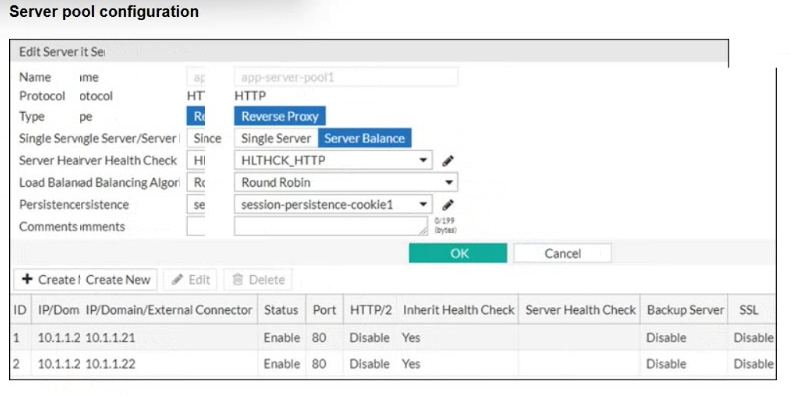
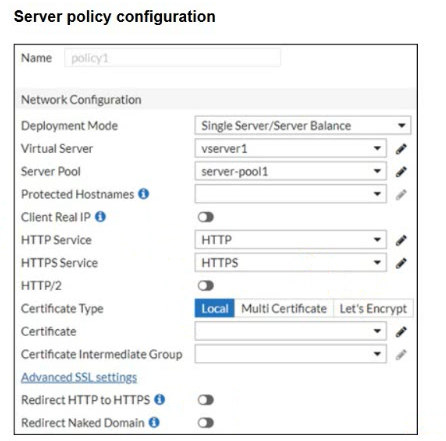
You are configuring a FortiWeb device in reverse proxy mode, placed downstream from a FortiGate. The server pool includes two back-end web servers: 10.1.1.21 and 10.1.1.22, and you've defined a health check policy.
After completing the server policy configuration and applying it to a virtual server, you notice that FortiWeb is not forwarding traffic to the back-end servers. No errors or health check failures appear in the logs.
Based on the configuration shown in the exhibit, which change should you make to restore back-end traffic flow?
Answer : A
The exhibits show a mismatch between the configured server pool and the server pool referenced by the server policy. The server pool containing the two back-end servers is named app-server-pool1, but the server policy is selecting server-pool1. In reverse proxy mode, FortiWeb receives traffic on the virtual server and then forwards it to the server pool selected in the server policy. If the policy points to the wrong or empty pool, traffic will not be forwarded to the intended back-end servers, even if health checks for the correct pool are healthy. Client Real IP affects source IP preservation, not pool selection. The FortiGate should forward traffic to FortiWeb, not directly bypass it. The correct fix is to select the correct server pool.
================
Which URL should you rewrite to reduce security risk?
Answer : D
The URL https://www.example.com/25.3.6/Browse/MediaData exposes internal application structure and what appears to be a version number. Revealing version information, framework paths, or internal directory names gives attackers useful reconnaissance data. Attackers can correlate exposed versions with known vulnerabilities and target the application more precisely. FortiWeb URL rewriting can reduce this risk by hiding or transforming sensitive internal URLs before users or scanners see them. The other URLs are normal-looking public paths or common application resources. A WordPress RSS feed may or may not be appropriate depending on business requirements, but it does not clearly expose internal versioned routing in the same way. The risky URL is the one containing 25.3.6/Browse/MediaData.
================
Refer to the exhibit.


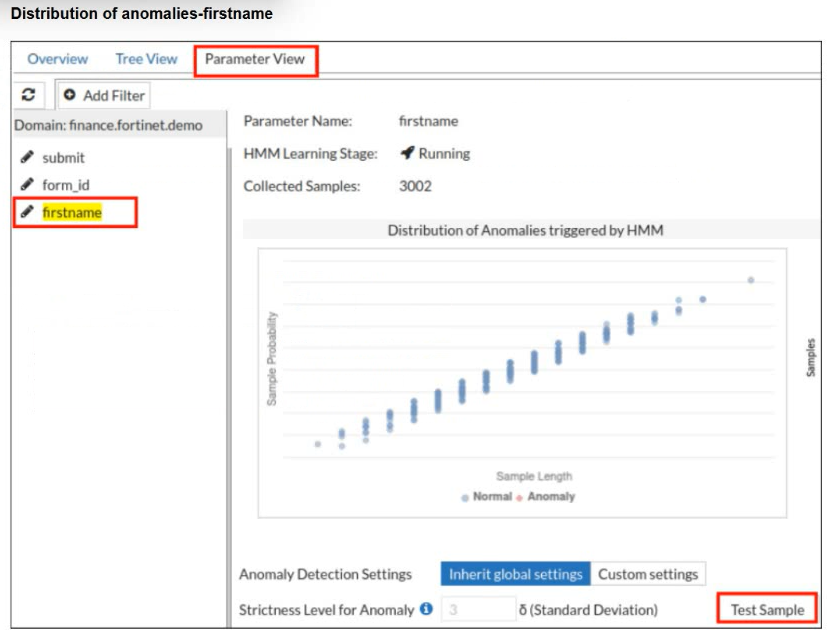
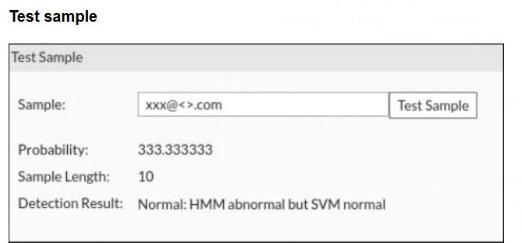
A FortiWeb administrator tests a new form input value after training the machine learning (ML) anomaly detection system.
The hidden Markov model (HMM) flags the input as abnormal, while the support vector machine (SVM) model classifies it as normal. FortiWeb allows the request.
What does this result indicate about the FortiWeb ML anomaly detection behavior?
Answer : C
FortiWeb machine learning uses layered detection rather than treating every unusual value as malicious. The HMM layer models normal parameter behavior and can flag a value as abnormal when it falls outside the learned distribution. However, abnormal does not automatically mean hostile. FortiWeb then uses additional ML classification logic, including SVM-based evaluation, to determine whether the anomaly resembles an actual attack or simply a legitimate unusual input. In this case, HMM noticed that the value was uncommon, but SVM classified it as normal, so FortiWeb allowed the request. That is expected behavior. Raising thresholds, disabling models, or assuming FortiWeb failed would misunderstand the two-stage ML decision process.
================
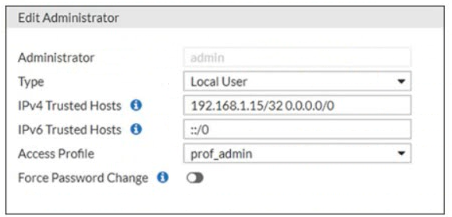
Refer to the exhibit.

There is only one administrator account configured on FortiWeb and IPv6 is not configured on any interface.
Which action should an administrator take to restrict any brute force attacks that attempt to gain access to the FortiWeb management GUI?
Answer : B
The exhibit shows the administrator account using IPv4 trusted hosts with a broad entry that effectively allows management access attempts from any IPv4 source. To reduce brute force exposure against the FortiWeb GUI, the administrator should restrict the trusted host entry to a specific trusted management IP address or subnet. FortiWeb administrator accounts can be limited by trusted host settings, so only defined source addresses can even attempt to authenticate. Changing the upstream device may help, but FortiWeb should still enforce its own management access restriction. Deleting the built-in administrator account does not solve the source-access problem. Changing the access profile to read-only only limits privileges after login; it does not prevent brute force attempts against the GUI.
================