Pass4Future also provide interactive practice exam software for preparing Fortinet NSE 5 - FortiSASE and SD-WAN 7.6 Core Administrator (NSE5_SSE_AD-7.6) Exam effectively. You are welcome to explore sample free Fortinet NSE5_SSE_AD-7.6 Exam questions below and also try Fortinet NSE5_SSE_AD-7.6 Exam practice test software.
Do you know that you can access more real Fortinet NSE5_SSE_AD-7.6 exam questions via Premium Access? ()
Which statement about security posture tags in FortiSASE is correct?
Answer : B
According to the FortiSASE 7.6 Administration Guide and FCP - FortiSASE 24/25 Administrator curriculum, security posture tags (often referred to as ZTNA tags) are the fundamental building blocks for identity-based and posture-based access control.
Multiple Tag Assignment: A single endpoint can be assigned multiple tags at the same time. For example, an endpoint might simultaneously have the tags 'OS-Windows-11', 'AV-Running', and 'Corporate-Domain-Joined'.
Evaluation Logic: During the policy evaluation process (for both SIA and SPA), FortiSASE or the FortiGate hub considers all tags assigned to the endpoint. Security policies can be configured to use these tags as source criteria. If an administrator defines a policy that requires both 'AV-Running' and 'Corporate-Domain-Joined,' the system evaluates both tags to decide whether to permit the traffic.
Dynamic Nature: Contrary to Option C, these tags are highly dynamic. They are automatically applied or removed in real-time based on the telemetry data sent by the FortiClient to the SASE cloud. If a user disables their antivirus, the 'AV-Running' tag is removed immediately, and the endpoint's access is revoked by the next policy evaluation.
Scalability: While the system supports many tags, documentation recommends a baseline of custom tags for optimal performance, though it confirms that multiple tags are standard for reflecting a comprehensive security posture.
Why other options are incorrect:
Option A: This is incorrect because the system does not pick just one tag; it evaluates the collection of tags against the policy's requirements (e.g., matching any or matching all).
Option C: This is incorrect because tags are dynamic and change as soon as the endpoint's status (like vulnerability count or software presence) changes.
Option D: This is incorrect because the architectural advantage of ZTNA is the ability to layer multiple security 'checks' (tags) for a single user.
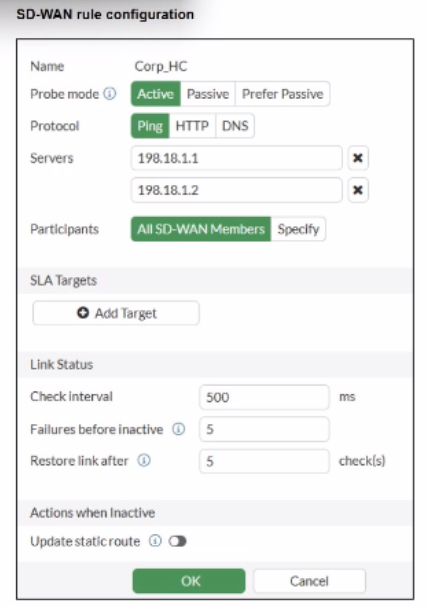
Refer to the exhibit.

You want the performance service-level agreement (SLA) to measure the jitter of each member. Which configuration change must you make to achieve this result?
Answer : A
According to the SD-WAN 7.6 Core Administrator study guide and FortiOS 7.6 Administration Guide, no configuration change is required to simply measure jitter.
Implicit Measurement: In FortiOS, once a Performance SLA (Health Check) is configured with an Active probe mode (as seen in the exhibit with Ping selected), the FortiGate automatically begins calculating three key quality metrics for every member interface: Latency, Jitter, and Packet Loss.
Visibility: Even without an SLA Target defined, these real-time measurements are visible in the SD-WAN Monitor and via the CLI command diagnose sys virtual-wan-link health-check <SLA_Name>.
Active Probes: Because the probe mode is set to Active using the Ping protocol, the FortiGate sends synthetic packets at the defined Check interval (500ms in the exhibit). It calculates jitter by measuring the variation in the round-trip time (RTT) between these consecutive probes.
Why other options are incorrect:
Option B: Adding an SLA target and defining a jitter threshold is only necessary if you want the SD-WAN engine to make steering decisions based on that metric (e.g., 'remove this link from the pool if jitter exceeds 50ms'). It is not required just to measure the jitter.
Option C: While you can specify participants, the current setting is 'All SD-WAN Members,' which means it is already measuring jitter for every member.
Option D: HTTP is an alternative probe protocol, but Ping (ICMP) is perfectly capable of measuring jitter and is often preferred for its lower overhead.
You are configuring SD-WAN to load balance network traffic. Which two facts should you consider when setting up SD-WAN? (Choose two.)
Answer : A, D
According to the SD-WAN 7.6 Core Administrator study guide and the FortiOS 7.6 Administration Guide, configuring load balancing within SD-WAN rules requires an understanding of how the engine selects and distributes sessions across multiple links.
SLA Target Logic (Option A): In FortiOS 7.6, the Lowest Cost (SLA) strategy has been enhanced. When the load-balance option is enabled for this strategy, the FortiGate does not just pick a single 'best' link; it identifies all member interfaces that currently meet the configured SLA target (e.g., latency < 100ms). It then load balances the traffic across all those healthy links to maximize resource utilization.
Hash Modes (Option D): When an SD-WAN rule is configured for load balancing (valid for Manual and Lowest Cost (SLA) strategies in 7.6), the administrator must define a hash mode to determine how sessions are distributed. While 'outsessions' in the question is a common exam-variant typo for outbandwidth (or sessions-based hashing), the core principle remains: you can select the specific load-balancing algorithm (e.g., source-ip, round-robin, or bandwidth-based) for all strategies where load-balancing is enabled.
Why other options are incorrect:
Option B and C: These options are too restrictive. In FortiOS 7.6, load balancing is not limited to only 'manual and best quality' or 'manual and lowest cost' in a singular way. The documentation highlights that Manual and Lowest Cost (SLA) are the primary strategies that support the explicit load-balance toggle to steer traffic through multiple healthy members simultaneously.
An existing Fortinet SD-WAN customer who has recently deployed FortiSASE wants to have a comprehensive view of, and combined reports for, both SD-WAN branches and remote users. How can the customer achieve this?
Answer : C
For customers with hybrid environments (on-premises SD-WAN branches and remote FortiSASE users), the FortiOS 7.6 and FortiSASE curriculum recommends centralized log aggregation for unified visibility.
Centralized Reporting: The standard architectural best practice is to forward logs from FortiSASE to an external FortiAnalyzer (Option C).
Unified View: Since the customer's on-premises FortiGate SD-WAN branches are already sending logs to an existing FortiAnalyzer, adding the FortiSASE log stream to that same FortiAnalyzer allows for the creation of combined reports.
Fabric Integration: This setup leverages the Security Fabric, enabling the FortiAnalyzer to provide a single pane of glass for monitoring security events, application usage, and SD-WAN performance metrics across the entire distributed network.
Why other options are incorrect:
Option A: SOCaaS is a managed service for threat monitoring, not a primary tool for an administrator to generate combined SD-WAN/SASE operational reports.
Option B: FortiSASE is not designed to act as a log collector or reporting hub for external on-premises FortiGates.
Option D: Data flows from the source (FortiSASE) to the collector (FortiAnalyzer), not the other way around.
You want FortiGate to use SD-WAN rules to steer ping local-out traffic. Which two constraints should you consider? (Choose two.)
Answer : A, B
In the SD-WAN 7.6 Core Administrator curriculum, steering 'local-out' traffic (traffic generated by the FortiGate itself, such as DNS queries, FortiGuard updates, or diagnostic pings) requires specific configuration because this traffic follows a different path than 'forward' traffic.
Individual Configuration (Option A): By default, local-out traffic bypasses the SD-WAN engine and uses the standard system routing table (RIB/FIB). To use SD-WAN rules for specific features like DNS or RADIUS, you must individually enable the sdwan interface-select-method within that feature's configuration (e.g., config system dns or config user radius).
Default Steerable Traffic (Option B): In FortiOS 7.6, while most local-out traffic is excluded from SD-WAN by default, the system is designed so that when SD-WAN is active, it primarily considers SD-WAN rules for specific diagnostic local-out traffic---specifically ping and traceroute---to allow administrators to verify path quality using the same logic as user traffic.
Why other options are incorrect:
Option C: Local-out traffic can be steered using any SD-WAN strategy (Manual, Best Quality, etc.), provided the interface-selection-method is set to sdwan.