Pass4Future also provide interactive practice exam software for preparing Fortinet NSE 6 - FortiNAC-F 7.6 Administrator (NSE6_FNC_AD-7.6) Exam effectively. You are welcome to explore sample free Fortinet NSE6_FNC_AD-7.6 Exam questions below and also try Fortinet NSE6_FNC_AD-7.6 Exam practice test software.
Do you know that you can access more real Fortinet NSE6_FNC_AD-7.6 exam questions via Premium Access? ()
While deploying FortiNAC-F devices in a 1+1 HA configuration, the administrator has chosen to use the shared IP address option.
Which condition must be met for this type of deployment?
Answer : C
In a1+1 High Availability (HA)deployment, FortiNAC-F supports two primary methods for management access: individual IP addresses or aShared IP Address(also known as a Virtual IP or VIP). The Shared IP option is part of aLayer 2 HAdesign, which simplifies administration by providing a single URL or IP that always points to whichever appliance is currently in the 'Active' or 'In Control' state.
For a Shared IP configuration to function correctly, thePrimary and Secondary administrative interfaces (port1) must be on the same subnet. This requirement exists because the Shared IP is a logical address that is dynamically assigned to the physical interface of the active unit. Since only one unit can own the IP at a time, both units must reside on the same broadcast domain (Layer 2) to ensure that ARP requests for the Shared IP are correctly answered and that the gateway remains reachable regardless of which unit is active. If the appliances were on different subnets (a Layer 3 HA design), a shared IP could not be used because it cannot 'float' across different network segments; instead, administrators would need to manage each unit via its unique physical IP or use a FortiNAC Manager.
'For L2 HA configurations, click theUse Shared IP Addresscheckbox and enter the Shared IP Address information...If your Primary and Secondary Servers are not in the same subnet, do not use a shared IP address.The shared IP address moves between appliances during a failover and recovery and requires both units to reside on the same network.' ---FortiNAC-F High Availability Reference Manual: Shared IP Configuration.
In which three ways would deploying a FortiNAC-F Manager into a large environment consisting of several FortiNAC-F CAs simplify management? (Choose three.)
Answer : B, D, E
TheFortiNAC-F Manager (FortiNAC-M)is designed as a centralized management platform for large-scale distributed environments where multiple FortiNAC-F Control and Application (CA) appliances are deployed across different sites. According to theFortiNAC-F Manager Administration Guide, the deployment of a Manager simplifies administrative overhead in three specific ways:
First, it providesGlobal Version Control (B). The Manager serves as a central repository for firmware and software updates, allowing administrators to push specific versions to all managed CAs simultaneously, ensuring consistency across the entire fabric. Second, it enablesPooled Licenses (D). Instead of purchasing and managing individual licenses for every CA, licenses are centralized on the Manager. The Manager then distributes these licenses to the CAs as needed based on their host counts. This 'floating' license model optimizes cost and prevents individual sites from running out of capacity while others have excess. Third, it offersGlobal Visibility (E). The Manager aggregates host and device data from every managed CA into a single console. This 'single pane of glass' allows an administrator to search for a specific MAC address or user across the entire global organization without logging into individual servers.
While the Manager can assist with configuration templates, authentication security policies (C) and infrastructure modeling (A) are still predominantly managed at the local CA level to ensure site-specific logic and performance.
'The FortiNAC Manager provides a central management console for multiple FortiNAC-F servers (CAs). Key benefits include: *License Management: Licenses are pooled on the Manager and allocated to managed CAs as needed. *Software Management: Firmware updates can be centrally managed and pushed to all CAs from the Manager. *Centralized Monitoring: Provides a global view of all hosts, adapters, and events across the entire managed environment.' ---FortiNAC-F Manager Administration Guide: Overview and Benefits.
An administrator manages a corporate environment where all users log into the corporate domain each time they connect to the network. The administrator wants to leverage login scripts to use a FortiNAC-F agent to enhance endpoint visibility. Which agent can be deployed as part of a login script?
Answer : D
The Passive Agent is the agent specifically associated in the FortiNAC-F 7.6 curriculum with domain login/logoff scripts. The Study Guide states that the Passive Agent is ''deployed by a login/logoff script'' and is designed to register and scan Windows endpoints joined to a domain when a domain user logs in.
The administrator places the Passive Agent executable in a user-accessible location, such as SYSVOL, configures the FortiNAC-F server information through administrative templates, and invokes the executable through the domain controller's login/logoff scripts. This allows FortiNAC-F to obtain endpoint information and track users without requiring interactive installation by the user. Passive Agent configurations can register the user and associated host, perform compliance scanning if configured, and track login/logout activity.
The Administration Guide reinforces this workflow by specifying GPO User Configuration > Windows Settings > Scripts (Logon/Logoff) and using the Passive Agent with -logon and -logoff parameters.
Therefore, the exam-specific answer is Passive Agent.
Study Guide Reference: Identification and Classification of Rogues Passive Agent, pp. 125--126.
When working with a FortiNAC-F Manager and cluster management, what will occur when a cluster manager recovers from a non-responsive state?
Answer : C
The correct answer is C. In FortiNAC-F Manager clustering, the active cluster management role is the leader role, and other cluster members operate as worker nodes. Fortinet's FortiNAC-F 7.6 Manager Cluster Guide states that when a worker is promoted to leader during automatic transition, the original leader becomes a worker node when it comes back online. It also explains that a cluster has one leader and can have multiple workers, with leader/worker roles used for cluster management and heartbeat exchange.
So, if the cluster manager becomes non-responsive and another node takes over leadership, the recovered manager does not automatically reclaim the leader role. It rejoins as a worker node. Option A is wrong because recovery does not automatically remove it into a standalone group. Option B is wrong because automatic return to the previous manager/leader state would create instability and possible split-brain behavior. Option D is wrong because ''standby'' is not the role described for FortiNAC-F Manager clustering in this context; the documented cluster roles are leader and worker.
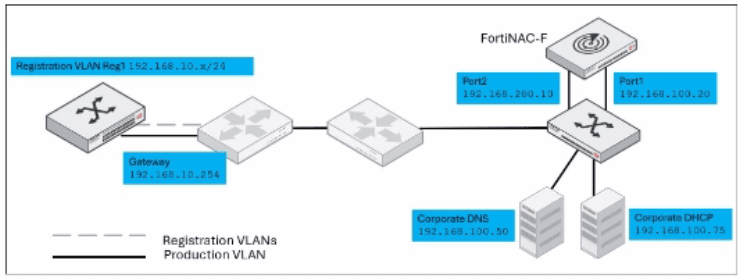
Refer to the exhibit.

Given this topology, and a layer 3 registration network configuration, which IP address would be designated in the DHCP relay configuration for the registration network?
Answer : D
The correct answer is D. In a Layer 3 registration or isolation network design, DHCP requests from the isolated registration VLAN are not served locally on that VLAN by a normal production DHCP server. Instead, the registration VLAN's DHCP relay must forward DHCP traffic to FortiNAC-F port2, because port2 is the captive network service interface. The study guide states that in Layer 3 captive networks, DHCP traffic is relayed to port2 from the captive networks, and that the FortiNAC-F port2 interface provides DHCP, DNS, and captive portal services for hosts assigned to those captive networks.
In the exhibit, the registration VLAN is 192.168.10.x/24, with gateway 192.168.10.254. That gateway is where the DHCP relay would be configured, but it is not the relay destination. The relay destination must be the FortiNAC-F port2 address, shown as 192.168.200.10. The corporate DHCP server 192.168.100.75 is for production network addressing, not registration isolation. The FortiNAC-F port1 address 192.168.100.20 is the administrative or production-facing interface, not the captive network service interface. Therefore, the DHCP relay should point to 192.168.200.10.