Fortinet - Big Savings Alert – Don’t Miss This Deal - Ends In 1d 00h 00m 00s Coupon code: 26Y30OFF
  1. Home
  2. Fortinet
  3. NSE6_FSM_AN-7.4 Exam
  4. Free NSE6_FSM_AN-7.4 Questions

Free Practice Questions for Fortinet NSE6_FSM_AN-7.4 Exam

Pass4Future also provide interactive practice exam software for preparing Fortinet NSE 6 - FortiSIEM 7.4 Analyst (NSE6_FSM_AN-7.4) Exam effectively. You are welcome to explore sample free Fortinet NSE6_FSM_AN-7.4 Exam questions below and also try Fortinet NSE6_FSM_AN-7.4 Exam practice test software.

Page:    1 / 14   
Total 48 questions

Question 1

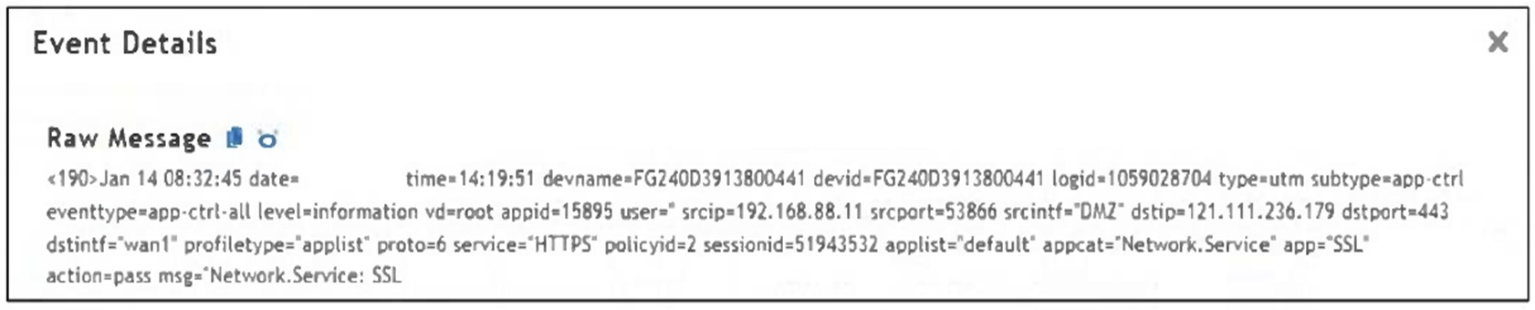
Refer to the exhibit.

Which value would you expect the FortiSIEM parser to use to populate the Application Name field?


Answer : C

The correct answer is C. SSL. FortiSIEM receives raw logs, processes them through parsers, normalizes the extracted fields, classifies the event, and stores the structured data. The Study Guide explains the FortiSIEM process flow: data is collected, processed by the parsing engine, normalized, classified, and then stored. It further states that normalization extracts individual fields from raw events and maps those fields to a common schema. The FortiSIEM 7.4 User Guide describes a parser as a file containing instructions for the parser module to convert a raw log into event attributes. In the exhibit, the raw FortiGate log includes values such as profiletype='applist', appcat='Network.Service', and app='SSL'. The field that directly represents the application value is app='SSL'. Therefore, the parser would use SSL to populate the normalized Application Name field. applist describes the profile type, Network.Service is the application category, and wan1 is the interface, not the application name.


Question 2

When configuring anomaly detection machine learning, in which step must you select the fields to analyze?


Answer : A

The correct answer is A. Design. In the FortiSIEM 7.4 User Guide's anomaly detection workflow, the first configuration step is Step 1: Design. In that step, FortiSIEM requires the analyst to identify the fields that will be analyzed by the machine learning job. The guide states that under Design, the analyst must identify Fields to Analyze, and explains that these fields are considered for anomaly detection and must currently be numerical fields. The guide also identifies the time field requirement for statistical deviation algorithms and notes that a FortiSIEM report is used to provide the dataset. The Prepare Data step comes later and is used to load or prepare the data source for training. The Train step runs the algorithm against the prepared dataset. The Schedule step is used after training to run inference. Therefore, the selection of fields to analyze belongs to the Design phase, not Prepare Data, Train, or Schedule. This sequence matters because FortiSIEM must know which numerical fields are relevant before it can prepare, train, or run inference on the machine learning job.


Question 3

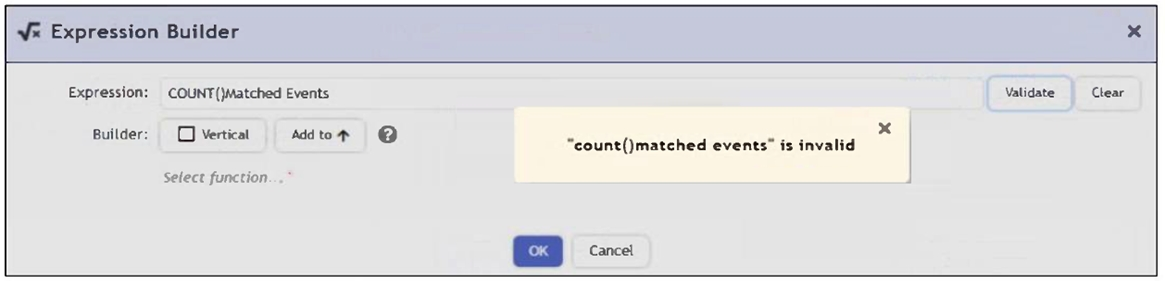
Refer to the exhibit.

An analyst is trying to identify an issue using an expression based on the Expression Builder settings shown in the exhibit; however, the error message shown in the exhibit indicates that the expression is invalid.

What is the correct syntax to create an expression that generates a total count of matched events?


Answer : A

The correct syntax is COUNT(Matched Events) - with proper capitalization and spacing - to generate a total count of matched events. The error in the exhibit likely stems from a formatting issue (e.g., lowercase count() or incorrect spacing), not the logical structure of the expression.

COUNT(Matched Events). FortiSIEM uses aggregate functions inside rule subpatterns and analytics display fields to calculate values such as the number of matched events. The Study Guide explains that rule conditions are built from subpatterns of event attribute filters and aggregation functions. It also shows that the Aggregate section is where expressions such as COUNT(Matched Events) are used to define event-count thresholds. In the exhibit, the expression is intended to generate a total count of matched events. The proper function format is the aggregate function name followed by the target field inside parentheses. Therefore, COUNT(Matched Events) is syntactically valid. Options B, C, and D are invalid because they place the function name outside the standard function-call format or attach the argument incorrectly. This matters because FortiSIEM's Expression Builder validates expressions according to function syntax. To count matched events, the function must be written as an aggregate operation over the Matched Events field.


Question 4

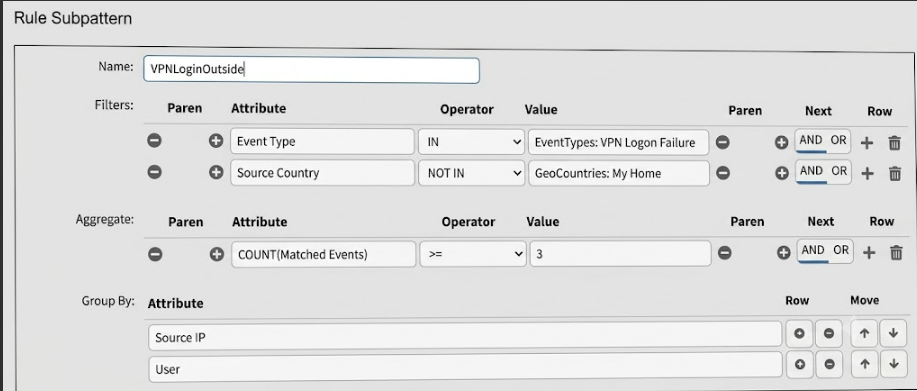
Refer to the exhibit.

What is this rule attempting to match? (Choose one answer)


Answer : B

The rule is matching VPN logon failure events where the Source Country is outside the configured home country. In the exhibit, the filter section shows Event Type IN EventTypes: VPN Logon Failure and Source Country NOT IN GeoCountries: My Home. That means the source must be outside the home-country geo group. The aggregate condition shows COUNT(Matched Events) >= 3, so the rule is looking for at least three matching failed VPN logon events. The Group By section uses Source IP and User, so FortiSIEM evaluates the count per unique source IP and user combination, not by different countries.

The FortiSIEM Study Guide explains that a rule subpattern contains three components: Filter, Aggregate, and Group By. It states that the filter identifies the matching event group, the aggregate function specifies how many events must match, and Group By combines events with the same grouped attributes into one row while the count tracks those events.

Option A is wrong because the rule does not count different countries. Options C and D are wrong because the source country is explicitly NOT IN My Home, not inside the home country.


Question 5

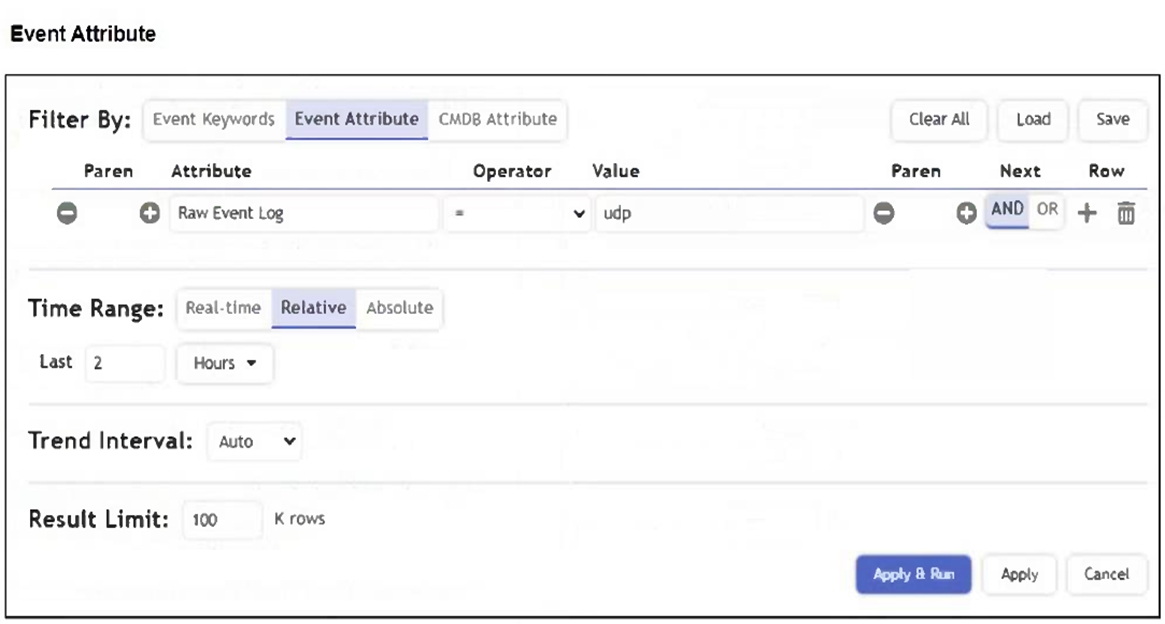
Refer to the exhibit.

A FortiSIEM device is receiving syslog events from a FortiGate firewall. The FortiSIEM analyst is trying to search the raw event logs for the last two hours that contain the keyword "udp". However, they are getting no results from the search, which they know should be available. Based on the filter shown in the exhibit, why are there no search results?


Answer : D

The operator is set to '=', which performs an exact match on the entire raw event log, not a substring search. To find logs that contain the keyword 'udp', the analyst should use the CONTAIN operator instead. This will return all logs where 'udp' appears anywhere in the raw log message.

The correct answer is D because the analyst is trying to search for raw logs that contain the keyword udp, but the filter uses the equality operator. The FortiSIEM Study Guide explains keyword searches in terms of Raw Event Log CONTAIN logic. In the keyword phrase search section, the guide states that without quotes, FortiSIEM searches raw event logs by using conditions such as Raw Event Log CONTAIN TCP OR Raw Event Log CONTAIN connection. Another analytics example explains that searching for TCP or UDP events uses the raw event log containing the keyword tcp or udp and that the search returns case-insensitive results for TCP and UDP. This directly eliminates option C. The time range is already set to the last two hours, which is correct for historical raw log searching. The problem is the operator. To find a keyword anywhere inside a raw log message, the analyst should use CONTAIN, not =.


Page:    1 / 14   
Total 48 questions