Pass4Future also provide interactive practice exam software for preparing Fortinet NSE 7 - Security Operations 7.6 Architect (NSE7_SOC_AR-7.6) Exam effectively. You are welcome to explore sample free Fortinet NSE7_SOC_AR-7.6 Exam questions below and also try Fortinet NSE7_SOC_AR-7.6 Exam practice test software.
Do you know that you can access more real Fortinet NSE7_SOC_AR-7.6 exam questions via Premium Access? ()
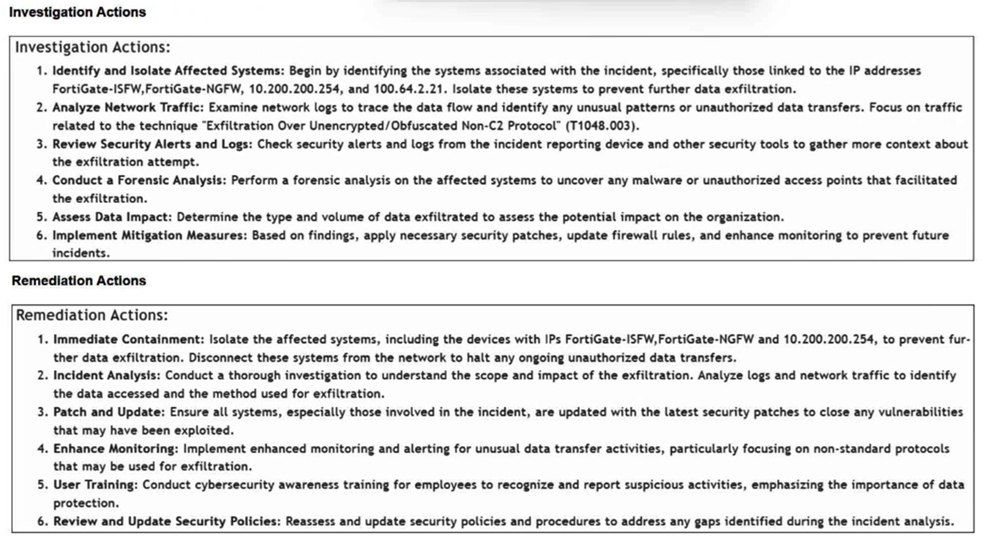
Refer to the exhibits.

How is the investigation and remediation output generated on FortiSIEM? (Choose one answer)
Answer : C
Comprehensive and Detailed Explanation From FortiSOAR 7.6., FortiSIEM 7.3 Exact Extract study guide:
In FortiSIEM 7.3, a key innovation is the integration of FortiAI, which provides generative AI capabilities to assist SOC analysts during the triage and response process.
Generative AI Summary: When an incident occurs, FortiAI can automatically analyze the underlying logs, correlation logic, and MITRE ATT&CK techniques (such as 'Exfiltration Over Alternative Protocol' shown in the exhibit) to generate a human-readable summary.
Structured Output: The output displayed in the exhibit---specifically the categorized Investigation Actions (identifying affected systems, analyzing traffic) and Remediation Actions (immediate containment, patching, user training)---is the typical result of a FortiAI summary request.
Analyst Efficiency: This feature is designed to reduce the 'mean time to respond' (MTTR) by providing analysts with immediate, actionable steps without requiring them to manually piece together the recommended response plan from static documentation or disparate log views.
Why other options are incorrect:
Exporting an incident (A): Exporting an incident typically results in a raw data file (CSV/JSON/PDF) containing the log data and metadata, rather than an AI-generated strategic plan for investigation and remediation.
Running an incident report (B): Standard incident reports provide statistical and historical data about incidents over time. They do not dynamically generate specific, numbered investigation steps tailored to the unique context of a single live incident.
Context tab (D): The Context tab in FortiSIEM is primarily used to view the CMDB information of the involved assets (e.g., host details, owner, location) and related historical events. While it provides the data needed for an investigation, it does not provide the list of actions to take.
Refer to the exhibits.
The FortiMail Sender Blocklist playbook is configured to take manual input and add those entries to the FortiMail abc. com domain-level block list. The playbook is configured to use a FortiMail connector and the ADD_SENDER_TO_BLOCKLIST action.
Why is the FortiMail Sender Blocklist playbook execution failing7
Answer : B
Understanding the Playbook Configuration:
The playbook 'FortiMail Sender Blocklist' is designed to manually input email addresses or IP addresses and add them to the FortiMail block list.
The playbook uses a FortiMail connector with the action ADD_SENDER_TO_BLOCKLIST.
Analyzing the Playbook Execution:
The configuration and actions provided show that the playbook is straightforward, starting with an ON_DEMAND STARTER and proceeding to the ADD_SENDER_TO_BLOCKLIST action.
The action description indicates it is intended to block senders based on email addresses or domains.
Evaluating the Options:
Option A: Using GET_EMAIL_STATISTICS is not required for the task of adding senders to a block list. This action retrieves email statistics and is unrelated to the block list configuration.
Option B: The primary reason for failure could be the requirement for a fully qualified domain name (FQDN). FortiMail typically expects precise information to ensure the correct entries are added to the block list.
Option C: The trust level of the client-side browser with FortiAnalyzer's self-signed certificate does not impact the execution of the playbook on FortiMail.
Option D: Incorrect connector credentials would result in an authentication error, but the problem described is more likely related to the format of the input data.
Conclusion:
The FortiMail Sender Blocklist playbook execution is failing because FortiMail is expecting a fully qualified domain name (FQDN).
Fortinet Documentation on FortiMail Connector Actions.
Best Practices for Configuring FortiMail Block Lists.
Which two playbook triggers enable the use of trigger events in later tasks as trigger variables? (Choose two.)
Answer : A, B
Understanding Playbook Triggers:
Playbook triggers are the starting points for automated workflows within FortiAnalyzer or FortiSOAR.
These triggers determine how and when a playbook is executed and can pass relevant information (trigger variables) to subsequent tasks within the playbook.
Types of Playbook Triggers:
EVENT Trigger:
Initiates the playbook when a specific event occurs.
The event details can be used as variables in later tasks to customize the response.
Selected as it allows using event details as trigger variables.
INCIDENT Trigger:
Activates the playbook when an incident is created or updated.
The incident details are available as variables in subsequent tasks.
Selected as it enables the use of incident details as trigger variables.
ON SCHEDULE Trigger:
Executes the playbook at specified times or intervals.
Does not inherently use trigger events to pass variables to later tasks.
Not selected as it does not involve passing trigger event details.
ON DEMAND Trigger:
Runs the playbook manually or as required.
Does not automatically include trigger event details for use in later tasks.
Not selected as it does not use trigger events for variables.
Implementation Steps:
Step 1: Define the conditions for the EVENT or INCIDENT trigger in the playbook configuration.
Step 2: Use the details from the trigger event or incident in subsequent tasks to customize actions and responses.
Step 3: Test the playbook to ensure that the trigger variables are correctly passed and utilized.
Conclusion:
EVENT and INCIDENT triggers are specifically designed to initiate playbooks based on specific occurrences, allowing the use of trigger details in subsequent tasks.
Fortinet Documentation on Playbook Configuration FortiSOAR Playbook Guide
By using the EVENT and INCIDENT triggers, you can leverage trigger events in later tasks as variables, enabling more dynamic and responsive playbook actions.
Which three end user logs does FortiAnalyzer use to identify possible IOC compromised hosts? (Choose three.)
Answer : B, D, E
Overview of Indicators of Compromise (IoCs): Indicators of Compromise (IoCs) are pieces of evidence that suggest a system may have been compromised. These can include unusual network traffic patterns, the presence of known malicious files, or other suspicious activities.
FortiAnalyzer's Role: FortiAnalyzer aggregates logs from various Fortinet devices to provide comprehensive visibility and analysis of network events. It uses these logs to identify potential IoCs and compromised hosts.
Relevant Log Types:
DNS Filter Logs:
DNS requests are a common vector for malware communication. Analyzing DNS filter logs helps in identifying suspicious domain queries, which can indicate malware attempting to communicate with command and control (C2) servers.
IPS Logs:
Intrusion Prevention System (IPS) logs detect and block exploit attempts and malicious activities. These logs are critical for identifying compromised hosts based on detected intrusion attempts or behaviors matching known attack patterns.
Web Filter Logs:
Web filtering logs monitor and control access to web content. These logs can reveal access to malicious websites, download of malware, or other web-based threats, indicating a compromised host.
Why Not Other Log Types:
Email Filter Logs:
While important for detecting phishing and email-based threats, they are not as directly indicative of compromised hosts as DNS, IPS, and Web filter logs.
Application Filter Logs:
These logs control application usage but are less likely to directly indicate compromised hosts compared to the selected logs.
Detailed Process:
Step 1: FortiAnalyzer collects logs from FortiGate and other Fortinet devices.
Step 2: DNS filter logs are analyzed to detect unusual or malicious domain queries.
Step 3: IPS logs are reviewed for any intrusion attempts or suspicious activities.
Step 4: Web filter logs are checked for access to malicious websites or downloads.
Step 5: FortiAnalyzer correlates the information from these logs to identify potential IoCs and compromised hosts.
Fortinet Documentation: FortiOS DNS Filter, IPS, and Web Filter administration guides.
FortiAnalyzer Administration Guide: Details on log analysis and IoC identification.
By using DNS filter logs, IPS logs, and Web filter logs, FortiAnalyzer effectively identifies possible compromised hosts, providing critical insights for threat detection and response.
Refer to Exhibit:
You are tasked with reviewing a new FortiAnalyzer deployment in a network with multiple registered logging devices. There is only one FortiAnalyzer in the topology.
Which potential problem do you observe?
Answer : B
Understanding FortiAnalyzer Data Policy and Disk Utilization:
FortiAnalyzer uses data policies to manage log storage, retention, and disk utilization.
The Data Policy section indicates how long logs are kept for analytics and archive purposes.
The Disk Utilization section specifies the allocated disk space and the proportions used for analytics and archive, as well as when alerts should be triggered based on disk usage.
Analyzing the Provided Exhibit:
Keep Logs for Analytics: 60 Days
Keep Logs for Archive: 120 Days
Disk Allocation: 300 GB (with a maximum of 441 GB available)
Analytics: Archive Ratio: 30% : 70%
Alert and Delete When Usage Reaches: 90%
Potential Problems Identification:
Disk Space Allocation: The allocated disk space is 300 GB out of a possible 441 GB, which might not be insufficient if the log volume is high, but it is not the primary concern based on the given data.
Analytics-to-Archive Ratio: The ratio of 30% for analytics and 70% for archive is unconventional. Typically, a higher percentage is allocated for analytics since real-time or recent data analysis is often prioritized. A common configuration might be a 70% analytics and 30% archive ratio. The misconfigured ratio can lead to insufficient space for analytics, causing issues with real-time monitoring and analysis.
Retention Periods: While the retention periods could be seen as lengthy, they are not necessarily indicative of a problem without knowing the specific log volume and compliance requirements. The length of these periods can vary based on organizational needs and legal requirements.
Conclusion:
Based on the analysis, the primary issue observed is the analytics-to-archive ratio being misconfigured. This misconfiguration can significantly impact the effectiveness of the FortiAnalyzer in real-time log analysis, potentially leading to delayed threat detection and response.
Fortinet Documentation on FortiAnalyzer Data Policies and Disk Management.
Best Practices for FortiAnalyzer Log Management and Disk Utilization.