Pass4Future also provide interactive practice exam software for preparing Fortinet NSE 7 - FortiSASE 25 Enterprise Administrator (NSE7_SSE_AD-25) Exam effectively. You are welcome to explore sample free Fortinet NSE7_SSE_AD-25 Exam questions below and also try Fortinet NSE7_SSE_AD-25 Exam practice test software.
Do you know that you can access more real Fortinet NSE7_SSE_AD-25 exam questions via Premium Access? ()
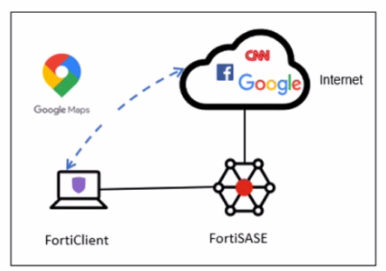
Refer to the exhibit.

An organization must inspect all the endpoint internet traffic on FortiSASE, and exclude Google Maps traffic from the FortiSASE tunnel and redirect it to the endpoint physical interface.
Which configuration must you apply to achieve this requirement? (Choose one answer)
Answer : D
In FortiSASE, the requirement to redirect specific traffic away from the secure tunnel and through the local physical interface is achieved through Steering Bypass (commonly referred to as split tunneling).
Steering Bypass Destinations: This feature is configured within the Endpoint Profile settings. When an administrator adds a destination (such as the Google Maps URL or FQDN) to the Steering Bypass table, the FortiClient agent updates the local routing table on the endpoint.
Traffic Redirection: Traffic matching these bypass rules is explicitly excluded from the FortiSASE VPN tunnel and instead sent directly out of the device's local internet gateway (physical interface). This is ideal for optimizing bandwidth and reducing latency for trusted, high-volume applications like mapping services or video conferencing.
Analysis of Other Options:
Option A: ZTNA TCP access proxy rules are designed for secure access to private applications, not for managing how internet-bound traffic is routed.
Option B: While it uses the term 'steering bypass,' there is no 'tunnel firewall policy' configuration for this purpose; the configuration is done at the endpoint profile level.
Option C: Exempting a URL in the Web Filter profile only instructs FortiSASE to skip security scanning (AV, DLP, etc.) for that traffic. The traffic would still be encapsulated in the tunnel and sent to FortiSASE, which does not meet the requirement to redirect it to the physical interface.
By configuring the Google Maps URL as a steering bypass destination, the organization ensures the traffic never enters the SASE tunnel, fulfilling the requirement for both traffic inspection (for all other traffic) and local redirection (for Google Maps).
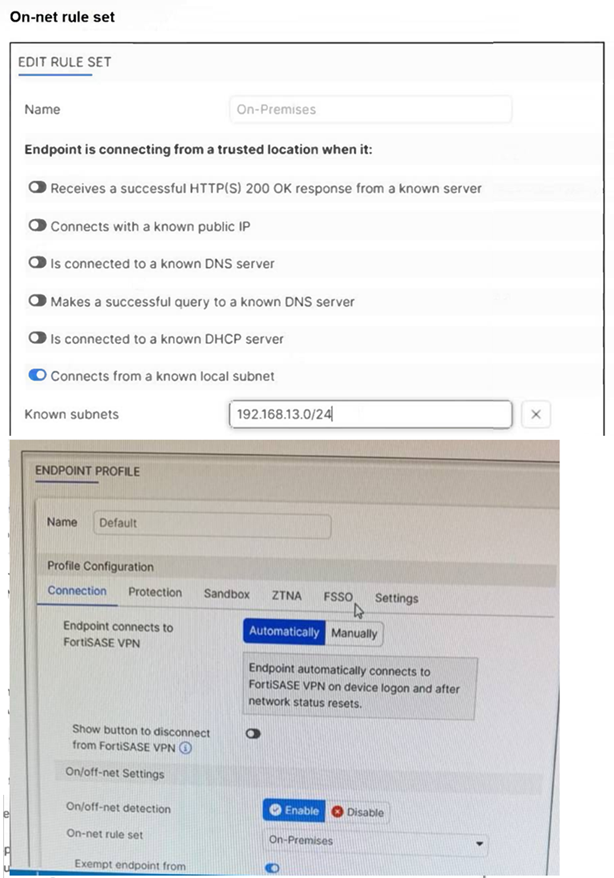
Refer to the exhibits.

An endpoint is assigned an IP address of 192.168.13.101/24. Which action will be run on the endpoint? (Choose one answer)
Answer : C
Based on the provided exhibits and the logic of FortiSASE On/off-net detection, the endpoint's behavior is determined by its network environment relative to the configured rules.
Subnet Matching and Detection: The On-net rule set (named 'On-Premises') is configured to identify a trusted location when the endpoint 'Connects from a known local subnet'. The administrator has defined the known subnet as $192.168.13.0/24$. Since the endpoint's IP address is $192.168.13.101$, it falls within this range. Consequently, FortiClient detects the endpoint as being on-net (on-fabric).
Action Logic (Exemption): In a FortiSASE Endpoint Profile, when On/off-net detection is enabled and an endpoint matches an 'On-net' rule, the standard behavior is to exempt the endpoint from auto-connecting to the FortiSASE VPN tunnel. This design assumes the endpoint is already in a secured office environment where the corporate firewall (FortiGate) provides the necessary protection, making the SASE tunnel redundant.
Comparison of Other Options: * Option B: Incorrect, because the IP matches the defined 'known local subnet' rule for on-net detection.
Option D: Incorrect, as auto-connect only triggers when the endpoint is detected as off-net to ensure remote security.
What is the purpose of security posture tagging in ZTNA? (Choose one answer)
Answer : C
In the context of Zero Trust Network Access (ZTNA), security posture tagging is the fundamental mechanism used to enforce compliance and security standards before granting access to protected resources.
Granular Access Control: The primary purpose of tagging is to provide granular access control.3 Instead of relying solely on static credentials, ZTNA uses these dynamic tags to determine if a device or user meets specific security requirements at the moment of the connection request.
Compliance-Based Enforcement: Tags are assigned based on the compliance status of the endpoint. For example, the FortiSASE Endpoint Management Service (EMS) can verify if a device has an active antivirus, is running a specific OS version, or is joined to the corporate domain.5 If the device fails any of these checks, the 'Compliant' tag is removed, and access is automatically revoked.
Dynamic and Continuous Assessment: Unlike traditional VPNs that check posture only at login, ZTNA posture tagging allows for continuous assessment. If a device's security posture changes---for instance, if the user disables their firewall---the tag is updated in real-time across the Security Fabric, and the ZTNA policy will immediately deny further access.8
Integration with Policies: On the FortiGate (acting as a ZTNA proxy) or within FortiSASE, these tags are used as source criteria in ZTNA policies.9 Only traffic originating from endpoints with the required tags (e.g., 'EMS-Tag: Corporate-Managed') is permitted to reach the protected application.
A FortiSASE administrator is configuring a Secure Private Access (SPA) solution to share endpoint information with a corporate FortiGate.
Which three configuration actions will achieve this solution? (Choose three.)
Answer : A, B, C
To configure a Secure Private Access (SPA) solution to share endpoint information between FortiSASE and a corporate FortiGate, you need to take the following steps:
Add the FortiGate IP address in the secure private access configuration on FortiSASE:
This step allows FortiSASE to recognize and establish a connection with the corporate FortiGate.
Use the FortiClient EMS cloud connector on the corporate FortiGate to connect to FortiSASE:
The EMS (Endpoint Management Server) cloud connector facilitates the integration between FortiClient endpoints and FortiSASE, enabling seamless sharing of endpoint information.
Register FortiGate and FortiSASE under the same FortiCloud account:
By registering both FortiGate and FortiSASE under the same FortiCloud account, you ensure centralized management and synchronization of configurations and policies.
FortiOS 7.6 Administration Guide: Provides details on configuring Secure Private Access and integrating with FortiGate.
FortiSASE 23.2 Documentation: Explains how to set up and manage connections between FortiSASE and corporate FortiGate.
What is required to enable the MSSP feature on FortiSASE? (Choose one answer)
Answer : D
To enable the Managed Security Service Provider (MSSP) feature on FortiSASE, the administrative framework must be established outside of the local SASE instance within the broader FortiCloud ecosystem.
FortiCloud IAM Integration: The FortiSASE MSSP portal relies on FortiCloud Identity & Access Management (IAM) to define the scope of management for internal teams. Administrators do not create local 'MSSP users' within the SASE portal itself; instead, they must use the FortiCloud IAM portal to assign specific Role-Based Access Control (RBAC) to IAM users.
Permissions and Scope: These RBAC settings determine which customer tenants (Organizational Units or OUs) an MSSP administrator can view, configure, or monitor. Without the proper role assignment in the IAM portal, the MSSP portal and its multi-tenant viewing capabilities will not be accessible to the user, even if the account has the necessary licenses.
Hierarchical Management: Once RBAC is correctly assigned, the MSSP administrator can leverage the FortiCloud Organizations service to manage multiple customer accounts from a single pane of glass. This centralized approach ensures that security policies and configurations can be standardized across the entire customer base while maintaining strict data isolation between tenants.
According to the FortiSASE 25 Multitenant Deployment Guide, configuring the IAM portal is the primary prerequisite that grants an MSSP internal team the permissions necessary to perform operations on customer FortiSASE tenants.