Pass4Future also provide interactive practice exam software for preparing Juniper Junos, Associate (OS 21.2) (JN0-106) Exam effectively. You are welcome to explore sample free Juniper JN0-106 Exam questions below and also try Juniper JN0-106 Exam practice test software.
Page: 1
/ 14 Total 95 questions
Do you know that you can access more real Juniper JN0-106 exam questions via Premium Access? ()
Question 1
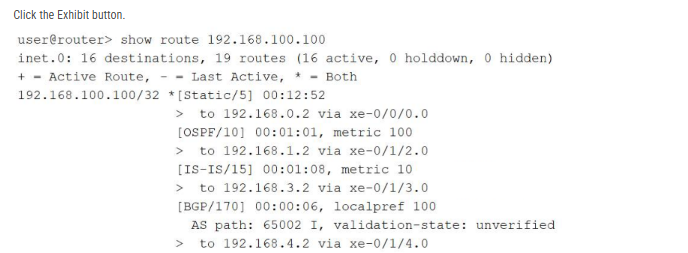
Refer to the exhibit.
Referring to the exhibit using the show route 192.168.100.100 command output, over which interface will the traffic be forwarded?
Answer : B
In the Junos OS architecture, the Routing Engine (RE) manages path selection by evaluating multiple potential routes to a specific destination found within the Routing Information Base (RIB). When multiple routing sources (such as static configuration, OSPF, IS-IS, and BGP) provide information for the exact same destination prefix---in this case, 192.168.100.100/32---the device utilizes route preference as the primary tie-breaker to determine which entry becomes the 'active' route.
The provided exhibit displays the default preference values for each protocol: Static is 5, OSPF is 10, IS-IS is 15, and BGP is 170. Junos OS follows a 'lower is better' logic for preference; therefore, the Static route is selected as the most trustworthy path. In the command output, the active route is explicitly identified by the asterisk (*) and plus sign (+) symbols located next to the [Static/5] entry. Looking at the specific next-hop information for this active static route, the output indicates the traffic is sent to 192.168.0.2 via xe-0/0/0.0. Consequently, the Packet Forwarding Engine (PFE) will install this specific path into the forwarding table, causing all traffic destined for 192.168.100.100 to be egressed over the xe-0/0/0.0 interface.
Question 2
Which two actions would you perform when you are in the operational mode of the CLI? (Choose two.)
Answer : A, C
The Junos Command Line Interface (CLI) is strictly partitioned into operational and configuration modes to maintain a clear boundary between monitoring and administrative changes. Operational mode, identified by the > prompt, is designed for executing commands that monitor device status, troubleshoot network connectivity, and manage the physical system state. One typical administrative task performed here is clearing log files (using the clear log command) to free up storage space or reset diagnostic data during troubleshooting.
Additionally, high-level system requests that do not alter the persistent configuration database, such as rebooting the hardware, are executed in operational mode. The request system reboot command allows the administrator to gracefully restart the device after a software update or as part of a maintenance cycle. In contrast, actions such as configuring routing protocols or committing changes require transitioning to configuration mode (the # prompt). Committing a configuration is the specific act of moving changes from the candidate database to the active database, which is a logic-altering event strictly reserved for configuration mode. Therefore, operational mode remains the dedicated environment for real-time observation and system-level requests that ensure the device operates correctly within its existing parameters. Reference: User Interfaces, CLI Modes, Operational Mode Commands.
Question 3
Which two characteristics apply to TCP? (Choose two.)
Answer : C, D
Comprehensive and Detailed 150 to 250 words of Explanation From: The Transmission Control Protocol (TCP) is a core transport-layer protocol within the TCP/IP suite designed to provide a highly reliable, connection-oriented service. Unlike the User Datagram Protocol (UDP), which is connectionless and best-effort, TCP ensures that data is delivered accurately and in the correct order. A defining characteristic of TCP is its use of a three-way handshake to establish a session. This process involves the exchange of SYN, SYN-ACK, and ACK segments, which synchronizes sequence numbers between the two endpoints and ensures both hosts are ready for data transfer.
Furthermore, TCP provides reliable, ordered delivery by utilizing sequence numbers and acknowledgments. Each data segment is assigned a sequence number; the receiving host uses these numbers to reassemble the data in its original order, even if segments arrive out of sequence due to network jitter or multiple paths. If a segment is lost, the lack of a timely acknowledgment triggers a retransmission, guaranteeing that the application receives all data. TCP does not provide fixed latency guarantees, as its error-recovery mechanisms can introduce delays. Additionally, TCP is a unicast-only protocol and does not support broadcasting on Ethernet. Reference: Networking Fundamentals, Transport Layer Protocols, TCP vs. UDP.
Question 4
You asked a network engineer to configure a new logical interface on a Juniper router. The interface must use the fourth usable host address from the 172.16.40.128/29 subnet. Which IP address is correct in this scenario?
Answer : B
In the Junos OS environment, precise IP addressing and subnet calculation are foundational for interface configuration. A /29 subnet mask (255.255.255.248) provides a total of 8 IP addresses. To identify the usable host range, we must first identify the network and broadcast addresses. For the subnet 172.16.40.128/29, the network address is 172.16.40.128. The broadcast address is the last address in the block, which is 172.16.40.135.
Following standard IPv4 conventions, the first and last addresses in a block are reserved for the network identity and the directed broadcast, respectively. This leaves 6 usable host addresses: 172.16.40.129 through 172.16.40.134. Counting sequentially from the beginning of the usable range: the first usable host is .129, the second is .130, the third is .131, and the fourth usable host is 172.16.40.132. Assigning this specific address ensures that the Packet Forwarding Engine can correctly route traffic within the intended segment. As a Senior Architect, it is critical to verify these boundaries when using the set interfaces unit 0 family inet address command to prevent address overlapping or the accidental assignment of reserved network/broadcast IDs.
Question 5
Which two tasks would you perform in operational mode? (Choose two.)
Answer : A, B
The Junos Command Line Interface (CLI) is structured into two primary hierarchical modes: operational mode and configuration mode. Operational mode is the default entry point when a user logs into the device, signified by the > prompt. This mode is designed for monitoring the health of the device, troubleshooting network issues, and executing system-level maintenance tasks. Specifically, an administrator uses operational mode to verify the version of Junos OS currently active on the device using the show version command.
Additionally, system-level administrative actions that do not involve modifying the device's persistent configuration logic are performed within the operational mode. This includes requesting the system to reboot or halt via the request system hierarchy of commands. In contrast, tasks that involve manipulating the configuration database---such as committing proposed changes or rolling back to a previous configuration version---require the user to transition into configuration mode, indicated by the # prompt. Understanding this distinction is vital for efficient navigation of the Junos CLI; while operational mode provides the tools to observe the system and manage its physical state, configuration mode is reserved for altering the logical parameters and routing policies that govern device behavior. Reference: User Interfaces, CLI Modes, Operational Mode Commands.