Juniper - Big Savings Alert – Don’t Miss This Deal - Ends In 1d 00h 00m 00s Coupon code: 26Y30OFF
  1. Home
  2. Juniper
  3. JN0-231 Exam
  4. Free JN0-231 Questions

Free Practice Questions for Juniper JN0-231 Exam

Pass4Future also provide interactive practice exam software for preparing Juniper Security, Associate (JN0-231) Exam effectively. You are welcome to explore sample free Juniper JN0-231 Exam questions below and also try Juniper JN0-231 Exam practice test software.

Page:    1 / 14   
Total 105 questions

Question 1

Which feature would you use to protect clients connected to an SRX Series device from a SYN flood attack?


Answer : D

A screen option in the SRX Series device can be used to protect clients connected to the device from a SYN flood attack. Screens are security measures that you can use to protect your network from various types of attacks, including SYN floods. A screen option specifies a set of rules to match against incoming packets, and it can take specific actions such as discarding, logging, or allowing the packets based on the rules.


Juniper Networks SRX Series Services Gateway Screen Configuration Guide: https://www.juniper.net/documentation/en_US/junos/topics/topic-map/security-screen-configuring.html

Question 2

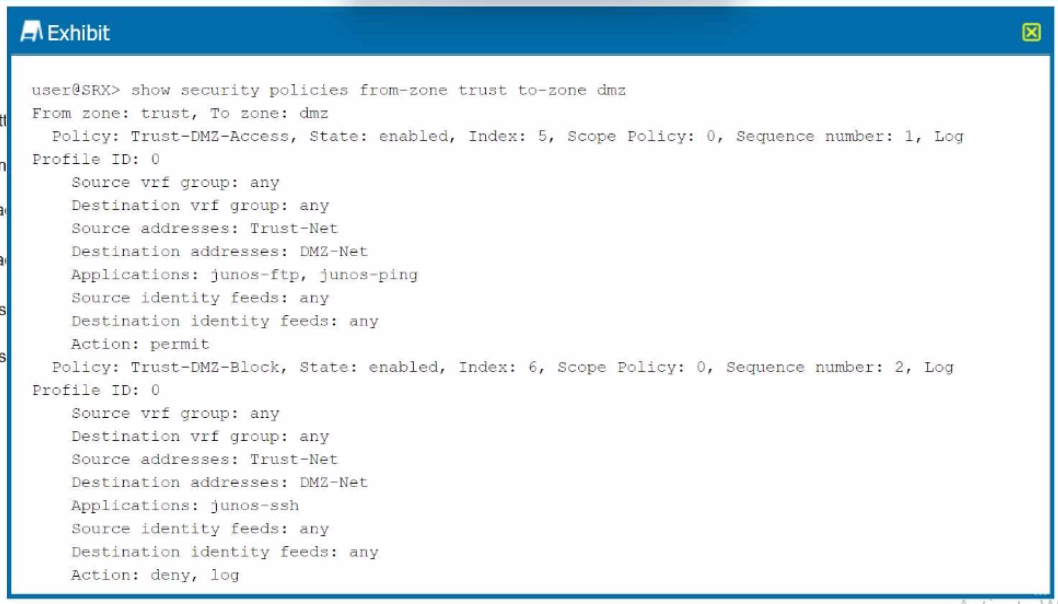
Exhibit.

Which two statements are correct referring to the output shown in the exhibit? (Choose two.)


Answer : A, D

Understanding the Policies in the Exhibit: The exhibit displays two policies configured on the Juniper SRX device for traffic between the trust zone and the dmz zone.

Policy 1:

Name: Trust-DMZ-Access

State: Enabled

Source Address: Trust-Net

Destination Address: DMZ-Net

Applications: junos-ftp, junos-ping

Action: permit

Log: Enabled

Policy 2:

Name: Trust-DMZ-Block

State: Enabled

Source Address: Trust-Net

Destination Address: DMZ-Net

Applications: junos-ssh

Action: deny, log

Analysis of Each Option:

Option A:

The Trust-DMZ-Access policy explicitly permits traffic for the junos-ftp and junos-ping applications.

This is validated by the action permit in the policy configuration.

Correct.

Option B:

This is incorrect because the Trust-DMZ-Access policy permits FTP and ping traffic rather than denying it.

Incorrect.

Option C:

The Trust-DMZ-Block policy explicitly denies traffic for the junos-ssh application.

Therefore, SSH access is not permitted.

Incorrect.

Option D:

The Trust-DMZ-Block policy denies SSH traffic from the Trust-Net to the DMZ-Net.

This is validated by the action deny.

Correct.

Juniper Security Reference:

Security Policy Overview: Security policies in Junos OS are used to control and filter traffic between security zones. Each policy defines:

Source and destination zones

Source and destination addresses

Applications or services

Action: permit, deny

Logging options

Policy Action Details:

permit: Allows the specified traffic.

deny: Blocks the specified traffic.

Application Identification:

Juniper SRX uses predefined application identifiers (junos-ftp, junos-ping, junos-ssh) for traffic matching.

Policy Evaluation Order: Policies are evaluated in sequence by their index number or sequence number. In this exhibit:

Trust-DMZ-Access is evaluated first (Sequence number: 1).

Trust-DMZ-Block is evaluated next (Sequence number: 2).

Conclusion: Based on the exhibit, FTP and ping traffic is permitted under Trust-DMZ-Access, and SSH traffic is denied under Trust-DMZ-Block. The answers to the question are therefore:

A . Correct

D . Correct

Refer to the Juniper Security Policy Documentation for more details on configuring and managing policies.


Question 3

You have multiple branch locations using an SRX Series device. You want a cloud-based solution to configure and monitor this device.

this scenario, which solution would you use?


Answer : B

Understanding the Requirement:

The scenario involves managing multiple branch SRX Series devices using a cloud-based solution for configuration and monitoring.

The solution must provide centralized visibility and control without requiring extensive on-premise infrastructure.

Evaluation of the Options:

Option A: J-Web

J-Web is a local web-based GUI tool for configuring and managing a single Juniper device.

It is not a cloud-based solution and is suitable for small-scale, device-specific management.

Incorrect.

Option B: Juniper Sky Enterprise

Juniper Sky Enterprise is a cloud-based management platform specifically designed for Juniper devices, including SRX Series.

It provides centralized configuration, monitoring, and management for distributed branch locations.

It does not require any on-premises infrastructure and is easy to deploy.

Features include:

Zero-touch provisioning.

Policy-based management.

Centralized logging and reporting.

Correct.

Option C: Junos Space Security Director

Junos Space Security Director is an on-premises or private cloud management tool for managing Juniper security devices.

It is not a fully cloud-based solution and requires the Junos Space platform to be deployed in the network.

Suitable for larger enterprises with a private data center.

Incorrect.

Option D: Juniper Secure Analytics (JSA)

JSA is a log and event management solution designed for security analytics and threat intelligence.

It focuses on collecting and analyzing security logs rather than device configuration and monitoring.

Incorrect.

Why Juniper Sky Enterprise is the Correct Solution:

Cloud-Based Management: Juniper Sky Enterprise provides a fully cloud-hosted environment for managing and monitoring SRX devices, making it ideal for distributed branches.

Ease of Deployment: Requires no additional hardware or software at the branch location.

Comprehensive Features: Offers visibility, configuration management, and logging for multiple SRX devices from a centralized dashboard.

Scalability: Suitable for small to large-scale deployments with minimal operational overhead.

Juniper Security Reference:

Refer to the Juniper Sky Enterprise Overview for detailed documentation and features.


Question 4

Which two features are included with UTM on an SRX Series device? (Choose two.)


Answer : A, D

Comprehensive Detailed Step-by-Step Explanation with All Juniper Security Reference:

Understanding UTM (Unified Threat Management) Features on SRX Devices: UTM is a security framework available on Juniper SRX Series devices that integrates multiple security features to protect against various threats. UTM functionalities are focused on advanced traffic inspection, content management, and threat prevention.

Explanation of Each Option:

Option A: Antivirus

UTM on SRX Series devices includes an antivirus feature that scans traffic for malware and viruses.

This feature is implemented using either:

Sophos Antivirus: A cloud-based solution.

Kaspersky Antivirus: A local database-based solution.

The antivirus feature detects and blocks malicious files, providing robust malware protection.

Correct.

Option B: NAT

Network Address Translation (NAT) is a fundamental networking feature on SRX devices but is not part of the UTM suite.

NAT is used to translate private IP addresses to public IP addresses and does not provide traffic filtering or threat management.

Incorrect.

Option C: IDP (Intrusion Detection and Prevention)

IDP is a separate feature on SRX devices for detecting and mitigating intrusions, but it is not part of the UTM framework.

IDP focuses on identifying malicious traffic patterns and blocking threats at the network level, whereas UTM focuses on content inspection and filtering.

Incorrect.

Option D: Content Filtering

Content filtering is a key UTM feature that blocks or allows traffic based on URL categories, keywords, and custom filtering rules.

This feature is used to restrict access to inappropriate or harmful websites and manage user behavior.

Correct.

UTM Features on SRX Devices Include:

Antivirus: Scans and blocks malware in real time.

Content Filtering: Manages access to websites and controls internet usage.

Web Filtering: Enforces policies on web content based on URL categories.

Spam Filtering: Blocks spam emails.

Juniper Security Reference:

Refer to the Juniper UTM Documentation for detailed configuration and feature details.


Question 5

The UTM features are performed during which process of the SRX Series device's packet flow?


Answer : A

Comprehensive Detailed Step-by-Step Explanation with All Juniper Security Reference:

Understanding SRX Packet Flow:

The SRX Series device processes traffic in a specific sequence of operations, including zones, security policies, NAT, and services.

UTM (Unified Threat Management) features, such as antivirus, web filtering, and content filtering, are considered advanced services and are applied during the services processing stage.

Explanation of Each Option:

Option A: Services

UTM features are categorized under 'services' because they involve advanced traffic inspection, filtering, and threat detection.

UTM services are triggered after basic security policies are applied and are performed as part of the packet processing workflow.

Correct.

Option B: Security Policies

Security policies are used to allow, deny, or permit traffic between zones.

Although policies determine whether traffic is allowed, UTM services are applied only after traffic matches a security policy that permits it.

UTM processing does not occur during the security policies stage.

Incorrect.

Option C: Zones

Zones define the logical segmentation of a network on SRX devices.

While zones determine traffic directionality and security boundaries, UTM features are not applied at this stage.

Incorrect.

Option D: Screens

Screens are used for DoS (Denial of Service) protection and detect specific types of malicious activity, such as SYN floods or port scans.

Screens focus on session-level protections, not UTM-specific traffic filtering or inspection.

Incorrect.

Where UTM Fits in the Packet Flow:

After a security policy permits traffic, advanced features such as UTM are applied in the services processing stage.

The typical SRX packet flow includes:

Ingress Interface

Zones and Screens

Security Policies

Services (UTM, IDP, etc.)

NAT (if applicable)

Egress Interface

Juniper Security Reference:

Refer to the Juniper SRX Packet Flow Documentation for more details on how UTM and services are integrated into the packet flow.

Page:    1 / 14   
Total 105 questions