Juniper - Big Savings Alert – Don’t Miss This Deal - Ends In 1d 00h 00m 00s Coupon code: 26Y30OFF
  1. Home
  2. Juniper
  3. JN0-253 Exam
  4. Free JN0-253 Questions

Free Practice Questions for Juniper JN0-253 Exam

Pass4Future also provide interactive practice exam software for preparing Juniper Mist AI, Associate (JN0-253) Exam effectively. You are welcome to explore sample free Juniper JN0-253 Exam questions below and also try Juniper JN0-253 Exam practice test software.

Page:    1 / 14   
Total 102 questions

Question 1

Which two statements are correct about the switch configuration hierarchy in Juniper Mist? (Choose two.)


Answer : B, C

The Juniper Mist Wired Assurance platform uses a hierarchical configuration model to manage switch settings efficiently across organizations and sites. This hierarchy provides flexibility by allowing administrators to apply global configurations through templates at the organization level, while also permitting site-specific customizations.

According to the Juniper Mist Wired Assurance Configuration and Template Management Guide, the configuration hierarchy functions as follows:

''Switch templates can be created at both the organization and site levels. Organization-level templates define global configurations, while site-level templates provide location-specific customization that overrides the organization-level settings where applicable.''

This structure enables consistent policy deployment while preserving site autonomy for unique configurations. For example, global VLAN or QoS configurations can be managed at the organization level, and local templates can adjust settings for switch ports or device groups at specific sites.

Switch-specific overrides are allowed within the hierarchy, ensuring flexibility in cases where unique port or feature configurations are required.

Therefore:

B is correct because switch templates exist at the organization level for global use.

C is correct because switch templates also exist at the site level for localized adjustments.


-- Juniper Mist Wired Assurance Configuration and Template Management Guide

-- Juniper Mist Cloud Hierarchical Configuration Documentation

-- Juniper Mist Wired Assurance and EX/QFX Management Overview

Question 2

Which Juniper Mist feature tracks the location of important devices and objects within a building?


Answer : C

The Juniper Mist Asset Visibility service provides real-time tracking and visibility for important devices and objects within indoor environments such as hospitals, offices, or warehouses. It uses Bluetooth Low Energy (BLE) technology and Mist vBLE-enabled access points to determine the precise location of tagged assets.

According to the Juniper Mist Location Services Guide, the feature is defined as:

''Asset Visibility leverages virtual Bluetooth LE technology and BLE tags to locate and track assets on floor plans in real time, providing actionable location-based intelligence.''

Key functionalities include:

Tracking BLE-tagged assets such as medical equipment, IT devices, or inventory.

Displaying live location information on floor maps.

Integrating with external asset management or workflow systems.

While User Engagement focuses on customer-facing location experiences (e.g., navigation or proximity marketing), Asset Visibility is designed specifically for internal asset monitoring and operational efficiency.

Therefore, the correct answer is C. Asset Visibility.


-- Juniper Mist Location-Based Services and Asset Visibility Guide

-- Juniper Mist AI for Asset Tracking and BLE Technology Overview

-- Juniper Mist Cloud Location Services Documentation

Question 3

You are asked to create a real-time visualization dashboard which displays clients on a map.

Which two Juniper Mist functions would you use in this scenario? (Choose two.)


Answer : C, D

When developing a real-time visualization dashboard that displays client locations on a map, Juniper Mist offers specific APIs and data streaming methods to support dynamic updates.

According to the Juniper Mist Developer Documentation, the WebSocket interface enables continuous, real-time streaming of client location and telemetry data directly from the Mist Cloud. This mechanism is ideal for live dashboards, as it eliminates the need for repeated REST API polling. WebSocket connections provide instant updates whenever a device moves, connects, or disconnects, ensuring the displayed map remains accurate in real time.

The Live View feature complements this functionality within the Mist Cloud and third-party integrations. It allows administrators and developers to view live location movements of Wi-Fi clients, BLE beacons, and IoT devices within a site's floor plan. It uses telemetry directly from access points, offering second-by-second updates.

In contrast, RESTful APIs and Webhooks are designed for event-based automation and configuration management rather than live visualization. REST APIs are best for historical or static data retrieval, while Webhooks are used for triggering external actions based on events.

Therefore, the correct functions for real-time map visualization are:

WebSocket (C) --- for continuous live data streaming

Live View (D) --- for direct map-based visualization of client activity


-- Juniper Mist Developer API and WebSocket Guide

-- Juniper Mist Location Services and Live View Documentation

-- Juniper Mist Cloud Architecture Overview

Question 4

You are creating a new site in the UI.

What are three required configuration settings in this scenario? (Choose three.)


Answer : A, B, E

When creating a new site in the Juniper Mist User Interface, the three required configuration settings are Site Name, Country, and Location. According to Juniper Mist's official configuration guides: 'At a minimum, enter the name, time zone, and location...' The 'Information' section of site setup requires the Site Name (a descriptive name to identify the site), Country (which sets regulatory and RF domain requirements), and Location (address or geo-coordinates for the site). These form the basis of the site identity in the Mist cloud and are mandatory for dashboard visibility, compliance, and baseline RF configuration. An RF Template, though critical for wireless tuning, is optional and can be assigned post-site creation. Active Hours are not required for the default site setup and are related to scheduling analytics or location-based services, not to the core creation workflow.


Juniper Mist Configure a Site , Site Configuration Settings Guide , Mist Management Guide

Question 5

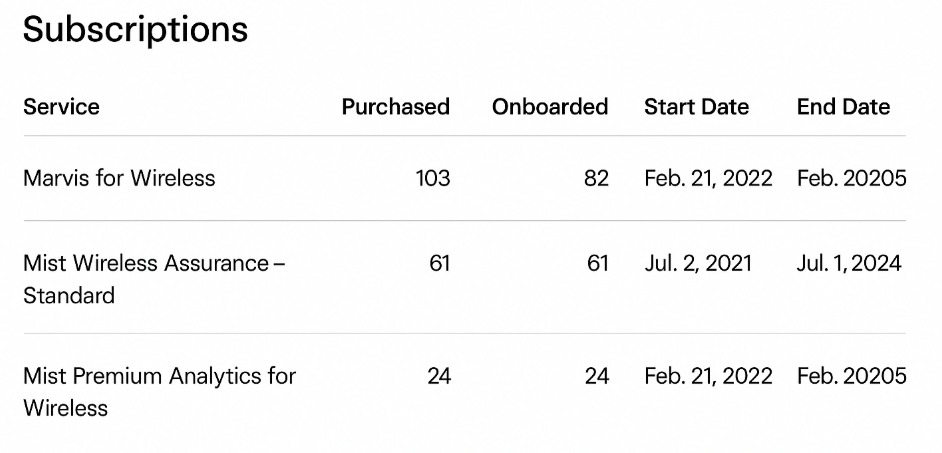
Exhibit:

Referring to the exhibit, how many Marvis for Wireless subscriptions have been purchased and onboarded?


Answer : B

In the Juniper Mist Cloud Portal, the Subscriptions page provides a summary of all service entitlements associated with an organization, including the number of licenses purchased and onboarded for each Mist Cloud service.

According to the official Juniper Mist Cloud Administration Guide, this section displays key fields such as Service Name, Purchased, Onboarded, Start Date, and End Date. The Purchased column indicates the total number of subscriptions bought, while the Onboarded column represents how many of those have been actively assigned and deployed within the organization's network.

In the exhibit, the entry for Marvis for Wireless shows 103 purchased and 82 onboarded, meaning that while 103 licenses were obtained, only 82 have been claimed and are in use within the system.

Therefore, the correct number of onboarded Marvis for Wireless subscriptions is 82.


-- Juniper Mist Cloud Administration Guide

-- Juniper Mist Licensing and Subscription Management Documentation

-- Juniper Mist Marvis Virtual Network Assistant Overview

Page:    1 / 14   
Total 102 questions