Juniper - Big Savings Alert – Don’t Miss This Deal - Ends In 1d 00h 00m 00s Coupon code: 26Y30OFF
  1. Home
  2. Juniper
  3. JN0-335 Exam
  4. Free JN0-335 Questions

Free Practice Questions for Juniper JN0-335 Exam

Pass4Future also provide interactive practice exam software for preparing Juniper Security, Specialist (JN0-335) Exam effectively. You are welcome to explore sample free Juniper JN0-335 Exam questions below and also try Juniper JN0-335 Exam practice test software.

Page:    1 / 14   
Total 98 questions

Question 1

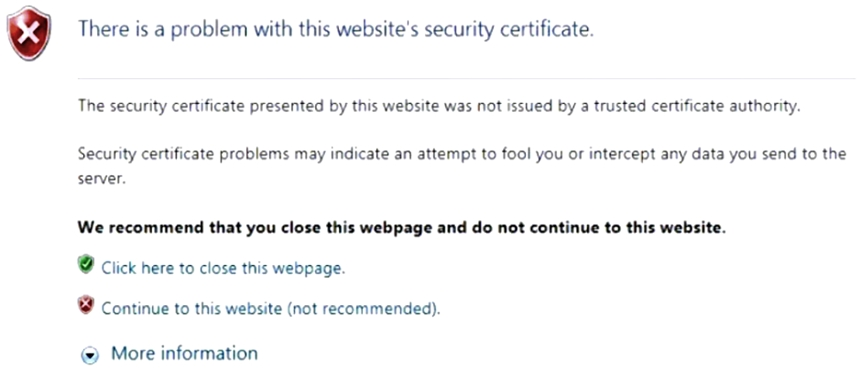
Click the Exhibit button.

You have implemented SSL client protection proxy. Employees are receiving the error shown in the exhibit.

How do you solve this problem?


Question 2

When a security policy is modified, which statement is correct about the default behavior for active sessions allowed by that policy?


Question 3

On an SRX Series firewall, what are two ways that Encrypted Traffic Insights assess the threat of the traffic? (Choose two.)


Answer : B, D

Encrypted Traffic Insights is a feature that enables the SRX Series firewall and the ATP Cloud to detect malicious threats that are hidden in encrypted traffic without decrypting the traffic. It does so by analyzing the metadata and connection patterns of the encrypted sessions. Two ways that Encrypted Traffic Insights assess the threat of the traffic are:

It validates the certificates used: The SRX Series firewall extracts the server certificate from the encrypted session and compares its signature with a blocklist of known malicious certificates provided by ATP Cloud. If there is a match, the session is blocked and reported as a threat.

It reviews the timing and frequency of the connections: The SRX Series firewall sends the connection details, such as source and destination IP addresses, ports, protocols, and timestamps, to ATP Cloud. ATP Cloud applies behavior analysis and machine learning algorithms to detect anomalous or suspicious patterns of connections, such as high frequency, low duration, or unusual timing.


Question 4

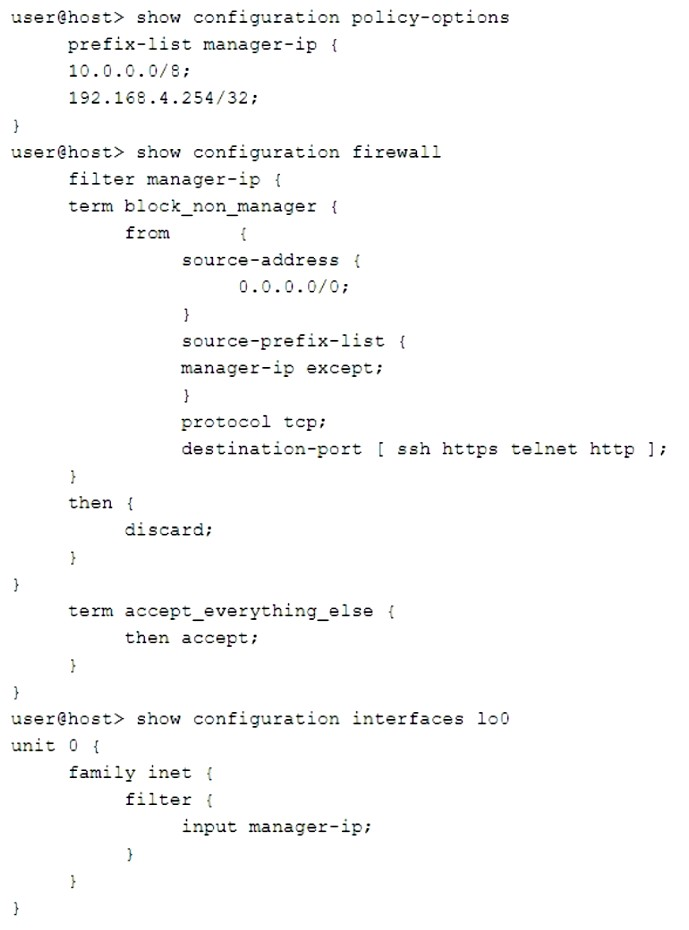
Click the Exhibit button.

You are validating the configuration template for device access. The commands in the exhibit have been entered to secure IP access to an SRX Series device.

Referring to the exhibit, which two statements are true? (Choose two.)


Answer : B, D

The commands in the exhibit show how to configure a firewall filter on the loopback interface (lo0) of an SRX Series device. The loopback interface is a gateway for all the control traffic that enters the Routing Engine of the device. The firewall filter can be used to monitor and protect this control traffic from various attacks. Two statements that are true based on the exhibit are:

The loopback interface blocks invalid traffic on its entry into the device: The firewall filter applied on lo0 has a term that matches any packet with an invalid source address (such as 0.0.0.0/8 or 127.0.0.0/8) and discards it. This prevents spoofing or DoS attacks using invalid source addresses.

The device manager can access the device from 10.253.1.2: The firewall filter applied on lo0 has a term that matches any packet with a source address of 10.253.1.2 and accepts it. This allows the device manager to access the device from this IP address using protocols such as SSH, Telnet, HTTP, or HTTPS.


Question 5

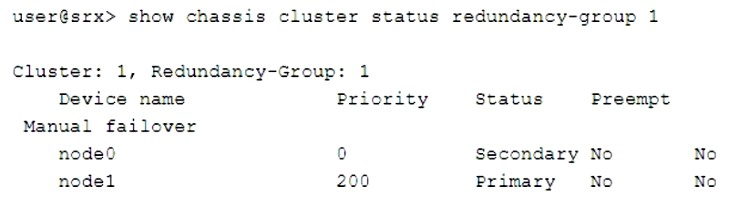
Click the Exhibit button.

Which two statements describe the output shown in the exhibit? (Choose two.)


Answer : B, D

The output shown in the exhibit displays the status of a chassis cluster redundancy group (RG) on an SRX Series device. A chassis cluster RG is a collection of objects, such as interfaces or services, that fail over together from one node to another in case of a failure or manual intervention. A chassis cluster RG can be primary on one node and backup on another node at any given time. Two statements that describe the output shown in the exhibit are:

Redundancy group 1 was administratively failed over: The output shows that redundancy group 1 has ''Manual failover'' set to ''Yes''. This indicates that redundancy group 1 was manually switched from one node to another using the request chassis cluster failover redundancy-group command.

Node 1 is controlling traffic for redundancy group 1: The output shows that node 1 has ''Status'' set to ''Primary'' for redundancy group 1. This means that node 1 is active and controlling traffic for redundancy group 1.


Page:    1 / 14   
Total 98 questions