Juniper - Big Savings Alert – Don’t Miss This Deal - Ends In 1d 00h 00m 00s Coupon code: 26Y30OFF
  1. Home
  2. Juniper
  3. Free JN0-636 Questions

Free Practice Questions for Juniper JN0-636 Exam

Pass4Future also provide interactive practice exam software for preparing Juniper Security, Professional (JN0-636) Exam effectively. You are welcome to explore sample free Juniper JN0-636 Exam questions below and also try Juniper JN0-636 Exam practice test software.

Page:    1 / 14   
Total 115 questions

Question 1

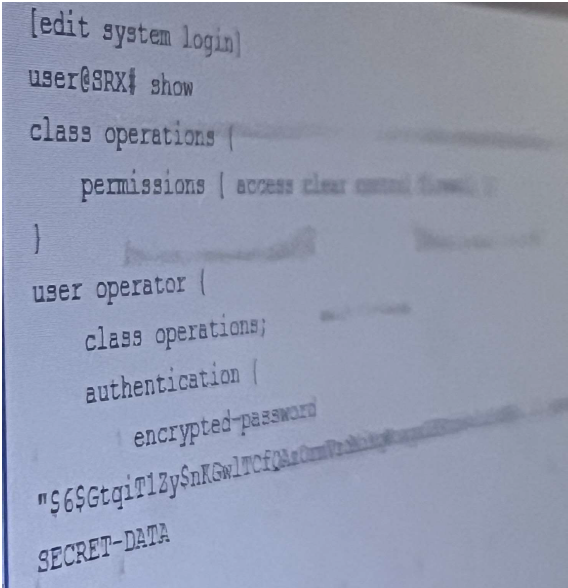
Exhibit:

Referring to the exhibit, the operator user is unable to save configuration files to a usb stick the is

plugged into SRX. What should you do to solve this problem?


Answer : B

To solve the problem of the operator user being unable to save configuration files to a USB stick that is plugged into SRX, you need to add the system-control permission flag to the operations class. The other options are incorrect because:

A) Adding the floppy permission flag to the operations class is not sufficient or necessary to save configuration files to a USB stick. The floppy permission flag allows the user to access the floppy drive, but not the USB drive.The USB drive is accessed by the system permission flag, which is already included in the operations class1.

C) Adding the interface-control permission flag to the operations class is also not sufficient or necessary to save configuration files to a USB stick. The interface-control permission flag allows the user to configure and monitor interfaces, but not to save configuration files.The configuration permission flag, which is also already included in the operations class, allows the user to save configuration files1.

D) Adding the system permission flag to the operations class is redundant and ineffective to save configuration files to a USB stick. The system permission flag allows the user to access the system directory, which includes the USB drive.However, the operations class already has the system permission flag by default1. The problem is not the lack of system permission, but the lack of system-control permission.

Therefore, the correct answer is B. You need to add the system-control permission flag to the operations class to solve the problem.The system-control permission flag allows the user to perform system-level operations, such as rebooting, halting, or snapshotting the device1.These operations are required to mount, unmount, and copy files to and from the USB drive2. To add the system-control permission flag to the operations class, you need to perform the following steps:

Enter the configuration mode: user@host> configure

Navigate to the system login class hierarchy: user@host# edit system login class operations

Add the system-control permission flag: user@host# set permissions system-control

Commit the changes: user@host# commit


login (System)

How to mount a USB drive on EX/SRX/MX/QFX Series platforms to import/export files

Question 2

Exhibit:

You are troubleshooting a firewall filter shown in the exhibit that is intended to log all traffic and block

only inbound telnet traffic on interface ge-0/0/3.

How should you modify the configuration to fulfill the requirements?


Answer : A

To modify the configuration to fulfill the requirements, you need to modify the log-all term to add the next term action. The other options are incorrect because:

B) Deleting the log-all term would prevent logging all traffic, which is one of the requirements.The log-all term matches all traffic from any source address and logs it to the system log file1.

C) Adding a term before the log-all term that blocks Telnet would also prevent logging all traffic, because the log-all term would never be reached. The firewall filter evaluates the terms in sequential order and applies the first matching term.If a term before the log-all term blocks Telnet, then the log-all term would not match any traffic and no logging would occur2.

D) Applying a firewall filter to the loopback interface that blocks Telnet traffic would not block inbound Telnet traffic on interface ge-0/0/3, which is another requirement. The loopback interface is a logical interface that is always up and reachable.It is used for routing and management purposes, not for filtering traffic on physical interfaces3.

Therefore, the correct answer is A. You need to modify the log-all term to add the next term action. The next term action instructs the firewall filter to continue evaluating the subsequent terms after matching the current term.This way, the log-all term would log all traffic and then proceed to the block-telnet term, which would block only inbound Telnet traffic on interface ge-0/0/34. To modify the log-all term to add the next term action, you need to perform the following steps:

Enter the configuration mode: user@host> configure

Navigate to the firewall filter hierarchy: user@host# edit firewall family inet filter block-telnet

Add the next term action to the log-all term: user@host# set term log-all then next term

Commit the changes: user@host# commit


log (Firewall Filter Action)

Firewall Filter Configuration Overview

loopback (Interfaces)

next term (Firewall Filter Action)

Question 3

you configured a security policy permitting traffic from the trust zone to the untrust zone but your

traffic not hitting the policy.

In this scenario, which cli command allows you to troubleshoot traffic problem using the match criteria?


Answer : C

To troubleshoot the traffic problem using the match criteria, you need to use the show security match-policies CLI command. The other options are incorrect because:

A) The show security policy-report CLI command displays the policy report, which is a summary of the policy usage statistics, such as the number of sessions, bytes, and packets that match each policy.It does not show the match criteria or the reason why the traffic is not hitting the policy1.

B) The show security application-tracking counters CLI command displays the application tracking counters, which are the statistics of the application usage, such as the number of sessions, bytes, and packets that match each application.It does not show the match criteria or the reason why the traffic is not hitting the policy2.

D) The request security policies check CLI command checks the validity and consistency of the security policies, such as the syntax, the references, and the conflicts.It does not show the match criteria or the reason why the traffic is not hitting the policy3.

Therefore, the correct answer is C. You need to use the show security match-policies CLI command to troubleshoot the traffic problem using the match criteria. The show security match-policies CLI command displays the policies that match the specified criteria, such as the source and destination addresses, the zones, the protocols, and the ports. It also shows the action and the hit count of each matching policy.You can use this command to verify if the traffic is matching the expected policy or not, and if not, what policy is blocking or rejecting the traffic4


Question 4

In an effort to reduce client-server latency transparent mode was enabled an SRX series device.

Which two types of traffic will be permitted in this scenario? (Choose Two )


Answer : A, B

To answer this question, you need to know what transparent mode is and what types of traffic it permits. Transparent mode is a mode of operation for SRX Series devices that provides Layer 2 bridging capabilities with full security services. In transparent mode, the SRX Series device acts as a bridge between two network segments and inspects the packets without modifying the source or destination information in the IP packet header.The SRX Series device does not have an IP address in transparent mode, except for the management interface1. Therefore, the types of traffic that will be permitted in transparent mode are:

A) ARP (Address Resolution Protocol) traffic. ARP is a protocol that maps IP addresses to MAC addresses. ARP traffic is a type of Layer 2 traffic that does not require an IP address on the SRX Series device.ARP traffic is permitted in transparent mode to allow the SRX Series device to learn the MAC addresses of the hosts on the bridged network segments2.

B) Layer 2 non-IP multicast traffic. Layer 2 non-IP multicast traffic is a type of traffic that uses MAC addresses to send data to multiple destinations. Layer 2 non-IP multicast traffic does not require an IP address on the SRX Series device.Layer 2 non-IP multicast traffic is permitted in transparent mode to allow the SRX Series device to forward data to the appropriate destinations on the bridged network segments3.

The other options are incorrect because:

C) BGP (Border Gateway Protocol) traffic. BGP is a protocol that exchanges routing information between autonomous systems. BGP traffic is a type of Layer 3 traffic that requires an IP address on the SRX Series device.BGP traffic is not permitted in transparent mode, because the SRX Series device does not have an IP address in transparent mode, except for the management interface1.

D) IPsec (Internet Protocol Security) traffic. IPsec is a protocol that provides security and encryption for IP packets. IPsec traffic is a type of Layer 3 traffic that requires an IP address on the SRX Series device.IPsec traffic is not permitted in transparent mode, because the SRX Series device does not have an IP address in transparent mode, except for the management interface1.


Transparent Mode Overview

ARP Support in Transparent Mode

Layer 2 Non-IP Multicast Traffic Support in Transparent Mode

Question 5

Exhibit:

Referring to the exhibit, your company's infrastructure team implemented new printers

To make sure that the policy enforcer pushes the updated Ip address list to the SRX.

Which three actions are required to complete the requirement? (Choose three )


Answer : A, B, C

Referring to the exhibit, your company's infrastructure team implemented new printers. To make sure that the policy enforcer pushes the updated IP address list to the SRX, you need to perform the following actions:

A) Configure the server feed URL as http://172.25.10.254/myprinters. The server feed URL is the address of the remote server that provides the custom feed data. You need to configure the server feed URL to match the location of the file that contains the IP addresses of the new printers.In this case, the file name is myprinters and the server IP address is 172.25.10.254, so the server feed URL should be http://172.25.10.254/myprinters1.

B) Create a security policy that uses the dynamic address feed to allow access. A security policy is a rule that defines the action to be taken for the traffic that matches the specified criteria, such as source and destination addresses, zones, protocols, ports, and applications. You need to create a security policy that uses the dynamic address feed as the source or destination address to allow access to the new printers. A dynamic address feed is a custom feed that contains a group of IP addresses that can be entered manually or imported from external sources.The dynamic address feed can be used in security policies to either deny or allow traffic based on either source or destination IP criteria2.

C) Configure Security Director to create a dynamic address feed. Security Director is a Junos Space application that enables you to create and manage security policies and objects. You need to configure Security Director to create a dynamic address feed that contains the IP addresses of the new printers. You can create a dynamic address feed by using the local file or the remote file server option.In this case, you should use the remote file server option and specify the server feed URL as http://172.25.10.254/myprinters3.

The other options are incorrect because:

D) Configuring Security Director to create a C&C feed is not required to complete the requirement. A C&C feed is a security intelligence feed that contains the IP addresses of servers that are used by malware or attackers to communicate with infected hosts. The C&C feed is not related to the new printers or the dynamic address feed.

E) Configuring the server feed URL as https://172.25.10.254/myprinters is not required to complete the requirement. The server feed URL can use either the HTTP or the HTTPS protocol, depending on the configuration of the remote server.In this case, the exhibit shows that the remote server is using the HTTP protocol, so the server feed URL should use the same protocol1.


Configuring the Server Feed URL

Dynamic Address Overview

Creating Custom Feeds

[Command and Control Feed Overview]

Page:    1 / 14   
Total 115 questions