Microsoft - Big Savings Alert – Don’t Miss This Deal - Ends In 1d 00h 00m 00s Coupon code: 26Y30OFF
  1. Home
  2. Microsoft
  3. AZ-140 Exam
  4. Free AZ-140 Questions

Free Practice Questions for Microsoft AZ-140 Exam

Pass4Future also provide interactive practice exam software for preparing Microsoft Configuring and Operating Microsoft Azure Virtual Desktop (AZ-140) Exam effectively. You are welcome to explore sample free Microsoft AZ-140 Exam questions below and also try Microsoft AZ-140 Exam practice test software.

Page:    1 / 14   
Total 286 questions

Question 1

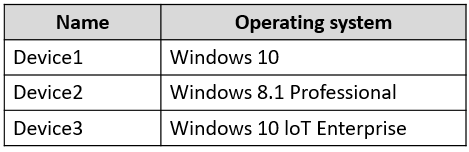
You have the devices shown in the following table.

You plan to deploy Azure Virtual Desktop for client access to remote virtualized apps.

Which devices support the Remote Desktop client?


Answer : C


Question 2

You have an Azure Virtual Desktop deployment.

You plan to create a new host pool named Pool1 that will contain five Windows 11 session hosts.

You need to enable secure boot and vTPM on the session hosts.

How should you configure the Virtual Machines settings?


Answer : B


Question 3

You have an Azure Virtual Desktop pooled host pool named HostPool1.

You need to dynamically allocate resources to HostPool1 based on the number of sessions for each host.

What should you create?


Answer : B


Question 4

You have an Azure Virtual Desktop deployment that contains a session host named Host1.

You need to configure Windows Defender Firewall to allow inbound network traffic for RDP Shortpath on Host1.

Which program in the C:\Windows\System32 folder should you specify in the inbound firewall rule?


Question 5

You have an on-premises network and an Azure subscription. The subscription contains the following virtual network:

* Name:VNet1

* Address space: 10.10.0.0/16

* Subnet name: Subnet1

* Subnet1 address range: 10.10.0.0/16

You deploy an Azure Virtual Desktop host pool that contains 10 session hosts to Subnets.

You plan to deploy a VPN gateway to VNet1 and provide the session hosts with access to the on-premises network.

You need to ensure that you can deploy the VPN gateway.

What should you do first?


Answer : B

In order to deploy a VPN gateway to VNet1, you should first add a subnet named GatewaySubnet to VNet1. According to the Microsoft Official Guide AZ-140, 'You must create a gateway subnet for the virtual network that you plan to use for the gateway. The subnet must be named GatewaySubnet and it must use an address range that is large enough to accommodate the number of IP addresses that you plan to use for the gateway and its supporting resources.' Therefore, the first step to ensure that you can deploy the VPN gateway is to add a subnet named GatewaySubnet to VNet1.


Page:    1 / 14   
Total 286 questions