Microsoft - Big Savings Alert – Don’t Miss This Deal - Ends In 1d 00h 00m 00s Coupon code: 26Y30OFF
  1. Home
  2. Microsoft
  3. Free AZ-303 Questions

Free Practice Questions for Microsoft AZ-303 Exam

Pass4Future also provide interactive practice exam software for preparing Microsoft Azure Architect Technologies (AZ-303) Exam effectively. You are welcome to explore sample free Microsoft AZ-303 Exam questions below and also try Microsoft AZ-303 Exam practice test software.

Page:    1 / 14   
Total 220 questions

Question 1

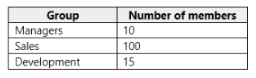
Your company has the groups shown in the following table.

The company has an Azure subscription that contains an Azure Active Directory (Azure AD) tenant named contoso.com.

An administrator named Admin1 attempts to enable Enterprise State Roaming for all the users in the Managers group.

Admin1 reports that the options for Enterprise State Roaming are unavailable from Azure AD.

You verify that Admin1 is assigned the Global administrator role.

You need to ensure that Admin1 can enable Enterprise State Roaming.

What should you do?


Answer : B

Enterprise State Roaming is available to any organization with an Azure AD Premium or Enterprise Mobility + Security (EMS) license.


https://docs.microsoft.com/bs-latn-ba/azure/active-directory/devices/enterprise-state-roaming-enable

Question 2

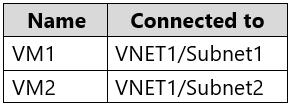
You have an Azure subscription that contains an Azure key vault named KeyVault1 and the virtual machines shown in the following table.

KeyVault1 has an access policy that provides several users with Create Key permissions.

You need to ensure that the users can only register secrets in KeyVault1 from VM1.

What should you do?


Answer : C

You grant data plane access by setting Key Vault access policies for a key vault.

Note 1: Grant our VM's system-assigned managed identity access to the Key Vault.

Select Access policies and click Add new.

In Configure from template, select Secret Management.

Choose Select Principal, and in the search field enter the name of the VM you created earlier. Select the VM in the result list and click Select.

Click OK to finishing adding the new access policy, and OK to finish access policy selection.

Note 2: Access to a key vault is controlled through two interfaces: the management plane and the data plane. The management plane is where you manage Key Vault itself. Operations in this plane include creating and deleting key vaults, retrieving Key Vault properties, and updating access policies. The data plane is where you work with the data stored in a key vault. You can add, delete, and modify keys, secrets, and certificates.


https://docs.microsoft.com/en-us/azure/active-directory/managed-identities-azure-resources/tutorial-windows-vm-access-nonaad

https://docs.microsoft.com/en-us/azure/key-vault/general/secure-your-key-vault2

Question 3

You have resources in three Azure regions. Each region contains two virtual machines. Each virtual machine has a public IP address assigned to its network interface and a locally installed application named App1.

You plan to implement Azure Front Door-based load balancing across all the virtual machines.

You need to ensure that App1 on the virtual machines will only accept traffic routed from Azure Front Door.

What should you implement?


Answer : C

Configure IP ACLing for your backends to accept traffic from Azure Front Door's backend IP address space and Azure's infrastructure services only. Refer the IP details below for ACLing your backend:

Refer AzureFrontDoor.Backend section in Azure IP Ranges and Service Tags for Front Door's IPv4 backend IP address range or you can also use the service tag AzureFrontDoor.Backend in your network security groups.


https://docs.microsoft.com/en-us/azure/frontdoor/front-door-faq

Question 4

You have an Azure key vault named KV1.

You need to ensure that applications can use KV1 to provision certificates automatically from an external certification authority (CA).

Which two actions should you perform? Each correct answer presents part of the solution.

NOTE: Each correct selection is worth one point.


Answer : C, D

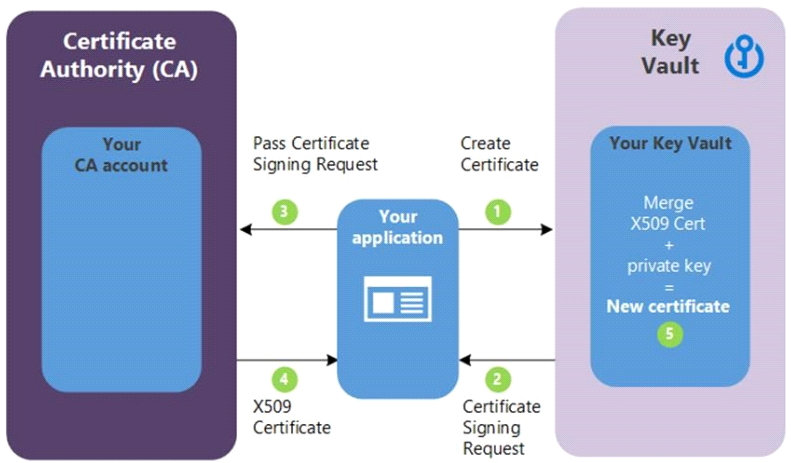
C: Obtain the root CA certificate (step 4 in the picture below)

D: From KV1, create a certificate signing request (CSR) (step 2 in the picture below)

Note:

Creating a certificate with a CA not partnered with Key Vault

This method allows working with other CAs than Key Vault's partnered providers, meaning your organization can work with a CA of its choice.

The following step descriptions correspond to the green lettered steps in the preceding diagram.

In the diagram above, your application is creating a certificate, which internally begins by creating a key in your key vault.

Key Vault returns to your application a Certificate Signing Request (CSR).

Your application passes the CSR to your chosen CA.

Your chosen CA responds with an X509 Certificate.

Your application completes the new certificate creation with a merger of the X509 Certificate from your CA.


https://docs.microsoft.com/en-us/azure/key-vault/certificates/certificate-scenarios

Question 5

Note: This question is part of a series of questions that present the same scenario. Each question in the series contains a unique solution that might meet the stated goals. Some question sets might have more than one correct solution, while others might not have a correct solution.

After you answer a question in this section, you will NOT be able to return to it. As a result, these questions will not appear in the review screen.

Your company is deploying an on-premises application named App1. Users will access App1 by using a URL of https://app1.contoso.com.

You register App1 in Azure Active Directory (Azure AD) and publish App1 by using the Azure AD Application Proxy.

You need to ensure that App1 appears in the My Apps portal for all the users.

Solution: You modify User and Groups for App1.

Does this meet the goal?


Answer : A

Assigning users and groups to individual applications in Azure AD controls the visibility of the link.

If you want only a subset of your users to see the link in the Azure AD My Apps portal, configure user assignment as follows:

In the menu on the left, select Properties.

Set User assignment required to Yes.

Click Save.

In the menu on the left, click Manage > Users and groups.

Click Add user.

Select Users.

Select the users or groups that you want to provision. If you select a group, all members of the group are provisioned.

Click Select.

Click Assign.

It might take several minutes for a link to show up in the My Apps portal.


https://cloud.google.com/architecture/identity/integrating-google-services-and-apps-with-azure-ad-portal#adding_links

Page:    1 / 14   
Total 220 questions