Microsoft - Big Savings Alert – Don’t Miss This Deal - Ends In 1d 00h 00m 00s Coupon code: 26Y30OFF
  1. Home
  2. Microsoft
  3. Free DP-200 Questions

Free Practice Questions for Microsoft DP-200 Exam

Pass4Future also provide interactive practice exam software for preparing Microsoft Implementing an Azure Data Solution (DP-200) Exam effectively. You are welcome to explore sample free Microsoft DP-200 Exam questions below and also try Microsoft DP-200 Exam practice test software.

Page:    1 / 14   
Total 243 questions

Question 1

You have an Azure Blob storage account.

Developers report that an HTTP 403 (Forbidden) error is generated when a client application attempts to access the storage account. You cannot see the error messages in Azure Monitor.

What is a possible cause of the error?


Answer : C


Question 2

You have an Azure subscription that contains an Azure Data Factory version 2 (V2) data factory named df1. Df1 contains a linked service.

You have an Azure Key vault named vault1 that contains an encryption key named key1.

You need to encrypt df1 by using key1.

What should you do first?


Question 3

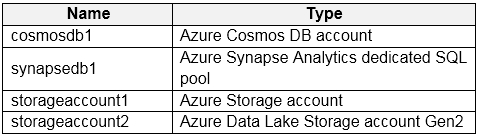
You have an Azure subscription the contains the resources shown in the following table:

All the resources have the default encryption settings.

You need to ensure that all the data stored in the resources is encrypted at rest.

What should you do?


Question 4

You have an Azure data factory.

You need to examine the pipeline failures from the last 60 days.

What should you use?


Answer : B

Data Factory stores pipeline-run data for only 45 days. Use Azure Monitor if you want to keep that data for a longer time. With Monitor, you can route diagnostic logs for analysis to multiple different targets.


https://docs.microsoft.com/en-us/azure/data-factory/monitor-using-azure-monitor

Question 5

You have an Azure Storage account.

You need to configure the storage account to send an email when an administrative action is performed on the account.

What should you do?


Answer : C

To determine if there is an activity log alert created for 'Create/Update Storage Account' events in your Microsoft Azure cloud account, perform the following actions:

Sign in to Azure Management Console.

Navigate to Azure Monitor blade

In the navigation panel, select Alerts to access all the alerts available in your cloud account.

On the Alerts page, click on the Manage alert rules button from the dashboard top menu to access the alert rules management page.

On the Rules page, select the subscription that you want to examine from the Subscription filter box and the Enabled option from the Status dropdown list, to return all the active alert rules created in the selected account subscription.

Click on the name of the alert rule that you want to examine.

On the selected alert rule configuration page, check the condition phrase available in the Condition section. If the phrase is different than Whenever the Activity Log has an event with Category='Administrative', Signal name='Create/Update Storage Account (Microsoft.Storage/storageAccounts)', the selected alert rule is not designed to fire whenever 'Create Storage Account' or 'Update Storage Account' events are triggered.


https://www.cloudconformity.com/knowledge-base/azure/ActivityLog/create-storage-account-alert.html

Page:    1 / 14   
Total 243 questions