Pass4Future also provide interactive practice exam software for preparing Microsoft Developing AI-Enabled Database Solutions (DP-800) Exam effectively. You are welcome to explore sample free Microsoft DP-800 Exam questions below and also try Microsoft DP-800 Exam practice test software.
Do you know that you can access more real Microsoft DP-800 exam questions via Premium Access? ()
You have an Azure SQL database that contains the following SQL graph tables:
* A NODE table named dbo.Person
* An EDGE table named dbo.Knows
Each row in dbo.Person contains the following columns:
* Personid (int)
* DisplayName (nvarchar(100))
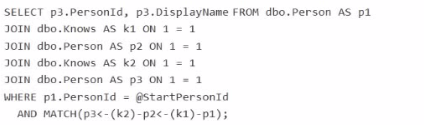
You need to use a HATCH operator and exactly two directed Knows relationships to return the Personid and DisplayName of people that are reachable from the person identified by an input parameter named @startPersonid.
Which Transact-SQL query should you use?
A)

B)

C)

D)

Answer : D
The correct query is Option D because it starts from the input person and uses exactly two directed Knows edges in a single MATCH pattern:
MATCH(p1-(k1)->p2-(k2)->p3)
Microsoft documents that SQL Graph uses the MATCH predicate in the WHERE clause to express graph traversal patterns over node and edge tables, and directed relationships are written with arrow syntax such as node1-(edge)->node2.
Why D is correct:
It anchors the starting node with p1.PersonId = @StartPersonId.
It traverses two directed hops: p1 -> p2 -> p3.
It returns p3.PersonId, p3.DisplayName, which are the people reachable in exactly two Knows relationships.
Why the others are wrong:
A filters on DisplayName = DisplayName, which is unrelated to the required input parameter and does not correctly anchor the start node.
B reverses the traversal direction in the pattern.
C uses two separate MATCH predicates instead of the required single two-hop directed pattern. The proper graph pattern syntax supports chaining the hops directly in one MATCH expression.
You have an Azure SQL database That contains a table named dbo.Products, dbo.Products contains three columns named Embedding Category, and Price. The Embedding column is defined as VECTOR(1536).
You use Ai_GENERME_EMBEDOINGS and VECTOR_SEARCH to support semantic search and apply additional filters on two columns named Category and Price.
You plan to change the embedding model from text-embedding-ada-002 to text-embedding-3-smalL Existing rows already contain embeddings in the Embedding column.
You need to implement the model change. Applications must be able to use VECTOR_SEARCH without runtime errors.
What should you do first?
Answer : A
When you change embedding models, the stored vectors should be treated as belonging to a different embedding space unless you intentionally keep the entire corpus consistent. Microsoft's vector guidance notes that when most or all embeddings are replaced with fresh embeddings from a new model, the recommended practice is to reload the new embeddings and, for large-scale replacement scenarios, consider dropping and recreating the vector index afterward so search quality remains predictable.
This question also says applications must continue to use VECTOR_SEARCH without runtime errors. VECTOR_SEARCH requires compatible vector dimensions, and the vector column already exists. Azure OpenAI documentation shows that text-embedding-ada-002 is fixed at 1536 dimensions and text-embedding-3-small supports up to 1536 dimensions. That means the migration can remain compatible with a VECTOR(1536) column, but the right implementation step is still to re-embed the existing rows so the table does not contain a mixed corpus produced by different models.
The other options are not appropriate:
B normalization does not solve a model migration problem.
C converting the vector column to nvarchar(max) would break vector-native search design.
D a vector index improves performance, but it does not migrate old embeddings to the new model.
You need to recommend a solution for the development team to retrieve the live metadata. The solution must meet the development requirements.
What should you include in the recommendation?
Answer : C
The best recommendation is to use an MCP server. In the official DP-800 study guide, Microsoft explicitly lists skills such as configuring Model Context Protocol (MCP) tool options in a GitHub Copilot session and connecting to MCP server endpoints, including Microsoft SQL Server and Fabric Lakehouse. That makes MCP the exam-aligned mechanism for enabling AI-assisted tools to work with live database context rather than static snapshots.
This also matches the stated development requirement: the team will use Visual Studio Code and GitHub Copilot and needs to retrieve live metadata from the databases. Microsoft's documentation for GitHub Copilot with the MSSQL extension explains that Copilot works with an active database connection, provides schema-aware suggestions, supports chatting with a connected database, and adapts responses based on the current database context. Microsoft also documents MCP as the standard way for AI tools to connect to external systems and data sources through discoverable tools and endpoints.
The other options do not satisfy the ''live metadata'' requirement as well:
A .dacpac is a point-in-time schema artifact, not live metadata.
A Copilot instruction file provides guidance, not live database discovery.
Including the database project in the repository helps source control and deployment, but it still does not provide live database metadata by itself.
You have an Azure SQL database.
You deploy Data API builder (DAB) to Azure Container Apps by using the mcr.nicrosoft.com/azure-databases/data-api-builder:latest image.
You have the following Container Apps secrets:
* MSSQL_COMNECTiON_STRrNG that maps to the SQL connection string
* DAB_C0HFT6_BASE64 that maps to the DAB configuration
You need to initialize the DAB configuration to read the SQL connection string.
Which command should you run?
Answer : B
Data API builder supports reading the database connection string from an environment variable by using the syntax:
@env('MSSQL_CONNECTION_STRING')
Microsoft's DAB documentation explicitly shows that @env('MSSQL_CONNECTION_STRING') tells Data API builder to read the connection string from an environment variable at runtime.
That fits this scenario because Azure Container Apps secrets are typically exposed to the container as environment variables. Microsoft's Azure Container Apps documentation states that environment variables can reference secrets, and DAB's Azure Container Apps deployment guidance shows a secret being mapped into an environment variable that DAB then reads.
Why the other options are wrong:
A and D incorrectly point the connection string to DAB_CONFIG_BASE64, which is the config payload secret, not the SQL connection string.
C uses secretref: syntax inside dab init, but DAB expects the connection string parameter in the config to use the environment-variable reference syntax @env(...). The secretref: pattern is for Azure Container Apps environment variable configuration, not for the DAB CLI connection-string argument itself.
So the correct command is:
dab init --database-type mssql --connection-string '@env('MSSQL_CONNECTION_STRING')' --host-mode Production --config dab-config.json
You have a Microsoft SQL Server 2025 instance that contains a database named SalesDB SalesDB supports a Retrieval Augmented Generation (RAG) pattern for internal support tickets. The SQL Server instance runs without any outbound network connectivity.
You plan to generate embeddings inside the SQL Server instance and store them in a table for vector similarity queries.
You need to ensure that only a database user account named AlApplicationUser can run embedding generation by using the model.
Which two actions should you perform? Each correct answer presents part of the solution.
NOTE: Each correct selection is worth one point.
Answer : C, D
Because the SQL Server 2025 instance has no outbound network connectivity, the embedding model cannot rely on a remote REST endpoint such as Azure AI Foundry or Azure OpenAI. Microsoft's CREATE EXTERNAL MODEL documentation includes a local deployment pattern using ONNX Runtime running locally with local runtime/model paths. That is the right design when embeddings must be generated inside the SQL Server instance without external network access. Microsoft explicitly documents a local ONNX Runtime example for SQL Server 2025 and notes the required local runtime setup and model path configuration.
The permission requirement is handled by granting the application user access to use the external embeddings model. Microsoft's AI_GENERATE_EMBEDDINGS documentation states that, as a prerequisite, you must create an external model of type EMBEDDINGS that is accessible via the correct grants, roles, and/or permissions. Among the choices, the exam-appropriate action is to grant execute permission on the external model project to AlApplicationUser so only that database user can run embedding generation through the model.