Microsoft - Big Savings Alert – Don’t Miss This Deal - Ends In 1d 00h 00m 00s Coupon code: 26Y30OFF
  1. Home
  2. Microsoft
  3. SC-401 Exam
  4. Free SC-401 Questions

Free Practice Questions for Microsoft SC-401 Exam

Pass4Future also provide interactive practice exam software for preparing Microsoft Administering Information Security in Microsoft 365 (SC-401) Exam effectively. You are welcome to explore sample free Microsoft SC-401 Exam questions below and also try Microsoft SC-401 Exam practice test software.

Page:    1 / 14   
Total 203 questions

Question 1

You have a Microsoft 365 E5 subscription.

You need to create static retention policies for the following locations:

Teams chats

Exchange email

SharePoint sites

Microsoft 365 Groups

Teams channel messages

What is the minimum number of retention policies required?


Answer : C

In Microsoft Purview Data Lifecycle Management, different Microsoft 365 locations require separate retention policies because they fall under different storage and compliance models.

Teams Chats & Teams Channel Messages (1 Policy) require a separate retention policy because Teams messages are stored differently than Exchange and SharePoint content. One policy can cover both Teams chats and Teams channel messages. Exchange Email (1 Policy) requires its own separate policy since emails are managed differently than Teams or SharePoint content. SharePoint Sites & Microsoft 365 Groups (1 Policy) are both stored in SharePoint Online, so they can be managed under one policy.


Question 2

You have a data loss prevention (DLP) policy configured for endpoints as shown in the following exhibit.

From a computer named Computer1, a user can sometimes upload files to cloud services and sometimes cannot. Other users experience the same issue.

What are two possible causes of the issue? Each correct answer presents a complete solution.

NOTE: Each correct selection is worth one point.


Answer : A, B

The issue where users sometimes can upload files to cloud services and sometimes cannot suggests inconsistent enforcement of Endpoint DLP policies. This can be caused by the unallowed browsers in the Microsoft 365 Endpoint DLP settings are NOT configured. Also, there are file path exclusions in the Microsoft 365 Endpoint DLP settings.

Endpoint DLP can block uploads only when using unallowed browsers. If unallowed browsers are not configured, users might be able to bypass restrictions by switching to a different browser. This could explain why uploads sometimes work and sometimes don't, depending on which browser is used.

File path exclusions allow certain files or folders to be exempt from DLP restrictions. If a specific file location is excluded, files stored there won't trigger DLP policies, leading to inconsistent behavior. This could result in some uploads being blocked while others are allowed.


Question 3

You have a Microsoft 365 E5 subscription that contains a retention policy named RP1 as shown in the following table.

You place a preservation lock on RP1.

You need to modify RP1.

Which two modifications can you perform? Each correct answer presents part of the solution.

NOTE: Each correct selection is worth one point.


Answer : A, F

A Preservation Lock in Microsoft Purview Retention Policies enforces strict compliance and prevents certain modifications to ensure data is retained according to compliance requirements.

When a Preservation Lock is applied:

1. You cannot disable or delete the policy.

2. You cannot remove locations from the policy.

3. You cannot decrease the retention period.

4. You can add locations to the policy.

5. You can increase the retention period.

You can expand the retention policy to cover additional locations (e.g., more Exchange mailboxes, SharePoint sites). You can extend the retention duration (e.g., increase from 5 years to 10 years) since this aligns with stricter compliance.


Question 4

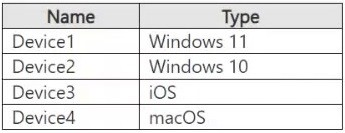
You have a Microsoft 365 E5 tenant that has devices onboarded to Microsoft Defender for Endpoint as shown in the following table.

You plan to start using Microsoft 365 Endpoint data loss protection (Endpoint DLP).

Which devices support Endpoint DLP?


Answer : B

Microsoft 365 Endpoint data loss prevention (Endpoint DLP) is supported only on Windows 10 and Windows 11 devices. It does not support macOS or iOS at this time.

From the provided table:

Device1 (Windows 11) - Supported

Device2 (Windows 10) - Supported

Device3 (iOS) - Not supported

Device4 (macOS) - Not supported

Thus, only Device1 and Device2 support Endpoint DLP.


Question 5

You have a Microsoft 365 tenant.

You have a database that stores customer details. Each customer has a unique 13-digit identifier that consists of a fixed pattern of numbers and letters.

You need to implement a data loss prevention (DLP) solution that meets the following requirements:

Email messages that contain a single customer identifier can be sent outside your company.

Email messages that contain two or more customer identifiers must be approved by the company's data privacy team.

Which two components should you include in the solution? Each correct answer presents part of the solution.

NOTE: Each correct selection is worth one point.


Answer : B, C

You need to define a custom sensitive information type that recognizes the unique 13-digit identifier format for customer records. Microsoft Purview DLP policies use these types to identify and protect sensitive data.

A Data Loss Prevention (DLP) policy is required to enforce the rules. It will allow emails with a single identifier but trigger an approval workflow when two or more identifiers are detected.


Page:    1 / 14   
Total 203 questions