Palo Alto Networks - Big Savings Alert – Don’t Miss This Deal - Ends In 1d 00h 00m 00s Coupon code: 26Y30OFF
  1. Home
  2. Palo Alto Networks
  3. NetSec-Analyst Exam
  4. Free NetSec-Analyst Questions

Free Practice Questions for Palo Alto Networks NetSec-Analyst Exam

Pass4Future also provide interactive practice exam software for preparing Palo Alto Networks Network Security Analyst (NetSec-Analyst) Exam effectively. You are welcome to explore sample free Palo Alto Networks NetSec-Analyst Exam questions below and also try Palo Alto Networks NetSec-Analyst Exam practice test software.

Page:    1 / 14   
Total 74 questions

Question 1

In order to attach an Antivirus, Anti-Spyware and Vulnerability Protection security profile to your Security Policy rules, which setting must be selected?


Answer : C

To enable the firewall to scan the traffic that it allows based on a Security policy rule, you must also attach Security Profiles ---including URL Filtering, Antivirus, Anti-Spyware, File Blocking, and WildFire Analysis---to each rule. To attach a Security Profile to a Security policy rule, you must select Profiles as the Profile Type in the Actions tab of the rule. This allows you to choose from the predefined or custom Security Profiles that you have configured. Group-Profiles, Default-Profiles, and Tagged-Profiles are not valid options for attaching Security Profiles to Security policy rules.Reference:Set Up a Basic Security Policy,Security Profiles,Updated Certifications for PAN-OS 10.1


Question 2

By default, which action is assigned to the interzone-default rule?


Answer : C


Question 3

What is the best-practice approach to logging traffic that traverses the firewall?


Answer : C

The best-practice approach to logging traffic that traverses the firewall is to enable log at session end only. This option allows the firewall to generate a log entry only when a session ends, which reduces the load on the firewall and the log storage. The log entry contains information such as the source and destination IP addresses, ports, zones, application, user, bytes, packets, and duration of the session.The log at session end option also provides more accurate information about the session, such as the final application and user, the total bytes and packets, and the session end reason1. To enable log at session end only, you need to:

Create or modify a Security policy rule that matches the traffic that you want to log.

Select the Actions tab in the policy rule and check the Log at Session End option.

Commit the changes to the firewall or Panorama and the managed firewalls.


Question 4

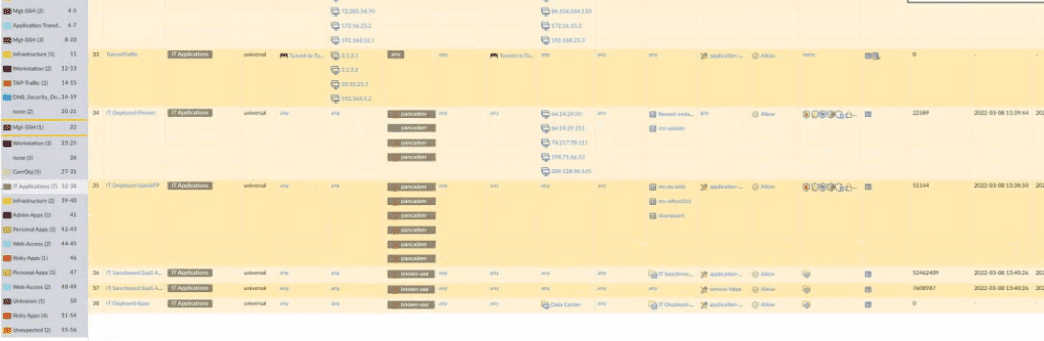
An administrator is reviewing the Security policy rules shown in the screenshot below.

Which statement is correct about the information displayed?


Answer : B


Question 5

Which DNS Query action is recommended for traffic that is allowed by Security policy and matches Palo Alto Networks Content DNS Signatures?


Answer : B

To enable DNS sinkholing for domain queries using DNS security, you must activate your DNS Security subscription, create (or modify) an Anti-Spyware policy to reference the DNS Security service, configure the log severity and policy settings for each DNS signature category, and then attach the profile to a security policy rule.

https://docs.paloaltonetworks.com/pan-os/10-1/pan-os-admin/threat-prevention/dns-security/enable-dns-security


Page:    1 / 14   
Total 74 questions