Pass4Future also provide interactive practice exam software for preparing Salesforce Certified Tableau Data Analyst (Analytics-DA-201) Exam effectively. You are welcome to explore sample free Salesforce Analytics-DA-201 Exam questions below and also try Salesforce Analytics-DA-201 Exam practice test software.
Do you know that you can access more real Salesforce Analytics-DA-201 exam questions via Premium Access? ()
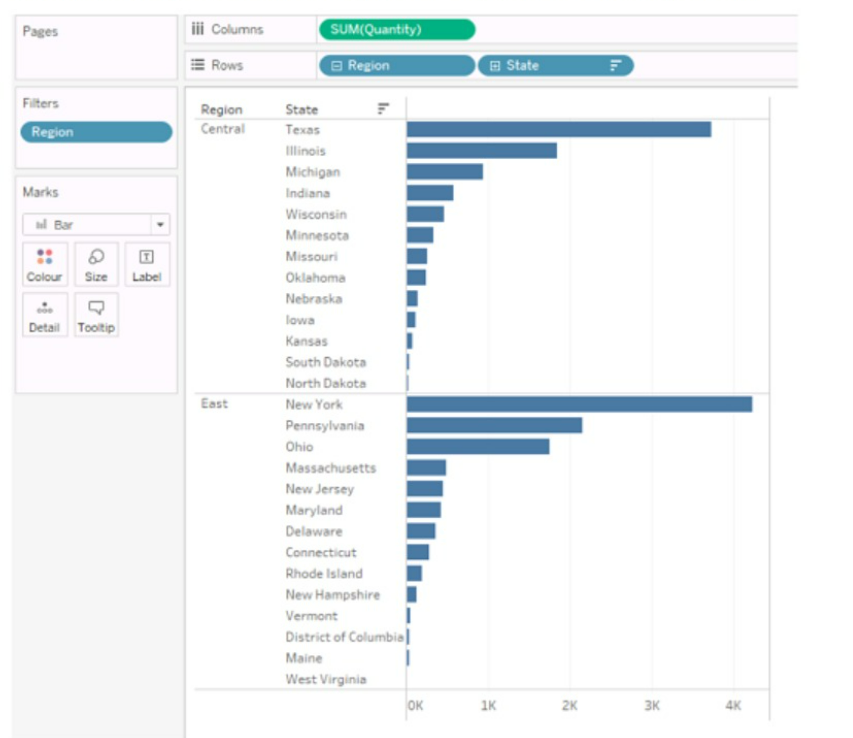
You have the following chart that sorts states by the number of products each state has purchased.

Which formula should you use to include a number with the position of each state within each region?
Answer : D
The LOOKUP function is used to return the value of a specified field in a different row, which can be defined relative to the current row. In this context, it can be used to include a number with the position of each state within each region by looking up the SUM([Quantity]) in each respective position.Reference:The information is inferred from general Tableau knowledge as well as the following sources:
Tableau Functions (Alphabetical)
LOOKUP
Tableau Certified Data Analyst Exam Guide
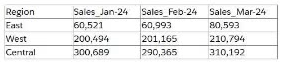
A Data Analyst is given the following table and asked to create a flow that adds a date field to the dat
a. This field should automatically update as new dates (months) are added to the original table.

Which technique should the analyst use as the first step to achieve this in Tableau Prep?
Answer : D
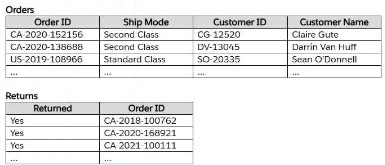
A Data Analyst has the following two tables named Orders and Returns.

The analyst needs to get the Customer ID and Customer Name for only the orders that were returned. Orders will be the leading table.
Which type of join should the analyst perform in Tableau Prep?
Answer : C
SIMULATION
Open the link to Book1 found on the desktop. Open Disciplines worksheet.
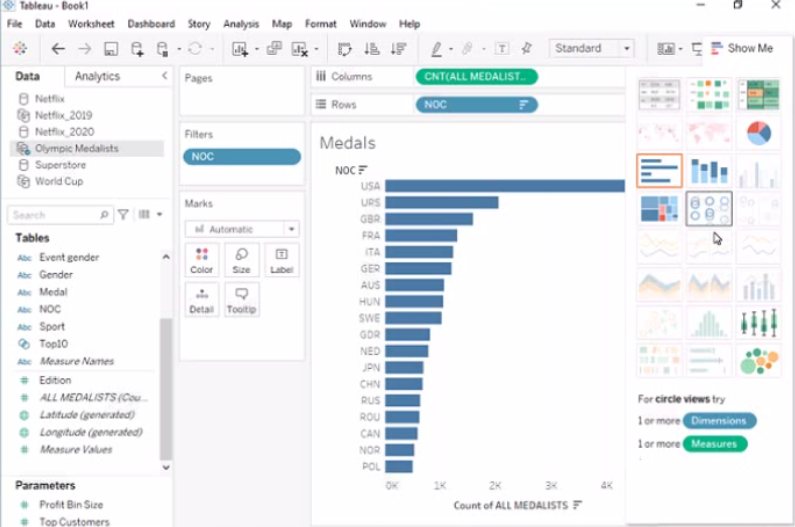
Filter the table to show the Top 10 NOC based on the number of medals won.

Answer : A
To filter the table to show the Top 10 NOC based on the number of medals won, you need to do the following steps:
Open the link to Book1 found on the desktop. This will open the Tableau workbook that contains the Disciplines worksheet.
Click on the Disciplines tab at the bottom of the workbook to open the worksheet. You will see a table that shows the NOC, discipline, and medals for each country.
Drag Medals from the Measures pane to the Filters shelf. This will open a dialog box that allows you to filter by different criteria.
Select Top from the dialog box. This will show you options to filter by the top or bottom values of a field.
Enter 10 in the text box next to By field. This will filter by the top 10 values of Medals.
Select NOC from the drop-down list next to By field. This will filter by the top 10 values of NOC based on Medals.
Click OK to apply the filter. You will see that the table now shows only 10 rows, one for each NOC with the highest number of medals.
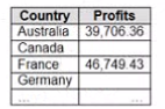
You have the following dataset that contain null values in the Profits field.

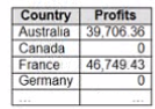
You want the data to appear as shown in the following table.

Which two formulas achieve the goal? Choose two.
Answer : A, C
Both the ZN and IFNULL functions in Tableau can be used to replace NULL values with zeros. The ZN function converts NULL to zero directly, while the IFNULL function allows you to specify that NULL should be replaced with zero. Both will result in showing zero for any NULL values in the Profits field.