Talend - Big Savings Alert – Don’t Miss This Deal - Ends In 1d 00h 00m 00s Coupon code: 26Y30OFF
  1. Home
  2. Talend
  3. Data-Integration-Developer Exam
  4. Free Data-Integration-Developer Questions

Free Practice Questions for Talend Data-Integration-Developer Exam

Pass4Future also provide interactive practice exam software for preparing Talend Data Integration Certified Developer (Data-Integration-Developer) Exam effectively. You are welcome to explore sample free Talend Data-Integration-Developer Exam questions below and also try Talend Data-Integration-Developer Exam practice test software.

Page:    1 / 14   
Total 55 questions

Question 1

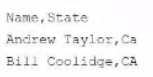
You have a tMap component whose main input provides the following data:

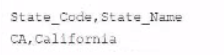
There is also a lookup table with the following data:

An inner join is configured between the State column of the main input with the State Code column of the lookup table.

What happens when the row containing the name Andrew laylor is processed?


Answer : D

The tMap component allows you to perform data transformations and joins between multiple input sources and output targets. You can configure different types of joins between the main input and the lookup tables, such as inner join, left outer join, right outer join, etc. An inner join returns only the matching rows from both tables based on a join condition. If a row from the main input does not match any row from the lookup table, it is considered as an inner join reject. You can configure an output to collect these rejects by setting the Catch inner join reject option to true. If you do so, the data will flow only to that output and not to the main output. If you do not configure an output to collect the rejects, the data will be ignored and no error will be raised.Reference:Talend Open Studio: Open-source ETL and Free Data Integration | Talend, [tMap properties - 7.3]


Question 2

Which statements are true about configuring the input sources of a tMap component?

Choose answers


Answer : A, B

The tMap component allows you to configure multiple input sources for your data transformation and mapping. The main input source is always placed on top of the tMap component and cannot be moved within it. The main input source provides the data flow that drives the processing of the tMap component. The lookup tables are placed below the main input source and can be reordered by using the up and down arrows on the toolbar. The order in which the lookup tables appear on the tMap component does not affect the functionality of the joins, as long as they are configured correctly with the appropriate join conditions and expressions.Reference:Talend Open Studio: Open-source ETL and Free Data Integration | Talend, [tMap properties - 7.3]


Question 3

What determines the name of the tMap output row that delivers join rejects?


Answer : B

The tMap component allows you to configure different types of joins between the main input and the lookup tables, such as inner join, left outer join, right outer join, etc. An inner join returns only the matching rows from both tables based on a join condition. If a row from the main input does not match any row from the lookup table, it is considered as an inner join reject. You can configure an output to collect these rejects by setting the Catch inner join reject option to true. The name of the output row that delivers the join rejects is determined by the output table you create to catch the rejects. You can name the output table as you wish, such as Rejects, Errors, etc.Reference:Talend Open Studio: Open-source ETL and Free Data Integration | Talend,


Question 4

You have a tMap component configured with a single input row1 and three outputs: CA, NY, Rejects. The input row1 consists of two columns. Name and State, containing the following data:

All outputs map only the Name column from row1, but CA employs a filter expression, CA.equals(row1.state), while Ny employs a filter expression, NY. Equals(row1, State). All Rejects have no such configuration.

Under these conditions, how does data flow to the outputs?


Answer : B

The tMap component allows you to configure multiple outputs for your data transformation and mapping. You can apply filter expressions on each output to filter out the rows that meet certain criteria. For example, if you want to send only the rows that have CA as the state value to one output, you can use CA.equals(row1.state) as the filter expression for that output. The filter expression evaluates to true or false for each row, and only the rows that evaluate to true are sent to the output. In this case, only Thomas Coolidge and Andrew Taylor have CA as their state value, so they are sent to the CA output. Similarly, only Calvin Adams has NY as his state value, so he is sent to the NY output. The Rejects output has no filter expression, so it receives all the rows from the input by default. However, since there is a conflict between the CA and NY outputs and the Rejects output, only the rows that are not sent to any other output are sent to the Rejects output. In this case, there are no such rows, so the Rejects output receives no data.Reference:Talend Open Studio: Open-source ETL and Free Data Integration | Talend,


Question 5

In the tMap component, where do you set up a filter on the input fields?


Answer : C

The tMap component allows you to set up a filter on the input fields by using the Expression filter in the output table. The Expression filter is a field where you can enter a logical expression that evaluates to true or false for each input row. For example, if you want to filter out the rows that have null values in a certain column, you can use row1.column != null as the expression filter for that output. The expression filter applies to all the input fields of the row, not just a single column. You cannot set up a filter on the input fields by using the Match Model parameter field for one of the inputs or outputs, as this field is used to define how to match rows between different inputs or outputs based on a key attribute.Reference:Talend Open Studio: Open-source ETL and Free Data Integration | Talend


Page:    1 / 14   
Total 55 questions