WGU - Big Savings Alert – Don’t Miss This Deal - Ends In 1d 00h 00m 00s Coupon code: 26Y30OFF
  1. Home
  2. WGU
  3. Web-Development-Applications Exam
  4. Free Web-Development-Applications Questions

Free WGU Web Development Applications (KVO1) Practice Questions

These WGU (KVO1) Web Development Applications sample questions are a small glimpse of our full set of WGU (KVO1) Web Development Applications actual questions. They give you a preview of what the real WGU (KVO1) Web Development Applications exam might look like and the contents of Pass4Future's premium WGU (KVO1) Web Development Applications product. You must not underestimate the value of WGU (KVO1) Web Development Applications practice exam questions, as they allow you to understand the actual WGU Web Development Applications (KVO1) exam in greater depth. Using them will save your time and money otherwise wasted in WGU Web Development Applications (KVO1) exam reattempts. Study guides and tutorials provide you with theoretical details about the WGU (KVO1) Web Development Applications exam; these WGU (KVO1) Web Development Applications practice exam questions prepare you to pass the exam. Get Pass4Future's premium access to continue your WGU (KVO1) Web Development Applications exam practice with the complete set of WGU (KVO1) Web Development Applications realistic questions. Our WGU (KVO1) Web Development Applications practice questions come in various formats; make sure to check out the details and free demo of each format.

WGU (KVO1) Web Development Applications Sample Exam Questions

Page:    1 / 14   
Total 136 questions

Question 1

Which code segment contains a conditional expression?

A)

B)

C)

D)


Answer : D

A conditional expression in JavaScript is an expression that evaluates to a boolean value and controls the execution flow based on its result. The conditional (ternary) operator ? : is used for conditional expressions.

Example Analysis:

Option A:

var result = dataCount;

This is a simple assignment, not a conditional expression.

Option B:

var result = count++ > 10;

This is a comparison but not a complete conditional expression.

Option C:

var result = dataCount++ * 1000 == 3000000;

This is an arithmetic operation followed by a comparison but not a complete conditional expression.

Option D:

javascript

Copy code

var result = count >= 10 ? 'Done' : getResult();

This is a conditional (ternary) expression. If count is greater than or equal to 10, result will be 'Done', otherwise, it will call getResult().


MDN Web Docs - Conditional (ternary) operator

W3Schools - JavaScript Conditions

Question 2

Given the following javaScript code:

Which code segment calls the method?


Answer : A

To call the sayHello method in the given JavaScript object, you need to use the object's name followed by the method name with parentheses.

Correct Method Call:

Given the object definition:

var obj = {

sayHello: function() {

alert('Hello');

}

};

To call the method sayHello on the object obj:

obj.sayHello();

Option A: Obj.sayHello; is incorrect syntax. The correct syntax is obj.sayHello();.

Option B: Window.sayHello(); is incorrect because the method is defined in the obj object, not the window object.


MDN Web Docs - Functions

W3Schools - JavaScript Objects

Question 3

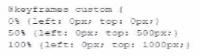
Given the following CSS:

What is being configured?


Answer : B

The given CSS configures properties that control the processing of animations directly in the browser.

CSS Animations: CSS animations are processed by the browser's rendering engine. The animations defined by CSS are handled client-side and do not require server-side processing.

Key Properties:


Question 4

Which HTML5 attribute specifies where to send the form data for processing a form is submitted?


Answer : C

The action attribute in the <form> element specifies the URL where the form data should be sent for processing when the form is submitted.

Action Attribute: This attribute defines the endpoint that will handle the submitted form data.

Usage Example:

<form action='/submit-form' method='post'>

<input type='text' name='username'>

<input type='submit' value='Submit'>

</form>

Here, the form data is sent to the /submit-form URL when submitted.


MDN Web Docs on <form> action attribute

W3C HTML Specification on Forms

Question 5

Given the following markup and no style sheet:

Which control does the input element render?


Answer : A

The type='range' attribute in an <input> element renders a slider control.

HTML Input Type range:

Purpose: The range type is used for input fields that should contain a value from a range of numbers.

Example:

Given the HTML:

<input id='range' name='range' type='range'>

This will render as a slider that the user can move to select a value within a range.


MDN Web Docs - <input type='range'>

W3Schools - HTML Input Range

Page:    1 / 14   
Total 136 questions